EasyManua.ls Logo

Bartec PETRODAT 3003 - Ending a Refuelling Order

Bartec PETRODAT 3003
76 pages
Print Icon
To Next Page IconTo Next Page
To Previous Page IconTo Previous Page
Loading...
Delivery mode
38
Aircraft Refuelling, Operating Instructions, BA 090323, (07.03.2022)
4.9 Ending an order
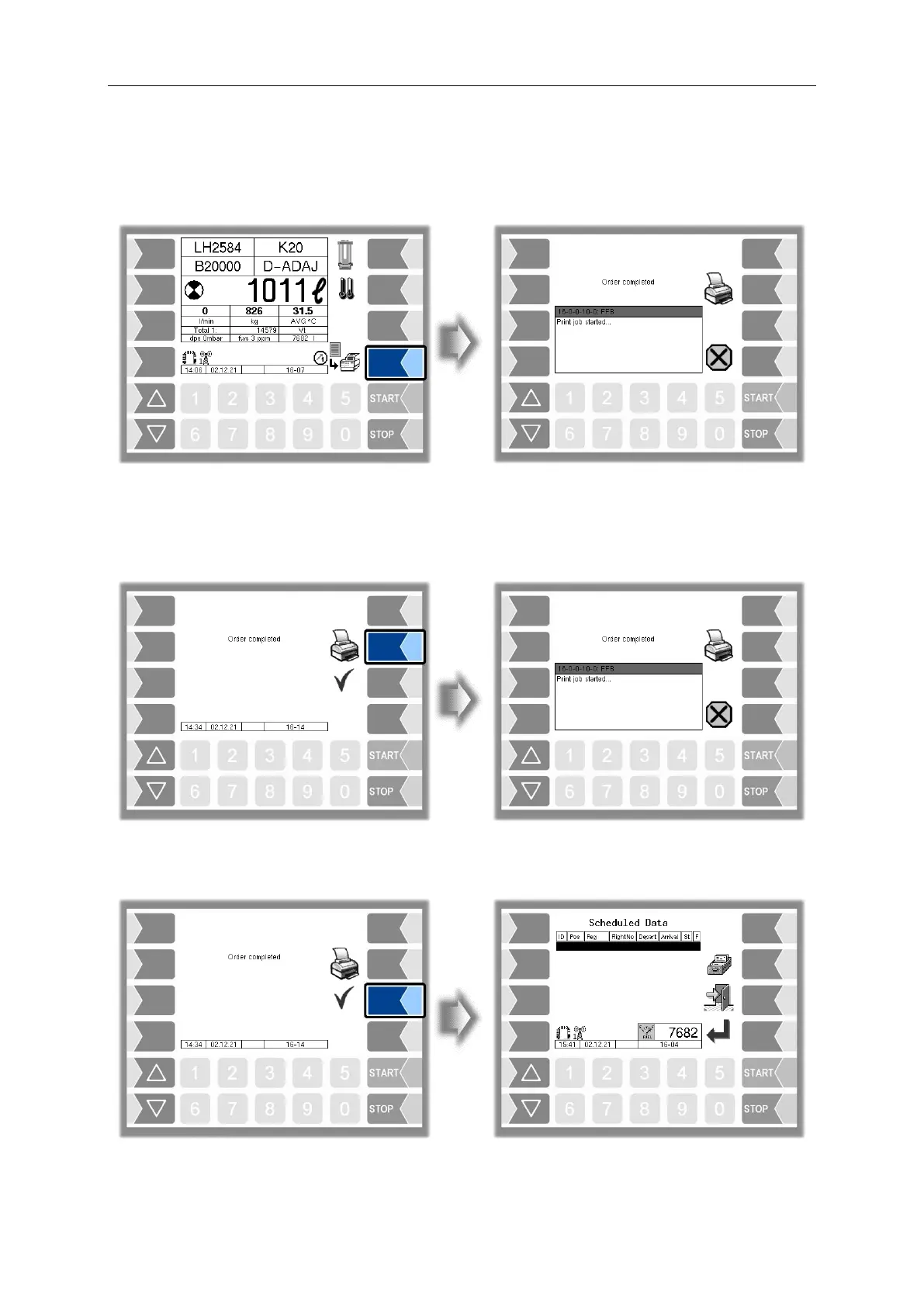
Either the "End order, save" softkey or the "End order, save, print" softkey will appear, depending on
whether a printer is configured. Press this softkey to save the order and, if necessary, print out a receipt.
(configuration:
Sequence Controls Menu/Ticket Layout Configuration/Auto print of delivery note)
Order Complete Dialog
The "Order complete" window will appear, depending on the configuration. You can print out the receipt
here again if required.
(Konfiguration:
Sequence Controls Menu/ Dialog Parameters/Order Complete Dialog)
You can complete the order by pressing the "Accept, Save" softkey. The order details and the message
"Order complete" are sent to the office

Table of Contents

Related product manuals