EasyManua.ls Logo

Bartec PETRODAT 3003 - Info Line; Event Display

Bartec PETRODAT 3003
76 pages
Print Icon
To Next Page IconTo Next Page
To Previous Page IconTo Previous Page
Loading...
Basics
12
Aircraft Refuelling, Operating Instructions, BA 090323, (07.03.2022)
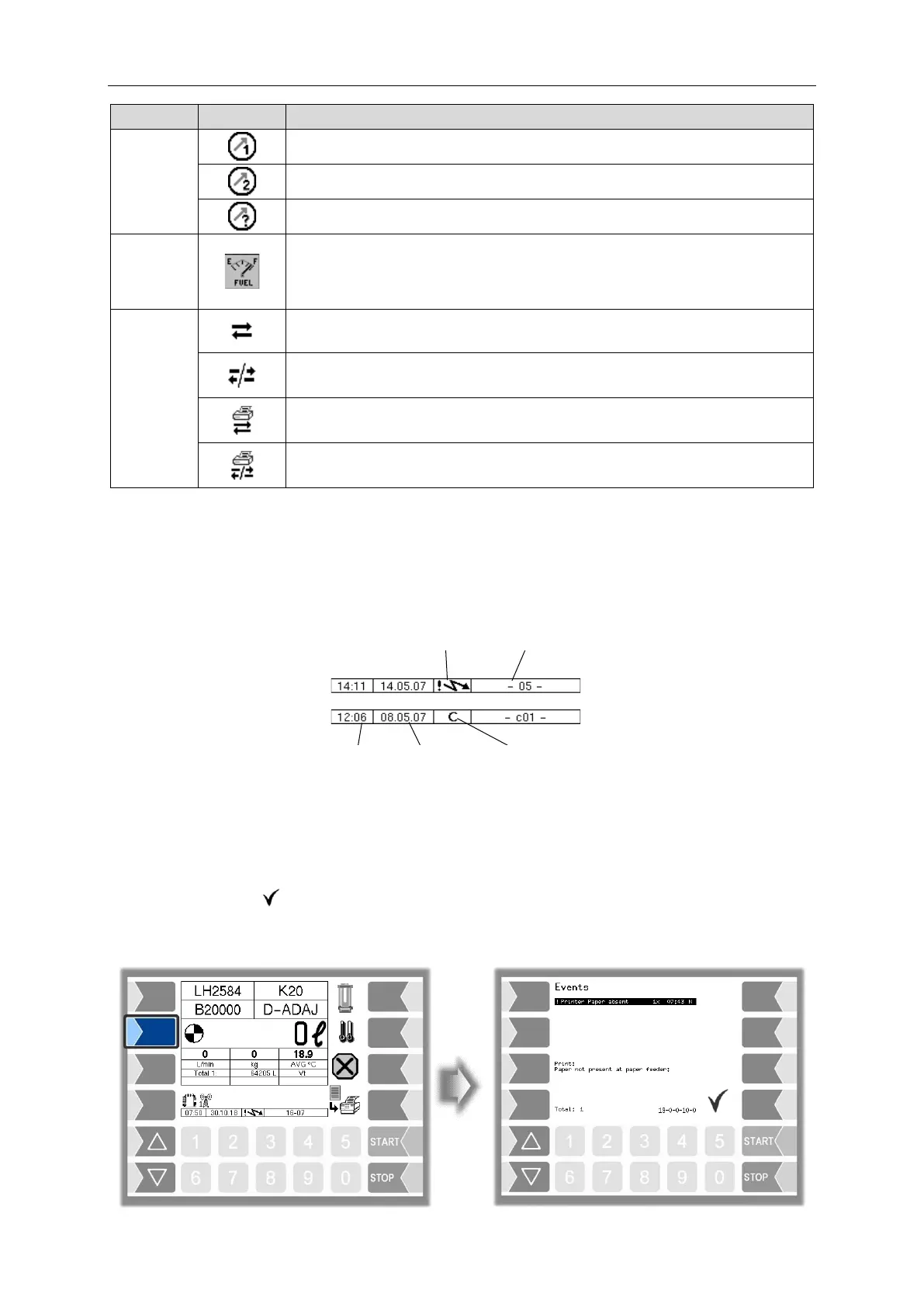
Symbol
Meaning
Counter
Meter 1 selected
Meter 2 selected
Meter unknown
Tank
content
Quantity in the tank
Module basic
Connection to the base module is present
Connection to the base module is interrupted
Connection to the base module and print jobs is present
Connection to the base module is interrupted and print jobs present
3.2.4 Info line
The info line shows the date and time, information about the operating status and the software page
number.
Example:
3.2.5 Event display
Important error- or fault messages are displayed directly on the display.
The second softkey down, to the left of the display, is used to open the event display, which shows all
operating statuses and faults.
You use the softkey to acknowledge messages that are displayed. The window "Events" will be
closed automatically after 20 seconds. Error messages are not deleted and the Fault-symbol is also
displayed in the info-line, until the cause of the error has been removed

Time
Date
Password level
Page
Fault

Table of Contents

Related product manuals