Basics
15
Aircraft Refuelling, Operating Instructions, BA 090323, (07.03.2022)
Alphanumerical entries
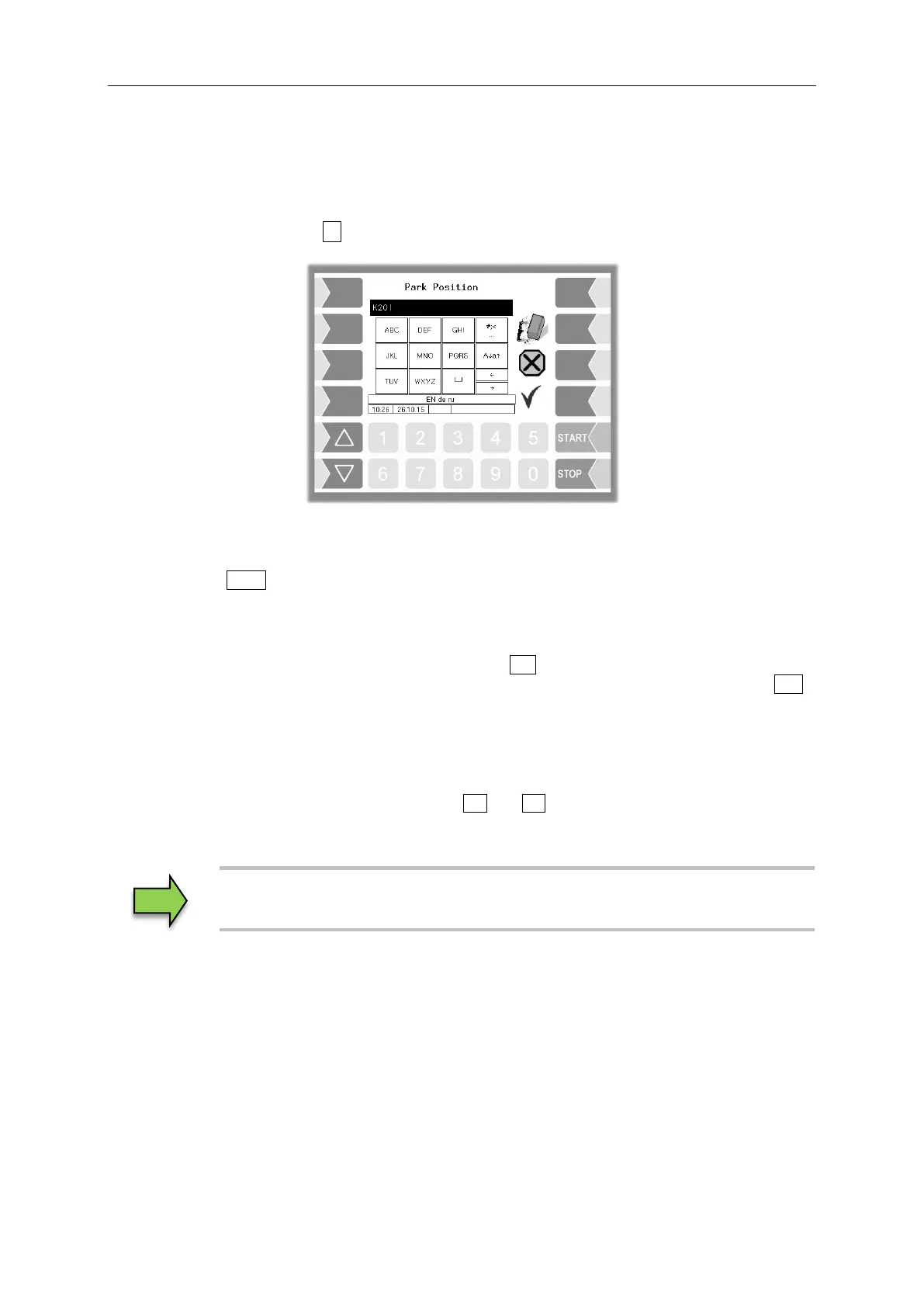
Letters are entered using the keys that are shown on the display. To enter a letter, simply touch the
corresponding key. The keys are assigned up to four characters. You determine which character
appears in the input line by pressing the key the appropriate number of times in quick succession.
You can enter a blank with the ⊔ key.
Shift key
You can use the A↓a↑ key to switch from upper case to lower case letters and vice versa.
Special characters
If special characters need to be entered, you can use the #;< key to switch the key assignment to the
special character level. You can switch back to letters using the same key, which is now labelled abc .
Once you have finished making your entry, touch the “Confirm” softkey.
Selection lists
Selection lists are available for certain parameter settings.
Select the required setting using the selection keys and .
The selected setting is highlighted with a black bar.
Confirm your selection using the “Confirm” softkey.


 To Next Page