NUMERIC ENTRY
Some text fields will only accept number entires. For these fields, the keypad
will only input numbers. For example, to enter the number “55”, simply press
the “5” button twice in a row.
ALPHANUMERIC ENTRY
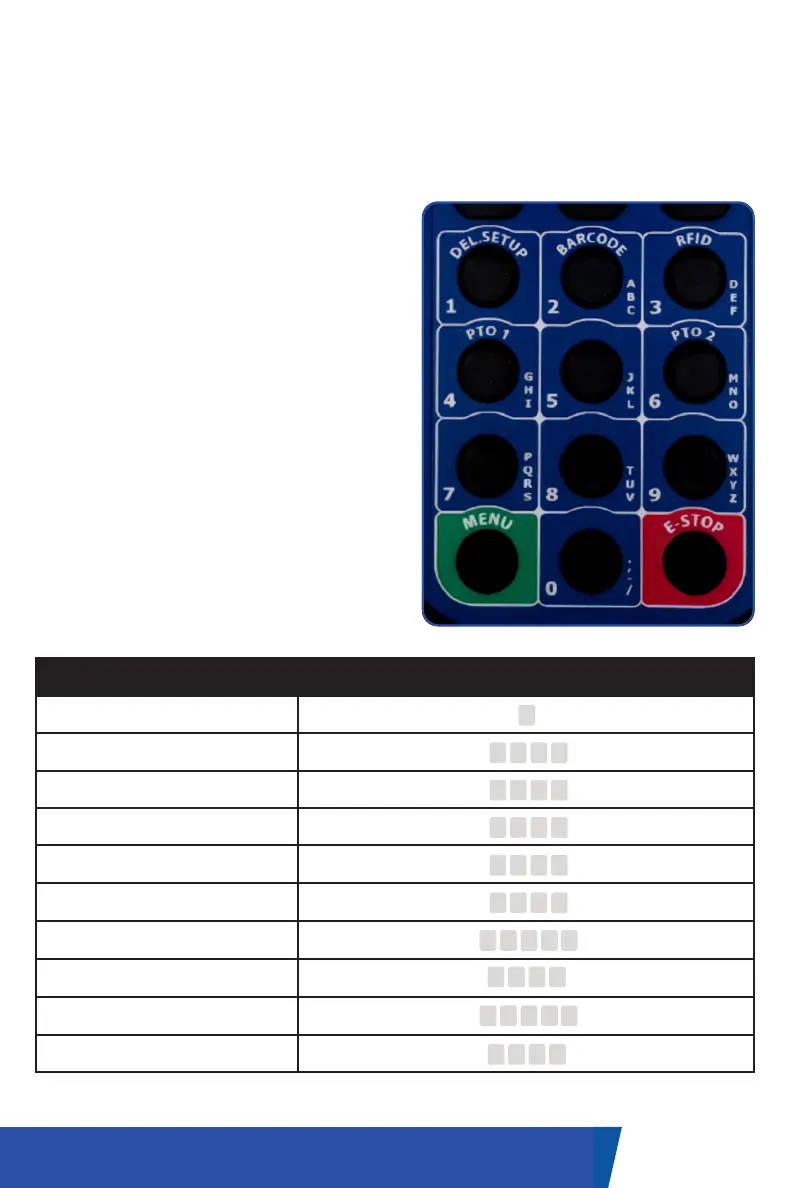
For fields that accept alphanumeric
entries (0-9, A-Z), multi-tap input
will be required. Each button on the
keypad corresponds to a number plus
additional letters to cycle through as
indicated on the keypad. For example,
to enter “B” in supported fields, you
would press the “2” button 3 times, as
“2” corresponds to 2, A, B, and C.
PUNCTUATION AND SPACE
In order to enter a space in the text,
press the “0” (zero) button two times
and wait one second for the space to
be stored. Pressing the zero repeatedly
will cycle through “0”, space, period,
comma, hyphen, and slash.
12UM-16-012
DATA ENTRY
Button Input Options
1 1
2
3
4
5
6
7
8
9
0
2 A B C
3 D E F
4 G H I
5 J K L
6 M N O
7 P Q R S
8 T U V
9
W
X Y Z
0 , - /


 To Next Page