15
UM-16-012
COMMON SCREENS
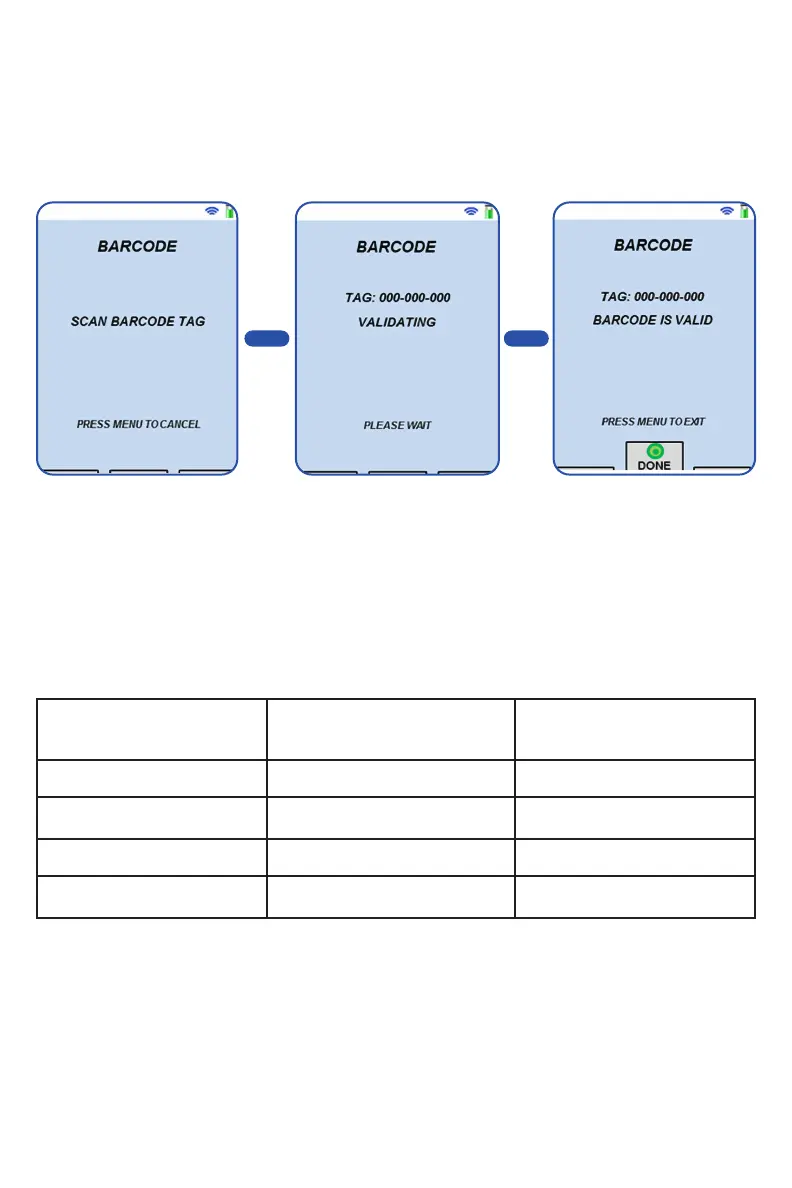
BARCODE SCANNING SCREEN
This screen allows the user to read the local Barcode and verify its customer
ID. What displays on the screen will change as the handheld processes the
information.
On the validating screen,
the barcode is displayed
while the system verifies.
Once the barcode has
been processed, the
results will be displayed
(valid or invalid).
System is ready to scan the
barcode.
> >
BARCODE SUPPORT
Below are the currently supported barcode types supported.
Codabar Code 25
Non-interleaved 2 of 5, Industrial 2 of 5,
Interleaved 2 of 5
Code 11
Code 32 Code 39 Code 93
Code 128
GS1-128
UCC/EAN-128, EAN 128, UCC 128
IATA
2 of 5
MSI Plessey Telepen
Universal Product Code
UPC-A and UPC-E


 To Next Page