13
UM-16-012
COMMON SCREENS
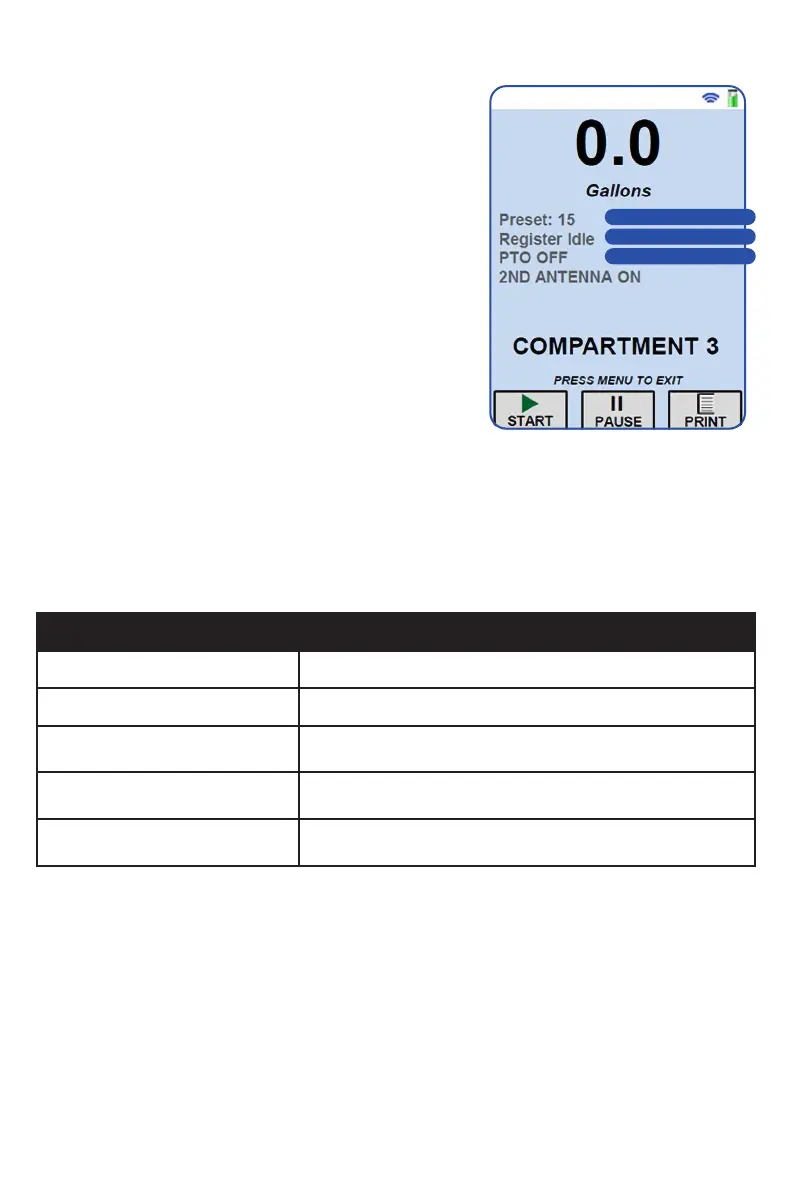
STANDARD DELIVERY SCREEN
From this screen, you will be able to view the
present volume from the truck’s meter register.
Additional control of the register can also
occur from this screen.
To activate a delivery, press the navigation
button below the ‘Start’ label. To end the
delivery and print the ticket, press the
navigation button below the ‘Print’ label. To
pause the flow during a delivery, press the
navigation button below the ‘Pause’ label.
Preset Status
If utilized, the preset value that is sent to the
register is mirrored on the screen in the ‘Preset
Status’ field. This label disappears when the preset is set to zero.
Register Status
The ‘Register Status’ field shows the state of the register. The label
descriptions are in the table below:
< Preset Status
< Register Status
< Channel Status
Label Description
Register Idle Register is ready to start a delivery
In Delivery A delivery has been started
Ticket Pending
The delivery has been ended and the ticket has not
completed printing yet
Register Busy
The register is unresponsive because it is starting a
delivery or printing a ticket
Register Disconnected
The register communication cable is disconnected from
the BASE receiver
Channel Status
The status of ‘ON’ or ‘OFF’ for a particular channel is reflected on the delivery
screen.


 To Next Page