19
UM-16-012
SYSTEM TESTING
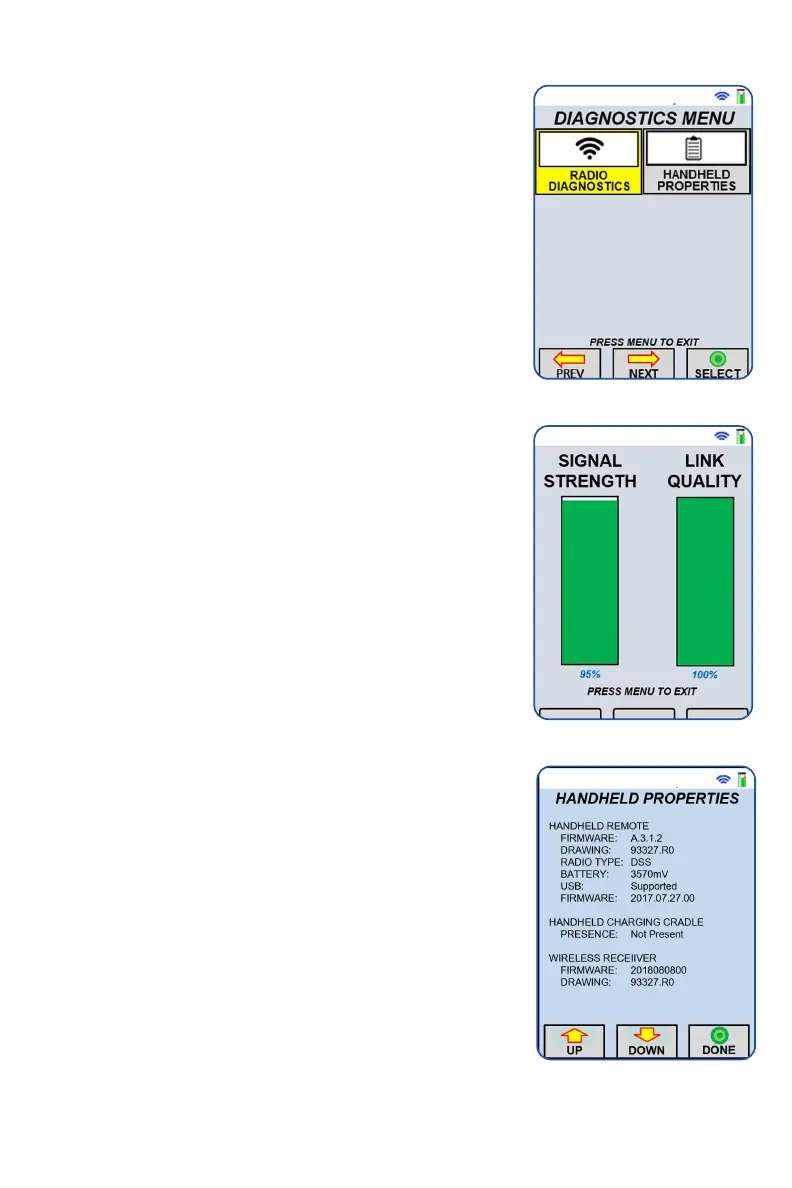
DIAGNOSTICS MENU
The diagnostics screen is useful when issues arise
and/or further communication information is
required. You can use the ’Diagnostics’ screen for
radio diagnostics and handheld properties.
Radio Diagnostics
Radio diagnostics are used to verify the quality
of the communication between the handheld and
truck receiver. Please record information to be
relayed to technical support if issues continue.
Handheld Properties
The handheld properties include information
relating to the handheld, charging cradle, and the
receiver. Depending on your screen layout, you
may need to press the ‘Down’ button to see more
information.
The handheld column shows the firmware version,
the system drawing number, the radio type, the
battery voltage, the USB supported status, a list
of hardware options, and barcode software. The
hardware options are primarily listed for technical
support reasons. The USB supported status is
important because not all PC3s support USB
updating and this Handheld Properties page is the
best way to determine support.
The charging cradle column shows two items: if the
handheld is present in the cradle or not and if the
cradle supports USB updating. This is important
because not all cradles support USB updating and
this Handheld Properties page is the best way to
determine USB support of the cradle.
The wireless receiver column shows information
that the handheld polls from the receiver. This
shows the firmware version of the receiver and the
drawing number that it is based off of.


 To Next Page