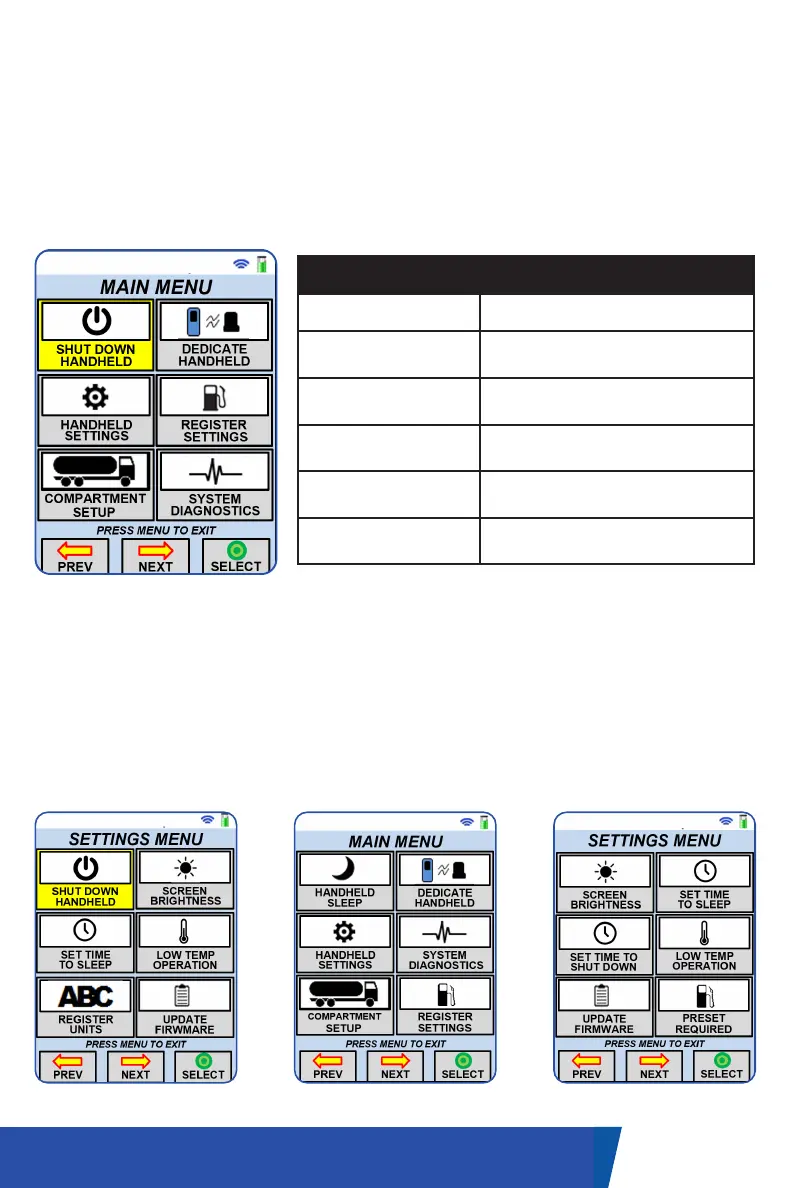
MAIN MENU SCREEN
This screen can be used to enter settings and diagnostics for the handheld
and system.
• Use the navigation buttons to select the desired function.
• Press the ‘Select’ button to open the selected functions screen.
16UM-16-012
COMMON SCREENS
Item Description
Shut Down Handheld To shut down the handheld.
Dedicate Handheld
To enter the dedication sequence
to pair with a receiver.
Handheld Settings
To enter the settings menu screen
to modify some handheld settings.
Register Settings
To enter the register settings
screen.
Compartment Setup
To enter the compartment setup
screen.
System Diagnostics
To enter and review diagnostic
options.
HANDHELD SETTINGS SCREEN
• Use the navigation buttons to highlight the setting you’d like to change.
• Once the desired setting is highlighted, push the navigation button under
the ’Select’ label.
• Depending on what setting you’re adjusting, you may be required to use
the alphanumeric keypad.
• Once the setting is adjusted to your requirements, save the setting by
pressing the navigation button under the ‘Select’ button.
Please note: these are samples only. Individual configurations may display different options.


 To Next Page