071960491 COLLEAGUE CXE VOLUMETRIC INFUSION PUMP OPERATOR’S MANUAL 4-75
Operating Instructions Managing Occlusion Settings
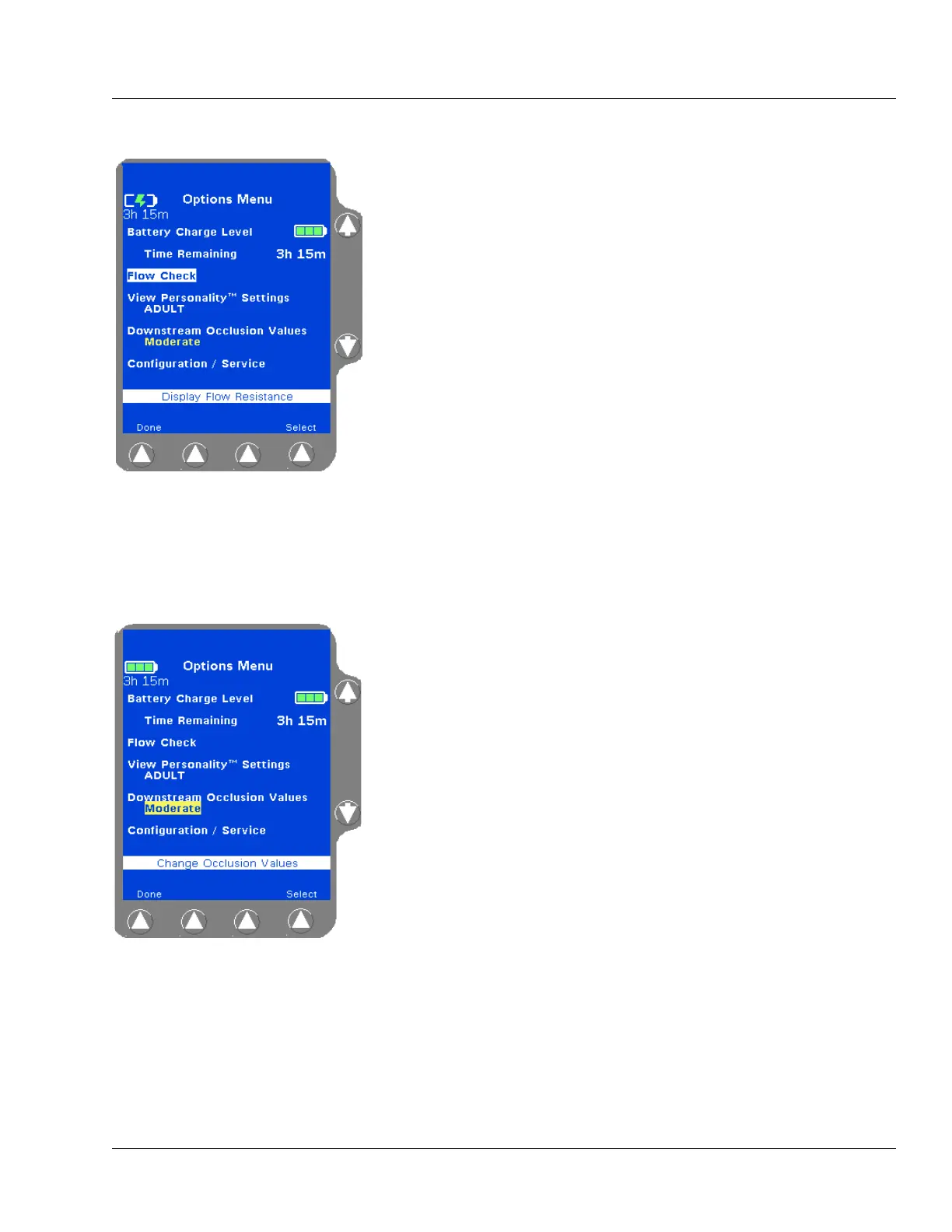
To access the Options Menu:
1. From the Main Display, press the Options soft key to access the
Options Menu as shown in Figure 4-104.
2. Use the ×Ø keys to highlight a function and then press the Select
soft key to access that function.
The Battery Charge Level is displayed whenever the Options Menu
is viewed; it is not a selectable option. Approximate battery time
remaining is displayed in hours and minutes, and a battery charge
icon shows an indication of the current battery charge level. See
“Battery Charge Icon Descriptions,” 4-8 for more information about
the battery charge level icons.
To exit the Options Menu and return to the Main Display screen,
press the
Done soft key or the Main Display key.
Managing Occlusion Settings
When enabled, the clinician can temporarily modify the downstream
occlusion values of all channels using the Options Menu.
1. Press the Options soft key from the Main Display to access the
Options Menu.
2. Use the ×Ø keys to highlight the Downstream Occlusion Values
setting and then press the
Select soft key (Figure 4-105).
Figure 4-104 Options Menu
Figure 4-105 Downstream
Occlusion Values Setting



 To Next Page