071960491 COLLEAGUE CXE VOLUMETRIC INFUSION PUMP OPERATOR’S MANUAL 2-13
Description Display Reference Guide
Pop-up Windows
Pop-up windows are message boxes that appear on top of the usual
screen display. Pop-ups may require user response in order to clear them
from the display.
Menus
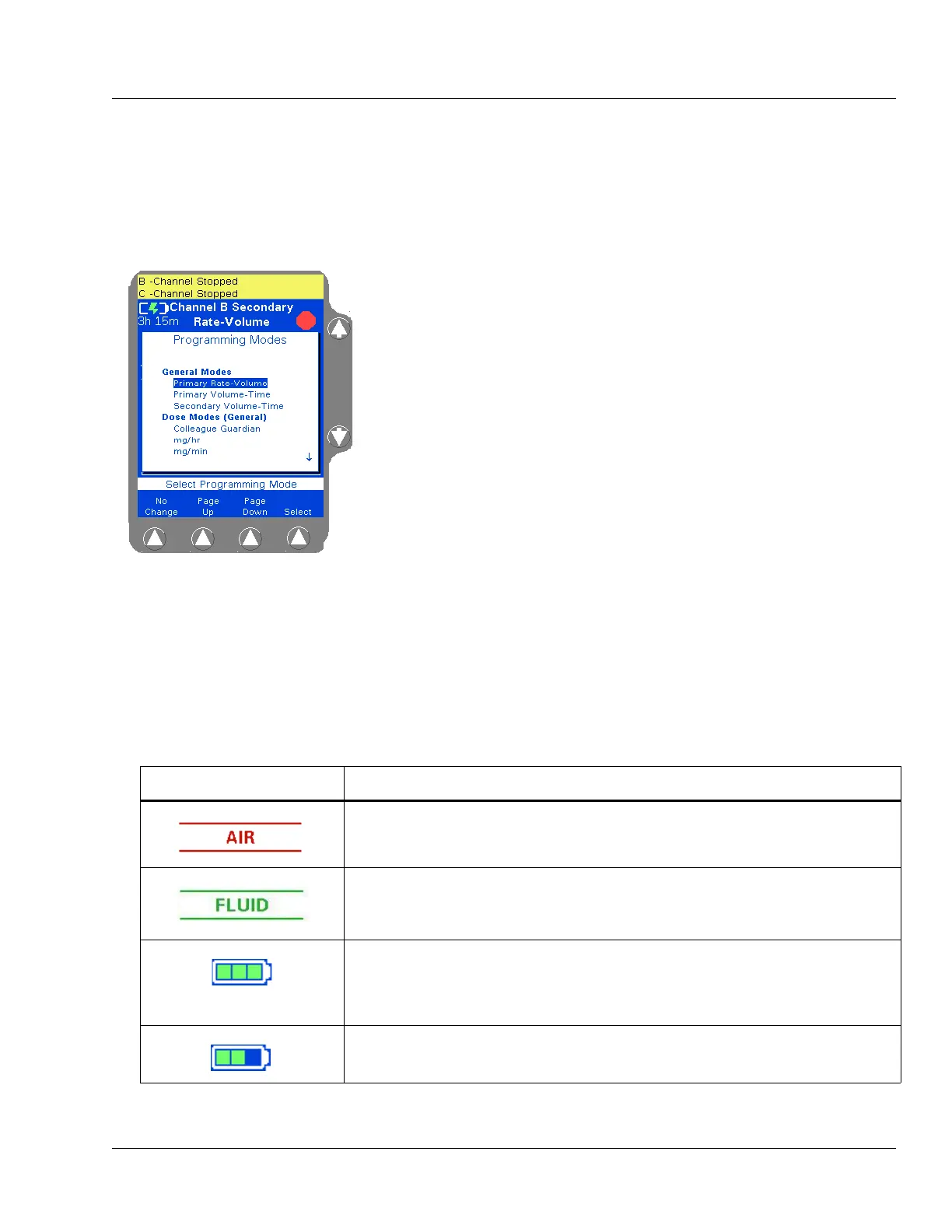
In some situations, a menu containing additional selections is provided
(Figure 2-6). To select a menu item, use the
×Ø keys to highlight the
desired selection, then press the
Select soft key.
Main Display Icons
Table 2-6 describes the icons that appear on the Main Display.
Table 2-6 Main Display Icons
Icon Description
This icon indicates that air has been detected by the air sensor.
This icon indicates that air has exited from the air sensor area and fluid is now
detected.
The battery charge icon is displayed at all times in the upper left part of the screen.
The number of filled areas in the battery charge icon is an approximate indication of
the battery charge level. When the battery time remaining is 80 to 100%, the icon
contains three green bars as shown at left.
As the battery charge level decreases, the battery charge icon changes. When the
battery time remaining is 60 to 80%, the icon contains two green bars as shown at left.


 To Next Page