071960491 COLLEAGUE CXE VOLUMETRIC INFUSION PUMP OPERATOR’S MANUAL 4-25
Operating Instructions Primary Infusions
Programming a Primary Volume-Time Infusion
1. From the Main Display screen:
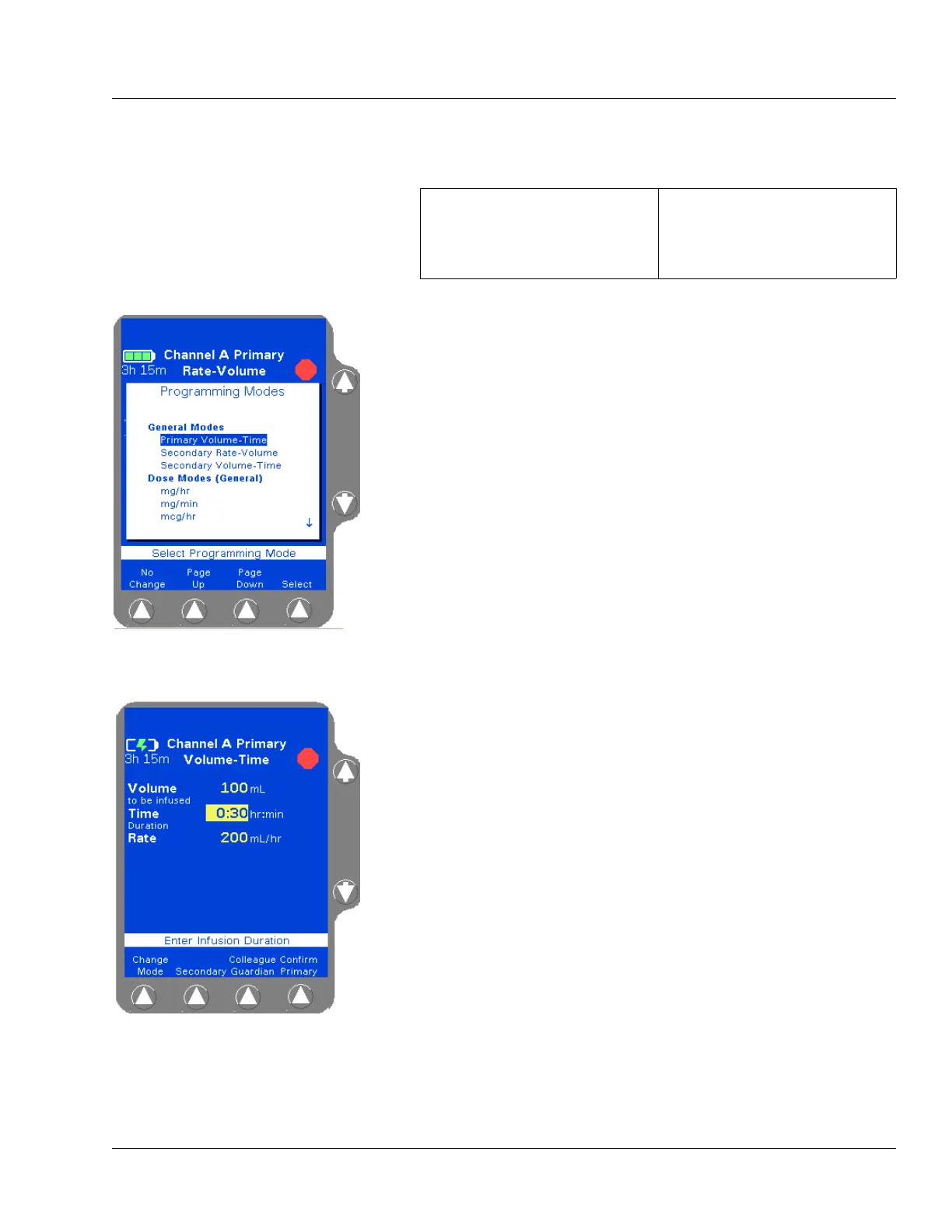
2. Press the Change Mode soft key. The Programming Modes menu is
displayed (Figure 4-30).
3. Highlight Primary Volume-Time, then press the Select soft key.
The Volume-Time Programming screen is displayed (Figure 4-31).
4. Enter the Volume to be infused using the keypad.
5. Highlight Time Duration using the ×Ø keys. Use the keypad to
enter the time period for the infusion in hours and minutes. The
pump automatically calculates the flow rate.
The pump may round off the calculated rate. If this occurs, the pump
then calculates the time duration based on the rounded rate. When
the
Confirm Primary soft key is pressed, the calculated time is
displayed as Time Remaining instead of the time duration entered.
The time duration must be less than or equal to 99:59. If a time
greater than 99:59 is entered, **:** is displayed.
6. Verify that the values are appropriate. After the time duration is
programmed, the Volume to be infused or Rate can be changed.
The pump then calculates the new time duration automatically.
7. Press the Confirm Primary soft key.
8. Press the START key to start the infusion.
If a secondary infusion has been programmed but not started, a
pop-up appears (Figure 4-26) warning that a primary infusion is
about to start when a secondary infusion has been programmed. See
step 7 on page 4-22 for more information.
For single channel pumps: For triple channel pumps:
press the Primary soft key. press the desired Channel
Select
key.
Figure 4-30 Programming Modes
Menu
Figure 4-31 Volume-Time
Programming Screen
Note:
Optional Labels
An optional label may also be selected. See “Selecting
a Label” on page 4-23 for details.
Note:
Unconfirmed
Primary Program
If the START key is pressed before pressing the
Confirm Primary soft key, an
Unconfirmed Primary
Program
alarm occurs and a message is displayed on
the prompt line.



 To Next Page