90
Connection instructions
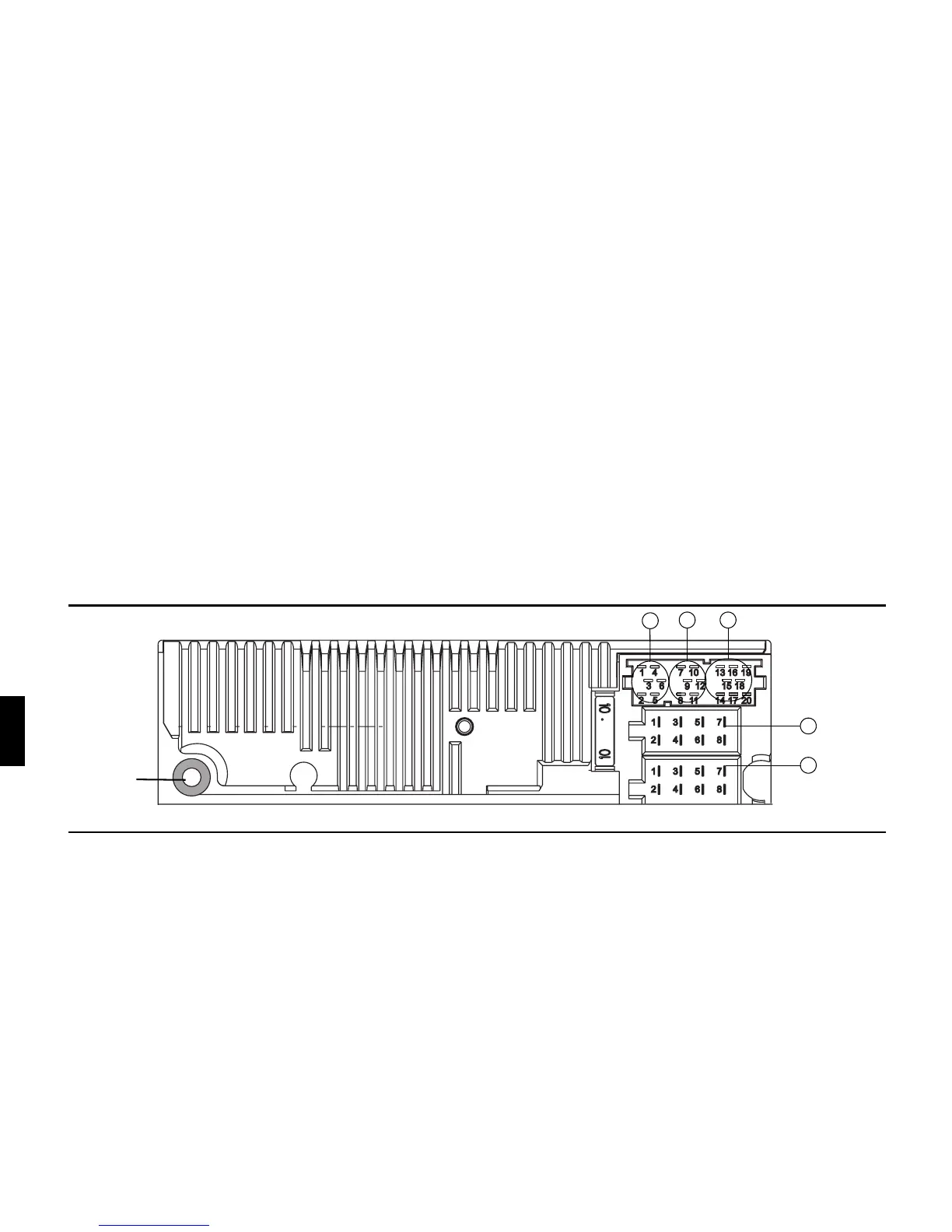
C1
C2
B
Antenna
socket
C3
A
Connection instructions
Warning. Terminal 30 and Terminal 15 must always be
connected separately, otherwise increased power consumption will
occur when the unit is switched off. Connection socket A is not the
same for all vehicle types. Therefore, always measure voltages
before installation.
Socket A
1 Speed Signal (GAL)
2 Not assigned
3 Telephone mute / clearing function
4 Permanent positive (Terminal 30)
5 Control output for automatic antenna / amplifier
6 Illumination (Terminal 58)
7 Switched positive (Terminal 15)
8 Earth (Terminal 31)
Socket B
1 Loudspeaker right rear +
2 Loudspeaker right rear -
3 Loudspeaker right front +
4 Loudspeaker right front -
5 Loudspeaker left front +
6 Loudspeaker left front -
7 Loudspeaker left rear +
8 Loudspeaker left rear -
Socket C1
1 LineOut left rear
2 LineOut right rear
3AF Earth
4 LineOut left front
5 LineOut right front
6 Subwoofer LineOut
Socket C2
7-12 Specific connection for Becker CD changer
Socket C3
13 AF – telephone input
14 Earth – telephone input
15-17 Specific connection for Becker CD changer
18 CD AF earth (AUX)
19 CD AF left (AUX)
20 CD AF right (AUX)















 To Next Page