TX-1xx Series Printer Operation Manual
~ 22 ~
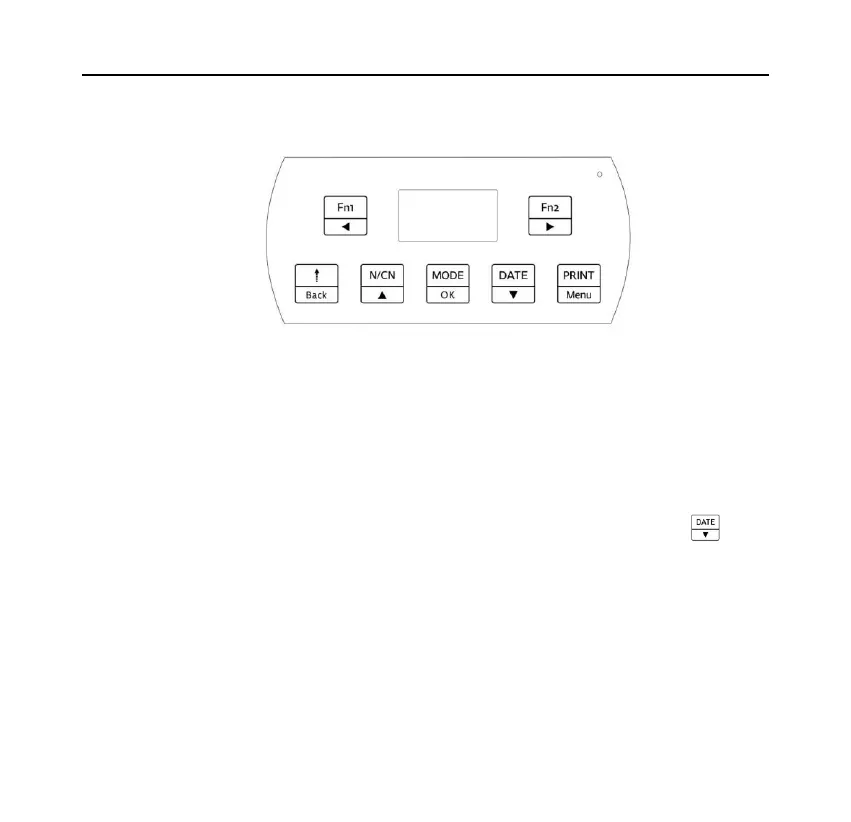
6.2 Keys
The printer with seven keys, because the printer with more functions, in
different operation conditions, the functions of the keys may be different, please
pay attention to the icon on the keys, which contains two meanings, the upper
side means the function of standby interface, the lower side means the function
under setting or inputting condition. Understand the meaning of the icon will
help you to understand the current function of the keys, such as: key,
which contains the "DATE" and the down arrow symbol, it indicates under the
standby interface, the operation of key associated with the time/date, in the
condition of setting, which is used to switch to the next setting items or
decreasing the setting value.
The operation methods of keys has two kinds: one kind is to press and release



 To Next Page