15
7.2.4 Technical calibration (TEC-CAL) [locked for verified balances]
This function allows storing the value of internal reference mass whenever checking or
assistance actions require it.
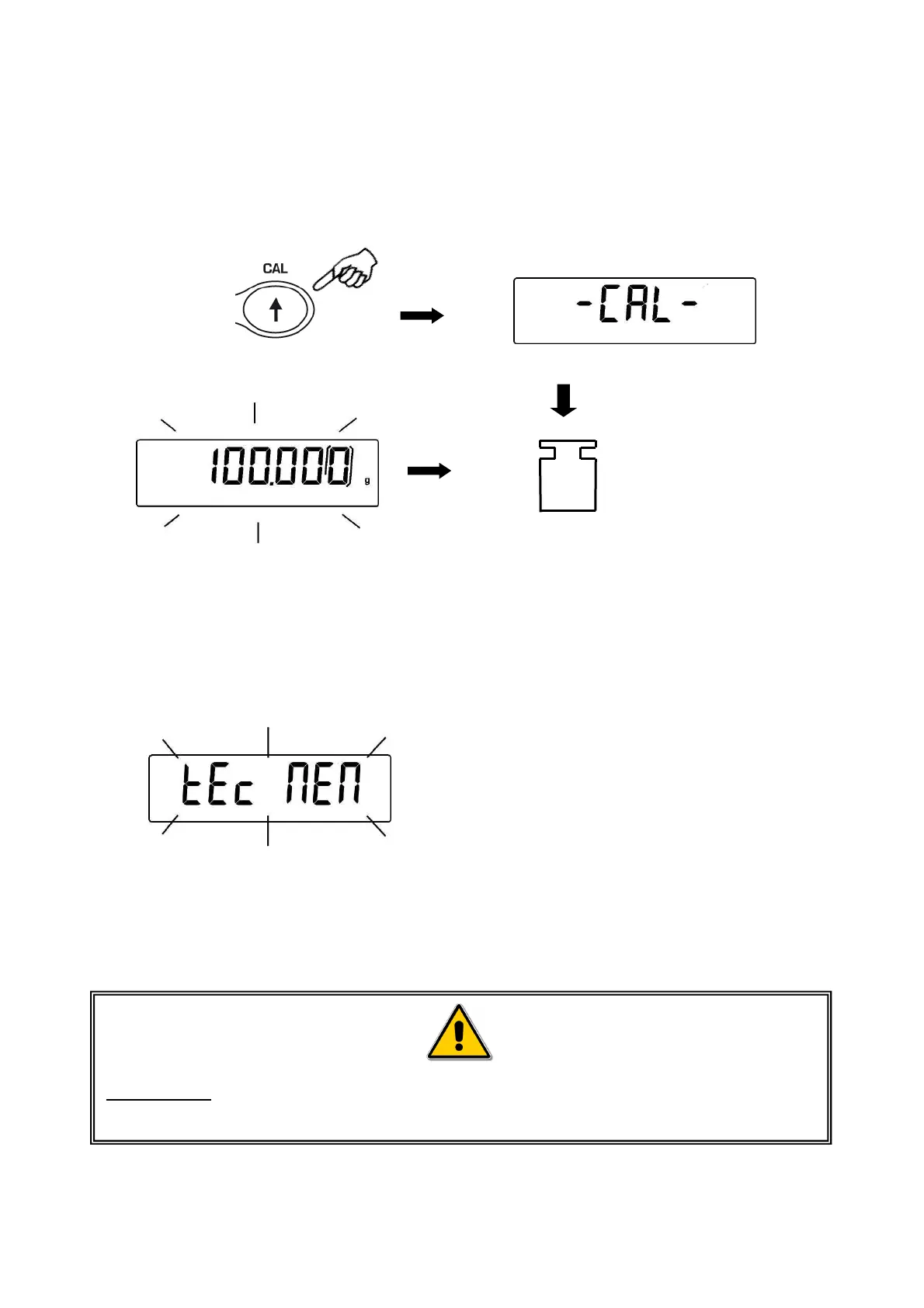
1. After having selected the TEC-CAL calibration mode, press CAL button at empty
pan. It will be displayed “CAL”.
2. When the value of
calibration weight start flashing on display, load the weight on to the balance pan.
3. Wait the acoustic alarm and that the displayed calibrated weight value stops flashing,
then unload the weight from balance pan.
4. When string “0.000” is displayed continuously, then press and keep pressed the
PRINT button. This starts the internal weight value automatic acquisition and store.
During the acquisition cycle, the display will show “TEC-MEM”.
5. After having stored the value of internal calibration weight, balance returns to normal
weighing conditions.
6. Return to calibration menu as described at paragraph 6.2 and set the desired
calibration mode: internal, automatic or external..
ATTENTION : this procedure must be effected only using E2-class reference
masses.


 To Next Page