29
16 Display Contrast regulation
It is possible to regulate the contrast level of display to have a comfortable view of the
indication at different angles of usage.
There are 15 different levels of regulation:
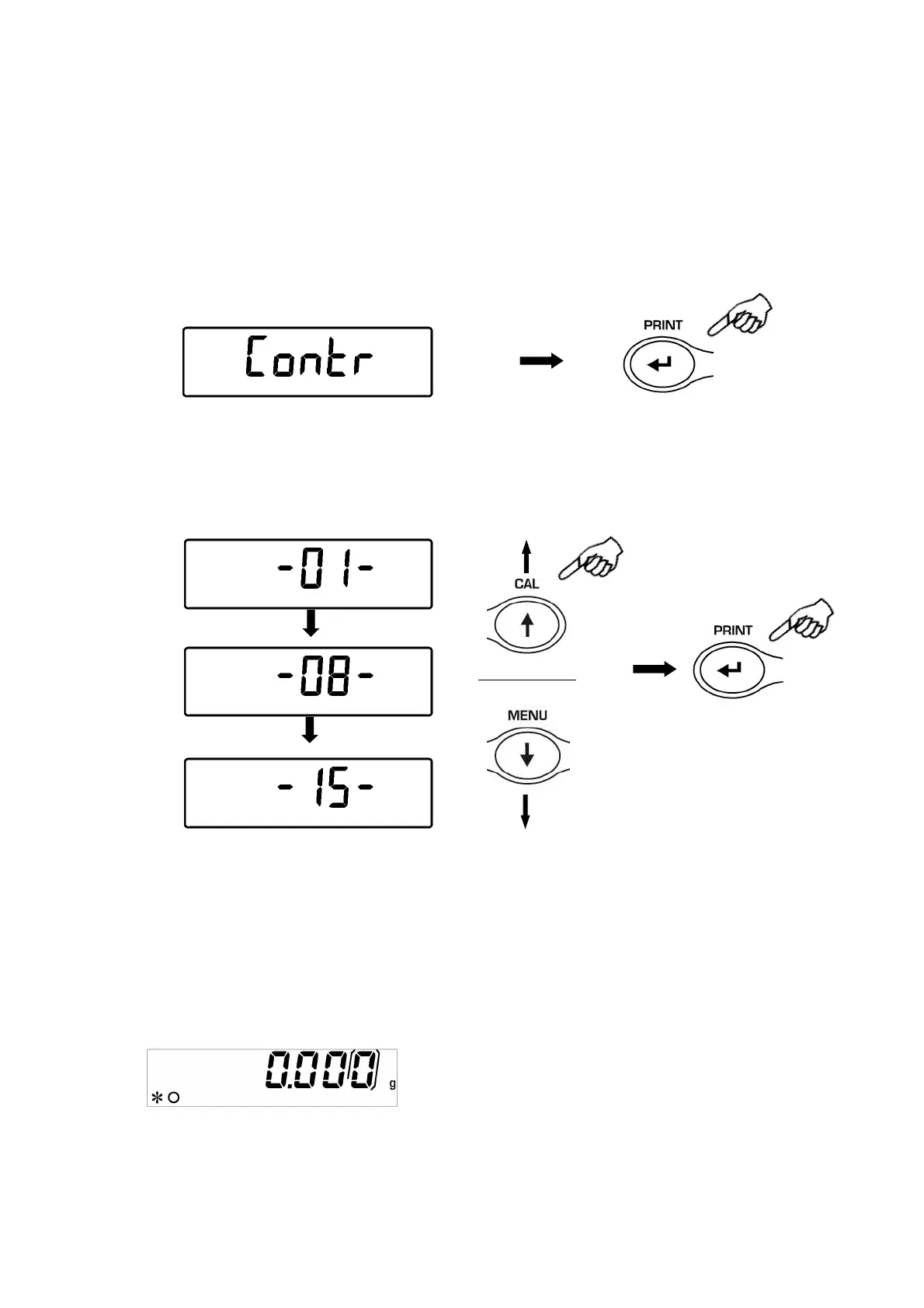
1. From zero condition on display, press and keep pressed the MENU button until the
acoustic signal gets mute, then release the button. The message “unitS” is
visualized, now press the MENU button repeatedly until the message “contr ” is
displayed and confirm this by pressing the PRINT button
2. Now, pressing the buttons MENU or CAL it is possible to increment or decrement the
level of the display contrast; select the one desired and confirm by pressing the
PRINT button.
…….
…….
3. After you have confirmed the contrast level desired, press the MENU button to go to
the next parameter or the CAL button to go to previous one.
4. To escape from parameters setup menu, press the MENU button until the acoustic
alarm gets mute, then release the button.
5. The balance returns to normal weighing mode


 To Next Page