E-1032 PROGRAMMING & OPERATION
2-2 Belanger, Inc. * PO BOX 5470 * Northville, MI 48167-5470 * Ph (248) 349-7010 * Fax (248) 380-9681 1MANUL226
Chapter 2 Operator Interface/Standard User Screens
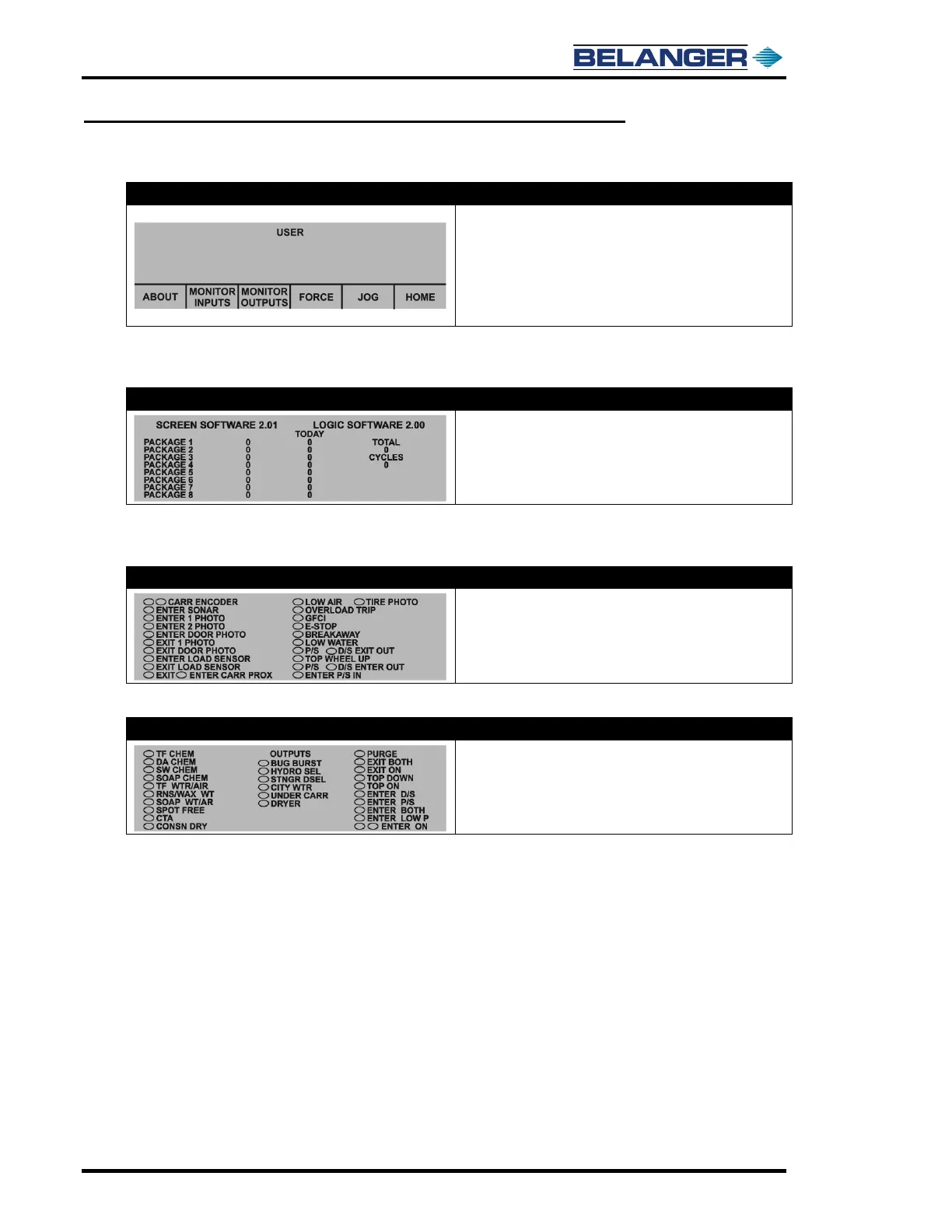
User
• Home: Moves you to the HOME screen
• Force: Moves you to the Force screen
• Jog: Moves you to the Jog screen
• Monitor inputs: Moves you to the Monitor Inputs screen
• Monitor Outputs: Moves you to the Monitor Outputs screen
• About: Moves you to the About screen
Machine MUST be in Home position to perform a “Carriage Find Limit”.
User / About
E-1032
• The number displayed to the right of “Screen Software”
shows the version of software in your Operator Interface
• The number displayed to the right of “Logic Software” shows
the version of software in your Controller (PLC)
Wash Data: has been provided to view what is in the “Wash Data” screen without any reset capability.
User / Monitor Inputs
• The ovals are ON/OFF indicators
• A filled oval indicates that an Input is ON
User / Monitor Outputs
E-1032
• The ovals are ON/OFF indicators
• A filled oval indicates that an Output is ON
• Some Outputs are namable and will not be the same as
names indicated to the left











 To Next Page