E-1032 PROGRAMMING & OPERATION
1MANUL226 Belanger, Inc. * PO BOX 5470 * Northville, MI 48167-5470 * Ph (248) 349-7010 * Fax (248) 380-9681 3-1
Chapter 3 Operator Interface/Programming
Setup
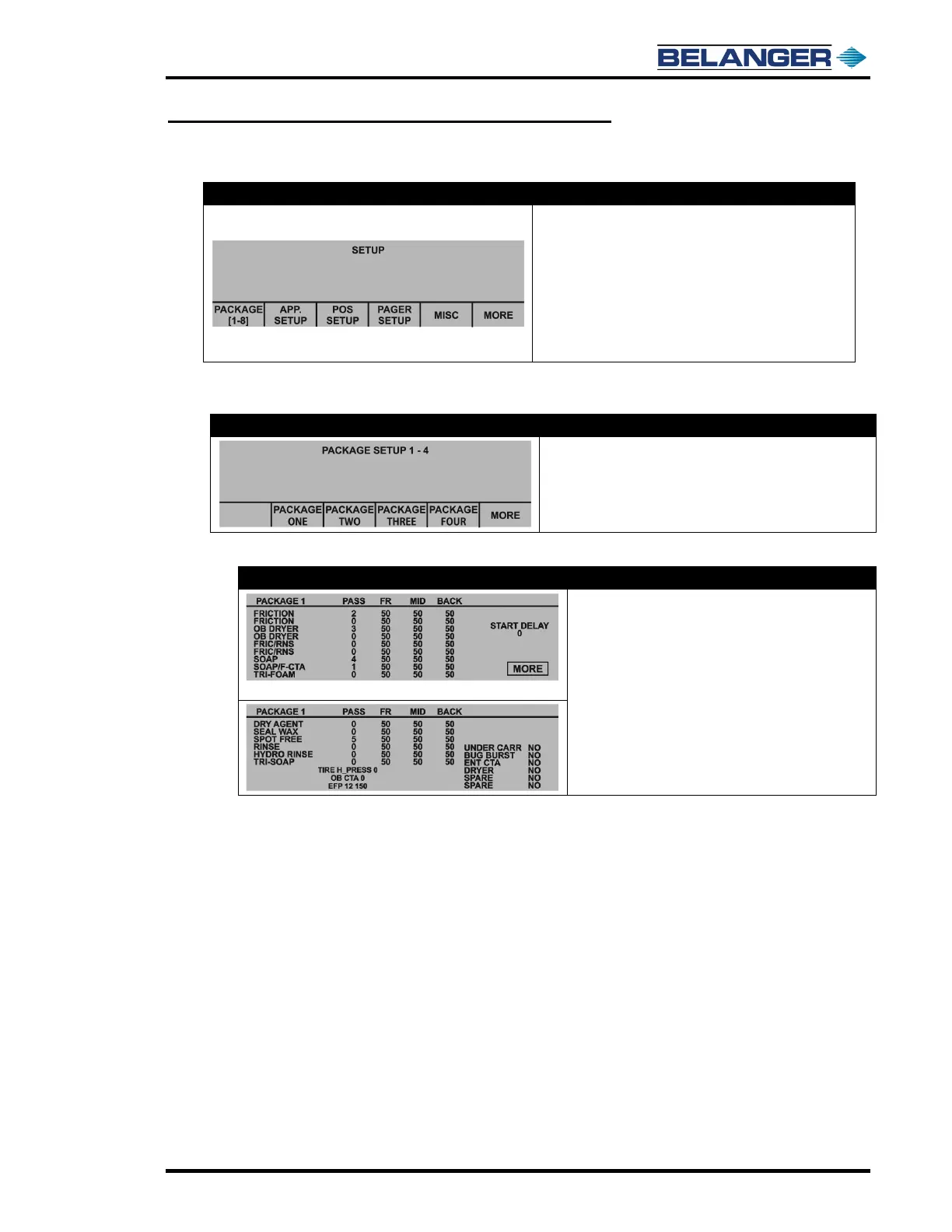
The following selections move you to their corresponding
screens
• PACKAGE 1 – 8
• APPLICATION SETUP
• POS SETUP
• PAGER SETUP
• MISC
Factory password for this level is 3333
Setup / Package 1 - 8
• Pressing any Package number moves you to that
corresponding Package Setup screens
• Press MORE for Packages 5 - 8
Setup / Package 1 – 8 / Package 1 Example
Pressing the MORE button moves to the screen below
• Left column is the name of the Application
• Pass: The order in which the passes will be performed
on a vehicle
• FR (Front): The B / F speed at the front of the vehicle
• MID (Middle): The carriage speed at the sides of the
vehicle
• BACK (Rear): The B / F speed at the rear of the
vehicle
Start Delay: Displays the Package after the vehicle is in position.
Entrance Operation: These are selectable at the bottom, left side of the second Package Setup screen. Toggle
to YES to activate that Package.
Exit Operation: These are selectable at the bottom, right side of the second Package Setup screen. Toggle to
YES to activate that Package.











 To Next Page