37
Product test procedures
Technical Support Software
This is the technical support software of the product MP-400 TH; with this software you will be
able to test all your printer functions.
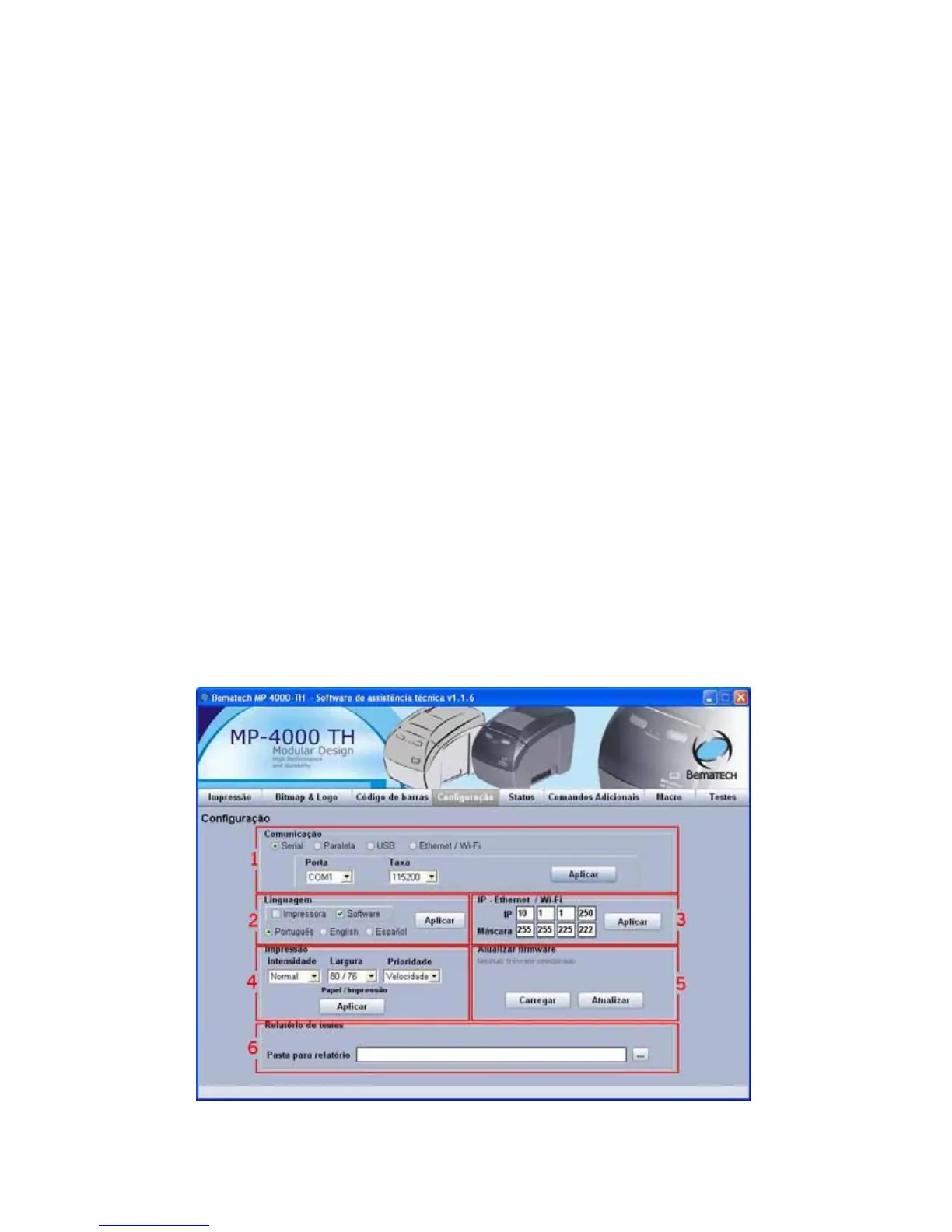
Tab 'Configuration'
At software initialization it will be necessary to configure it before use; this must be the first
screen to be accessed before other tabs are used to test the printer functions.
1. Configure the communication port according to the printer connected to the computer,
depending on the communication port chosen; other options will be made available below.
2. Configure the language used by the printer and/or the software, independently. If the
printer is configured, all the options on the printer menu done through the panel will be in the
new selected language. If the software is configured, just the language used by it will be
modified.
3. Configure the IP address and the network mask that the printer will use when working on a
net interface (Ethernet). If no value is configured, the ones already on the printer memory will
be valid (configured through the printer panel).
4. Configure the print intensity (stronger = darker), the width of the paper used to adjust the
margins (paper_width/print_width in mm) and the print speed / quality (faster or with better
quality).
5. Update the firmware (internal software) of the printer. New firmwares are released with bug
fixes and new implemented functions which are loaded into the printer after the update.
6. Select the folder where the reports on the tests performed will be stored (on the tab
'Tests').



 To Next Page