49
Yellow LED blinking 1 time - No Paper.
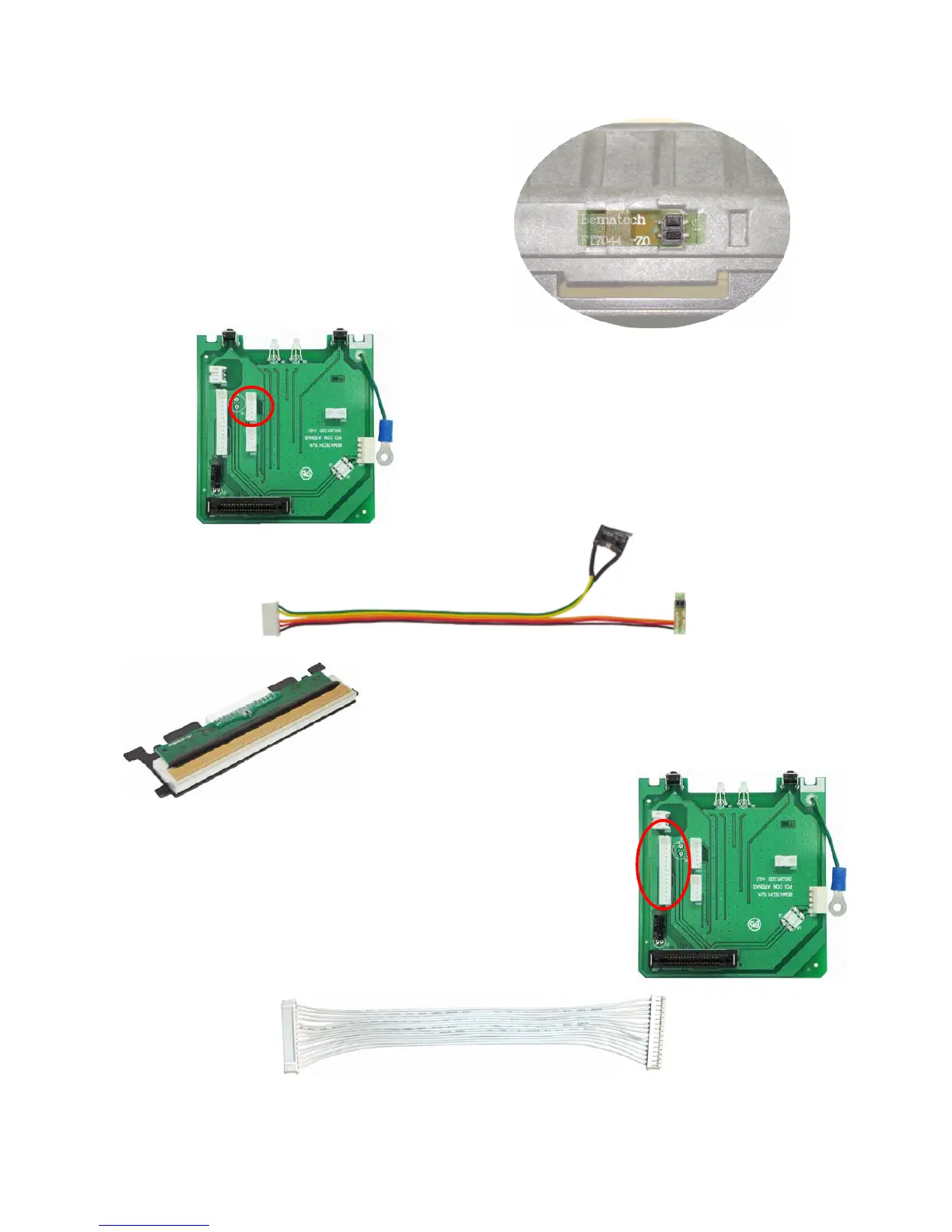
- Is the paper sensor located on the indicated
place?
Verify if the connection board sensor is
properly placed and if there is any dirt
obstructing it.
- Verify the connection of the board sensor.
The correct position to connect this cable is
on the CN4 connector (as shown on the
image on the side). Also, verify the sensor
cable (image below), as it must be in perfect
conditions on all its length.
Obs. On the paper sensor cable there is also
the cover sensor. If any of those sensors
show any problems, this cable must be
replaced.
Yellow LED Blinking 2 times - Overheated Print Head
The print Head (picture on the side) has an internal
temperature sensor against overheating, so when the print
head reaches 60ºC it informs the printer that a threshold has
been reached. From this point on, the printer informs the
user through the Information
LED, blinking 2 times in yellow
color and reducing the quantity
of items to be printed. With a slower print rate the print head
cools down, returning to its normal function.
If the printer constantly indicates overheating verify if:
- The print head connection cable (image below) is properly
connected and in perfect shape in all its length. The correct
position to connect this cable is on the CN6 connector (image on
the side). If the problem persists, replace the print head.



 To Next Page