50
Yellow LED blinking 3 times - Cutter Error
Verify if there is paper between the cutter and the mechanism plastic chassis. If there is and
it's not possible to remove it with available tools, cutter disassembly will be necessary. Paper
dust congestion, generated by the cutter itself can also cause malfunction. By disassembling it,
proper cleaning can be made on the slot where the cutter works. Refer to ‘Chapter 2 -
Procedures - Removing the Cutter Mechanism’ to see how to disassemble the cutter.
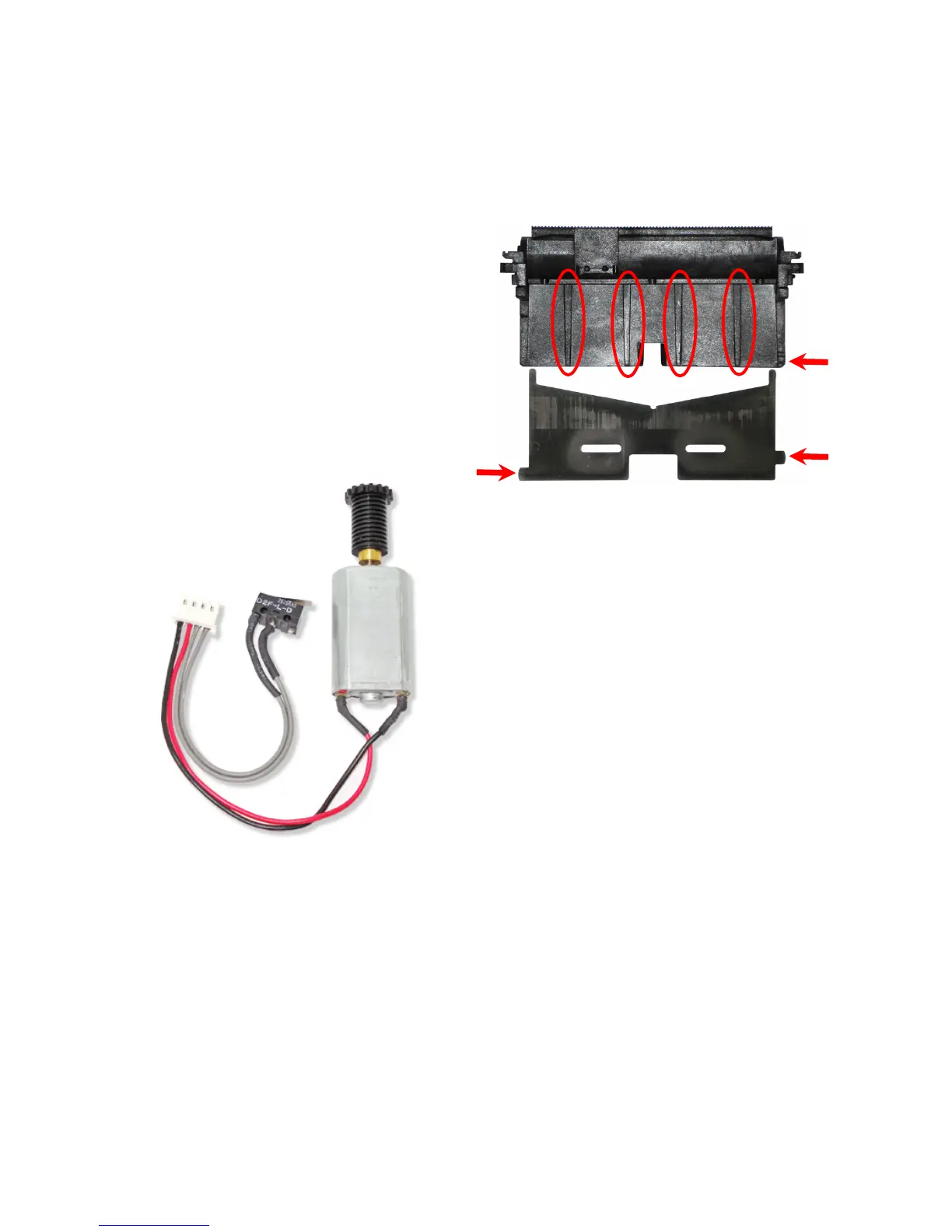
- When assembling the cutter blade, use the
image on the side to see its correct position.
The circles indicate the places where
lubrication is required. Use EM 30L grease.
The arrows indicate the reference to the
proper blade fitting.
- Verify if the cutter sensor and motor are in
perfect shape; verify if the cables are in
perfect conditions, with no cuts or marks that
can indicate a broken cable.
- Verify if the motor is properly fitted in the
metallic chassis.
- Verify if the sensor is properly fitted in the
correct position.
- Lubricate the motor gear with EM 30L
grease.
Yellow LED blinking 4 times - Communication Error
Unrecoverable Error - Information LED in Red
These are errors that require intervention by an Authorized Service . The errors are described
as follows:
Red LED blinking 1 time - RTOS (Real Time Operation System) Error
Firmware error on the control board. Replace the control board to address the issue.



 To Next Page