Using your Joybook26
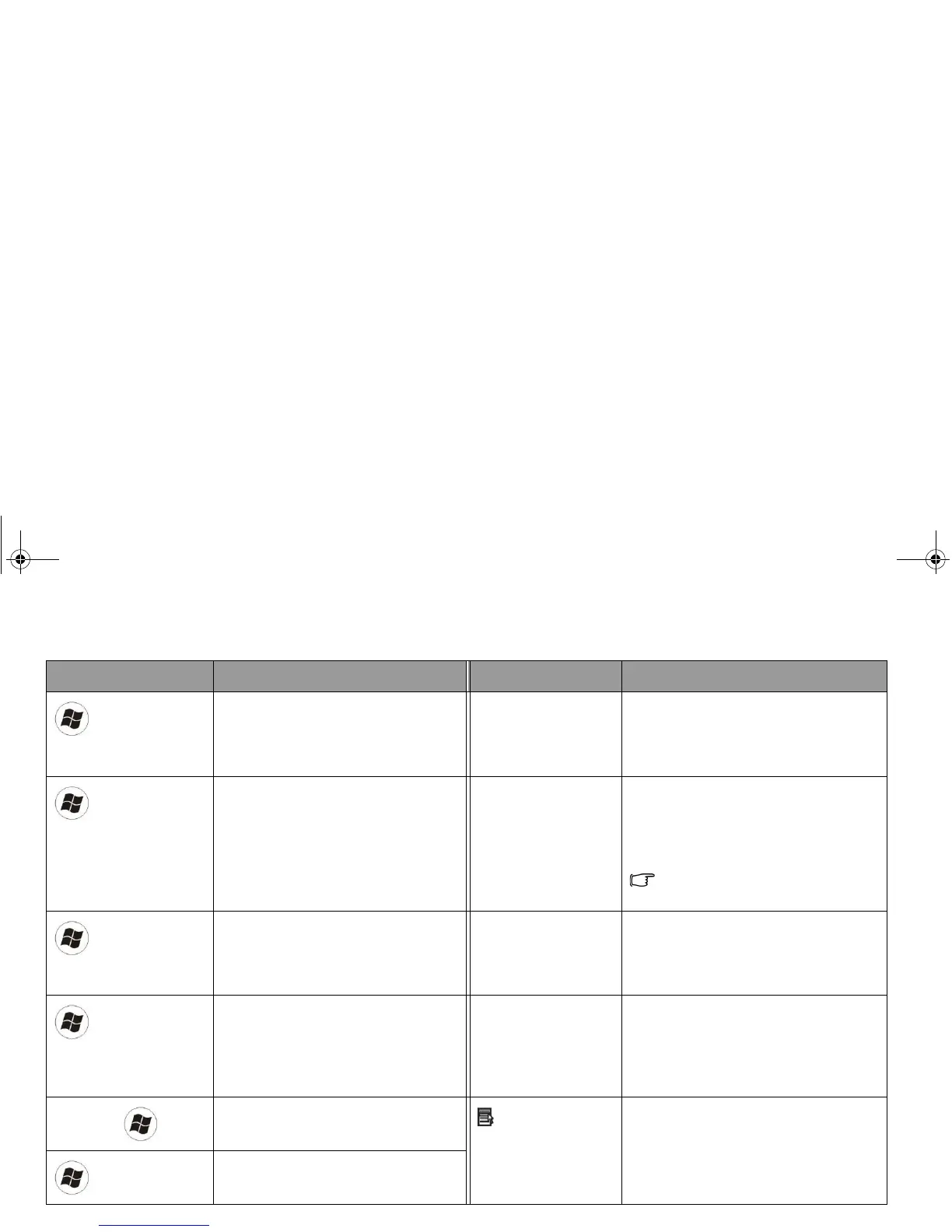
Function hotkey Description Function hotkey Description
Windows key
Functionally equivalent to clicking
the Start button on the Windows
desktop.
<Caps Lock> Capitalizes all text entered.
+ <Tab>
Press and hold the Windows key,
and then press Tab to switch
between windows.
<Scr Lk> Activates or deactivates the scroll
lock function. When activated, the
screen moves one line up or down
when you press the up or down arrow
key (, ).
Scroll Lock does not work in all
programs.
+ <E>
Opens the Computer window for
browsing disks and files.
<Num Lock> Activates or deactivates the numeric
keypad integrated in the keyboard
(indicated by the light gray shade in
the illustration on the previous page).
+ <M>
Minimizes all windows. <Prt Scr> Copies a bitmap image of the current
entire screen to your clipboard, which
can be inserted into documents as a
screenshot, or pasted into a graphics
software, such as Microsoft Paint.
<Shift> + + <M>
Cancels minimization of all
windows.
Application key
Provides the same function as the
right touchpad button, bringing up a
contextual pop-up menu.
+ <R>
Activates the Run dialog box.
JB_R56_en.book Page 26 Tuesday, July 3, 2007 10:01 AM



 To Next Page