Touring your Joybook10
Touring your Joybook
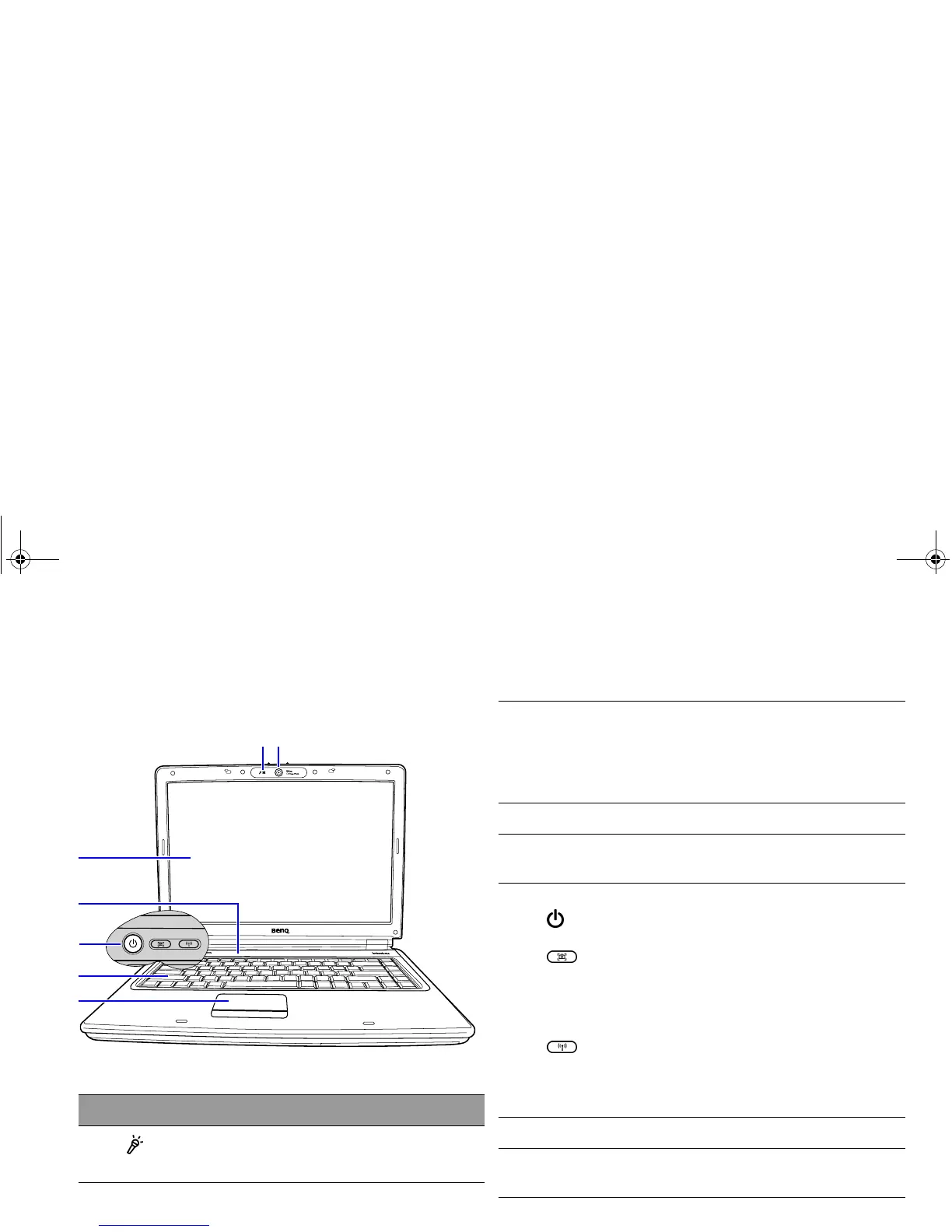
Front view
No. Front components
(1)
Built-in microphone
Receives sounds and voices for recording.
(1)
(2)
(5)
(6)
(3)
(7)
(4)
(2) Built-in camera (QEye)
A 1.3 megapixel built-in camera (QEye) that allows
you to hold a video conference, capture images, or
record videos. For details, refer to "Using QEye" on
page 38.
(3) LCD (Liquid Crystal Display) panel
(4) Indicators
Refer to "Indicators" on page 17 for details.
(5) Power and quick access buttons
Power button
Turns your Joybook on or off.
QShot button
Allows you to capture desktop images, still images
from movies, real-time images from QEye, or record
a video of your screen with one touch. For details,
refer to "Using QShot" on page 41.
Wireless button
Press this button to enable/disable the wireless LAN
function. For details, refer to "Using built-in wireless
connectivity (available on selected models)".
(6) Keyboard
(7) Touchpad
Refer to "Using the touchpad" on page 21 for details.
JB_R56_en.book Page 10 Tuesday, July 3, 2007 10:01 AM



 To Next Page