40
Base-2 Security Panel
ENGLISH
If you insert a Digital key into a Key reader, or hold a Proximity Card/Key near
the sensitive area of a Proximity reader—the Green LED [36](Zone 1) and
Amber LED [37](Zone 2) will turn OFF, and the Red LED [38] will change
status (ON to OFF or vice versa).
If the Green or Amber LED blinks when the Red LED turns ON —do not extract
the key—as the Panel is not-ready-to arm, due to violation on one of the Zones
(open window or door, etc.). To abort an Arming request—push the Key gently
several times to the back of the slot; or hold the Card/Key near sensitive area of
a Proximity reader until the Red LED [38] turns OFF. At this point it will be
possible to remove the Key/Card without triggering a False Alarm.
Arming the System at a Reader
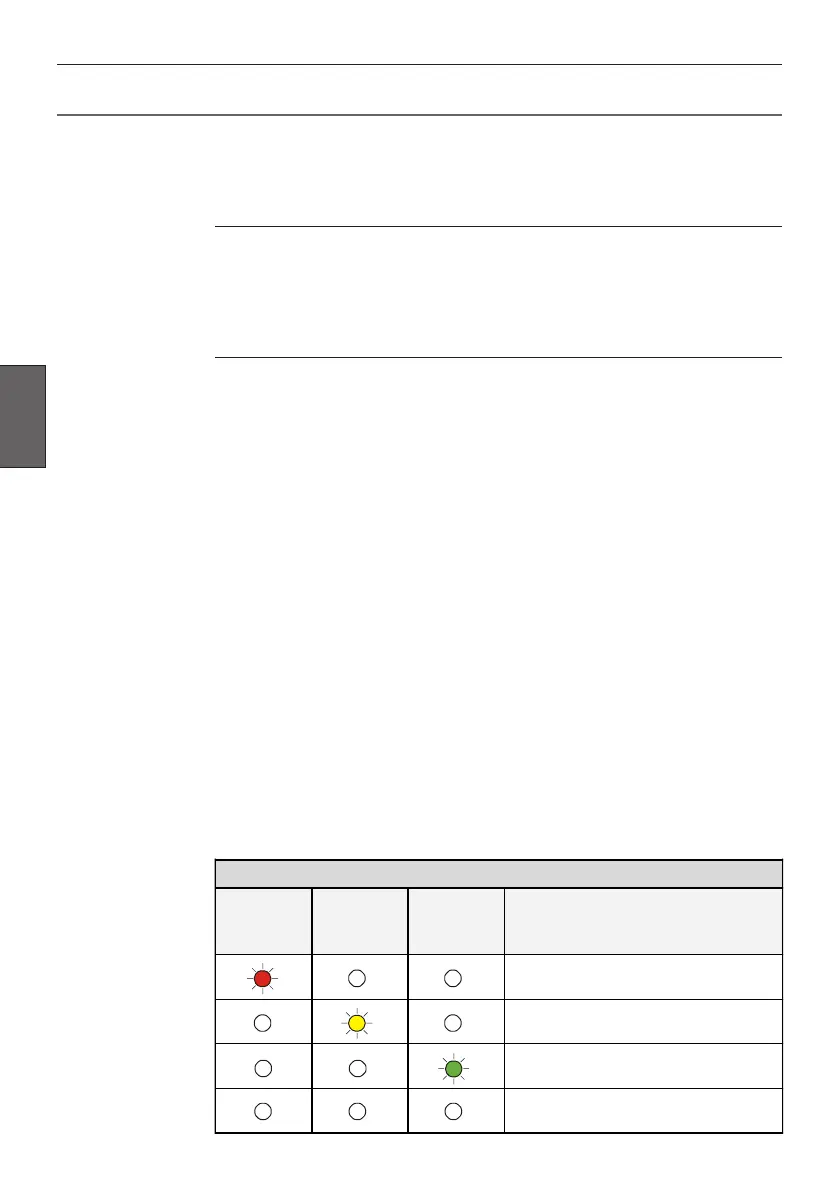
To arm the system—insert a Digital key [41] into a Key reader, or hold a Card/
Key near the sensitive area of a Proximity reader [42]. The Red LED [38]will
turn ON (refer to the LED CONFIGURATIONS table). The system will arm
when the Key/Card is removed from the Reader.
Disarming the System at a Reader
To disarm the system—insert a Digital key [41] into a Key reader, or hold a
Card/Key near the sensitive area of a Proximity reader [42]. The LEDs will turn
OFF and the system will disarm (refer to the LED CONFIGURATIONS
table).
Alarm and/or Tamper events, that occur during armed status, will be saved on
the Alarm memory, and signalled by blinking on the Red LED [38]. The specific
event will be indicated on Panel LEDs [5], [1] and/or [6]. Refer to Resetting
the Alarm memory for the Reset procedure.
Bypassing a Zone at a Key Reader
To bypass Zone 1 or Zone 2—insert a Digital key [41] then push it gently to
the back of the slot. Each time the key is pushed, the configuration of the LEDs
will change. Extract the key when the required status is shown (refer to the LED
CONFIGURATIONS table).
Using Digital Key/Cards
Abort Arming
LED CONFIGURATIONS
RED
LIGHT
[38]
AMBER
LIGHT
[37]
GREEN
LIGHT
[36]
RESULT
OOO
System Armed
OOO
Zone 1 Bypassed
OOO
Zone 2 Bypassed
OOO
System Disarmed



 To Next Page