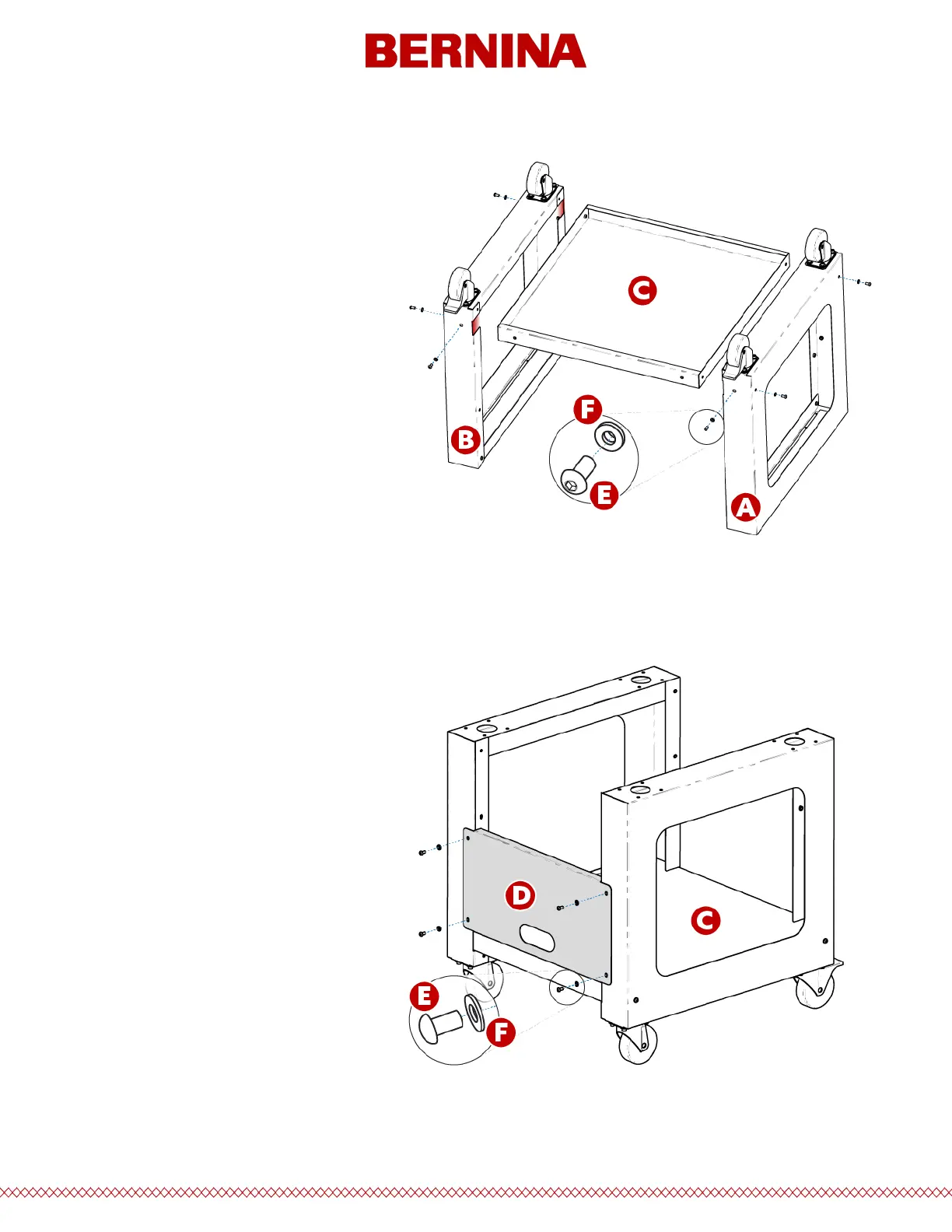
Stage 1 - Attaching the Base Support
1. Place items A and B (Cart Leg
Assemblies) on the oor with the
Casters facing up. The Casters with
the brake face the front of the Cart.
2. Assemble Item C (Base Support) into
the cutouts (see red highlights)
located on each side of both Cart
Legs, Items A and B, as shown.
3. Install (6 each) items E and F (M6 x
12mm Screw and M6 Washer) at the
locations shown. Assemble loosely,
do not tighten.
4. Fully tighten all (6) item E Screws.
Stage 2 - Installing the Rear Support
1. Rotate the Cart to its upright
position.
2. Assemble Item D (Rear Support) to
the rear side of the Cart resting on
Item C (Base Support), with the
obround opening facing towards the
bottom of the Cart.
3. Install (4 each) items E and F (M6 x
12mm Screw and M6 Washer) at the
locations shown. Assemble loosely,
do not tighten.
4. Fully tighten all (4) item E Screws.



 To Next Page