BestCode Next Series 8 Technical Manual October 2022 Page 267 of 290
throughout the variable speeds of the line.
Setting up Time of Flight
1. To ensure print placement accuracy when using a
Photo Eye (Non AutoPrint modes), it is important
to set up the time of flight value.
See Time of Flight for setup values based on Printhead
Distance to product.
Troubleshooting
Missed Encoders
Missed encoders occur when the speed demands of the line exceed the print capability of the printer. However, this
can accidentally occur in some circumstances. This can cause variations in print width and location up to 5%, which is
unacceptable in most Meter Marking type applications.
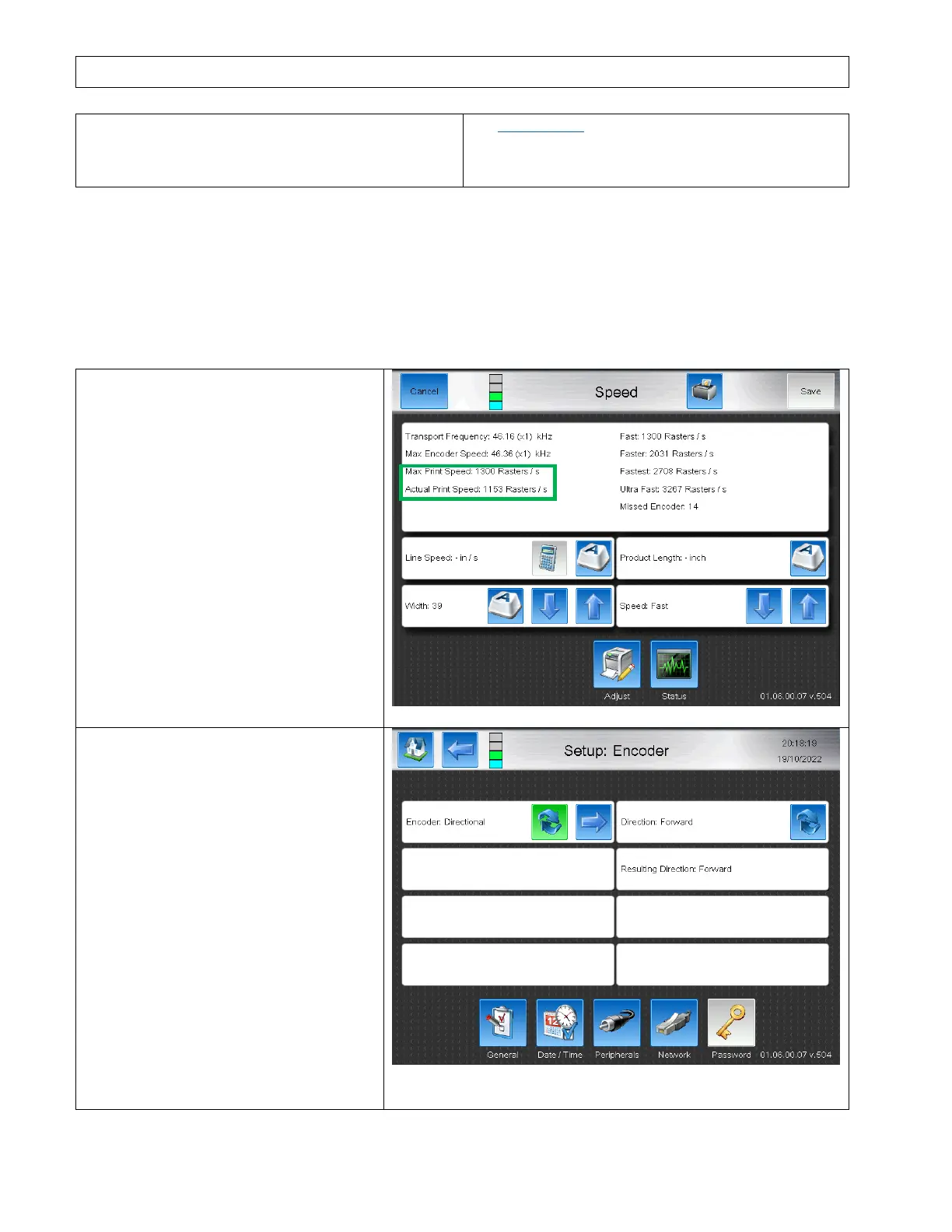
1. The use of a shaft encoder can impact
some Templates by reducing the
maximum speed by up to 10%. It is
recommended first if Missed Encoders
are occurring to set the width value so
the Actual Print speed is only 90% of the
Max Print Speed.
Example shows 1153 / 1300 * 100 =
88.7%
2. If missed encoders still occur after
reducing the “Actual Print Speed”, the
cause of the Missed Encoders may be
rigidity issues with the mechanical
coupling of the Shaft Encoder to the
conveyor.
3. Set the Encoder mode to Directional to
help smooth the encoder signal.
If this does not eliminate the occurrence
of Missed Encoders, re-evaluate the
Shaft Encoder coupling method to use a
higher input frequency and use a larger
width value to help smooth the encoder
input speeds.



 To Next Page