36
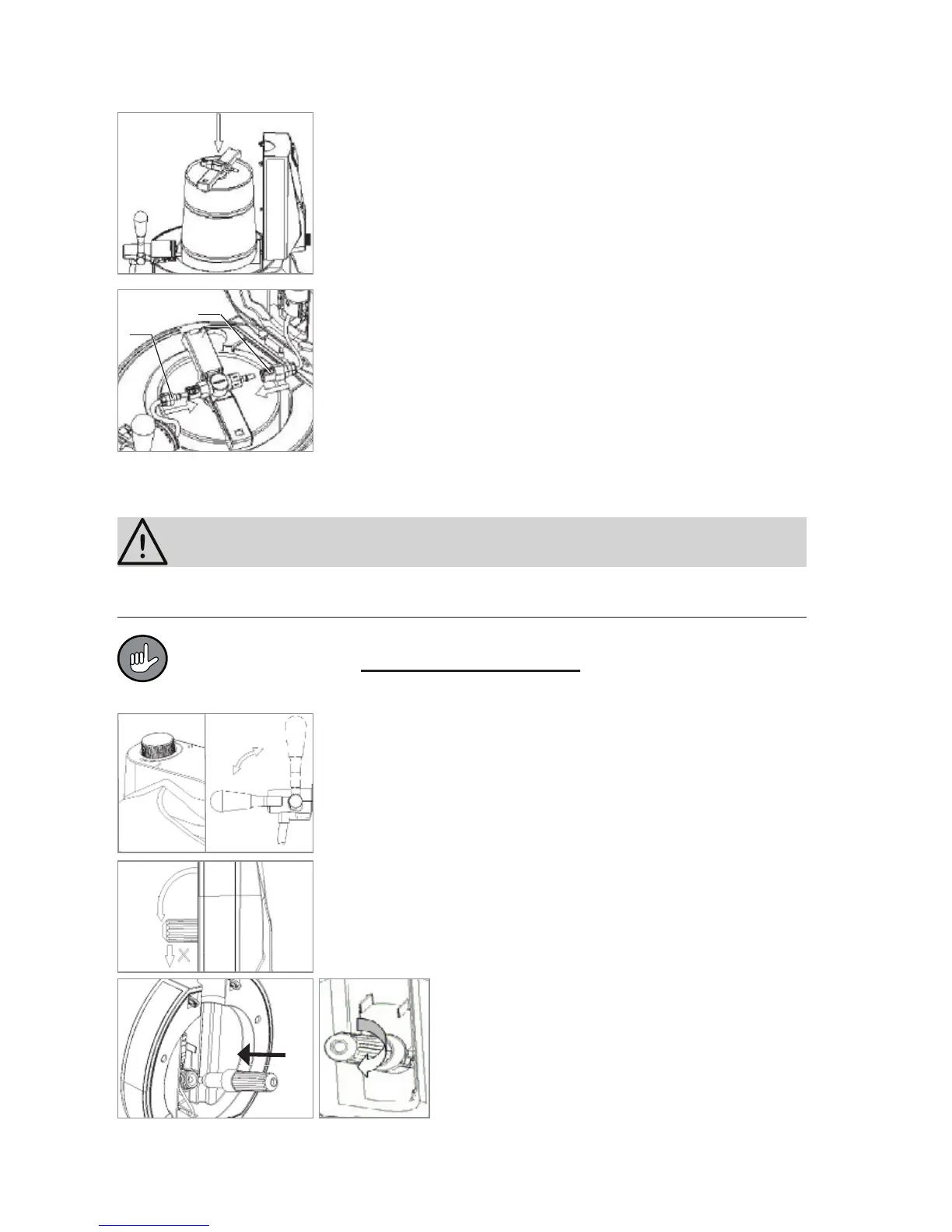
5. Open the lid of the beer pump by pressing the release
button and place the beer keg into the cooling container.
When you do this, you can hold the beer keg by the mount
for the tapping sword.
6. Place the connection pieces for the CO
2
feed line (a) and
the beer line (b) to the tap onto the valve unit. They must
engage audibly.
Inserting/Changing the CO
2
Cartridge
CAUTION!
Only insert the CO
2
cartridge when the pressure regulator is at its limit stop in the –
position as otherwise the contents of the CO
2
cartridge will empty into the beer pump!
To draw beer, you require 16 g CO
2
cartridges. You can order more of these
through our website: www.service-shopping.de. One cartridge is generally
suffi cient for one beer keg.
1. Make sure that the pressure regulator of the beer pump is
at its limit stop in the – position, the tap handle is vertical
and the beer pump is switched off (switch position 0).
2. The sleeve for receiving the CO
2
cartridge can be found
in the lid of the beer pump. Pull out the sleeve from the lid
and unscrew it.
3. Place a CO
2
cartridge into the sleeve and
then screw it back onto the thread in the lid.
When you hear a click, the cartridge has
been pierced and the gas can fl ow into the
keg. Screw the sleeve tight in order to pre-
vent any unwanted gas escape.
a
b
open
closed


 To Next Page