BIGTREETECH Pi 2 User Manual
16
4.3. Writing System onto eMMC
4.3.1. Using RKDevTool to Write the eMMC (Windows)
Download and unzip RKDevTool from the GitHub repository
(https://github.com/bigtreetech/CB2) to your computer. DO NOT insert a
MicroSD card.
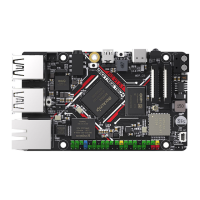
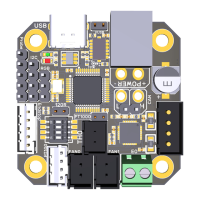
1. As shown in the diagram below, toggle the USB OTG switch to the ON
position. At this position, the USB OTG port is connected to a Type-C port.
Set the eMMC switch to the OFF position, allowing the RK3566 to access
the eMMC normally.
2. Hold down the “Recovery” button, then connect the BIGTREETECH Pi 2 to
the computer using a Type-C cable. Power on and after 3 seconds,
release the button.





 To Next Page