7.10. IR Application Diagrams
7.10.1. IR Pass-Through from Control System
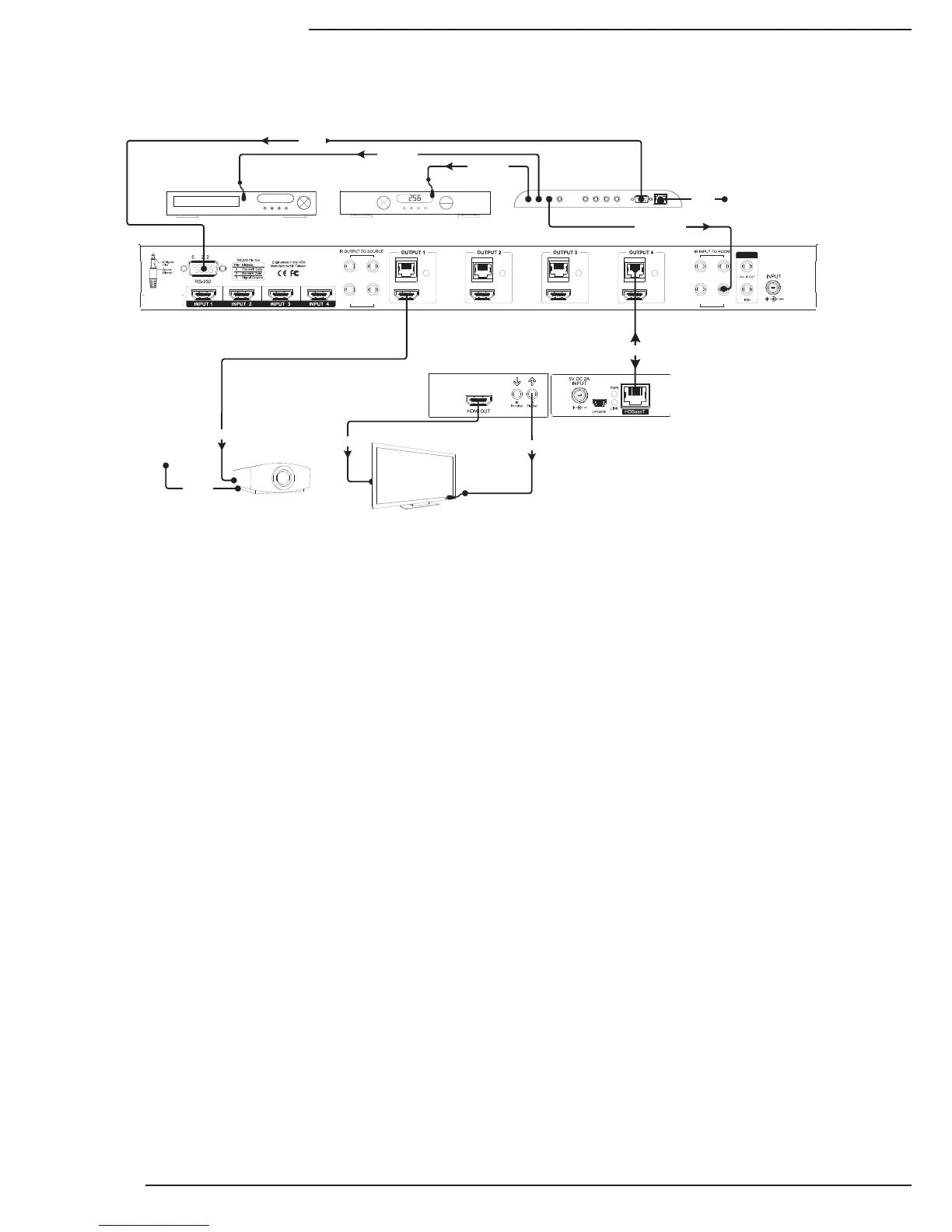
ThediagramaboveillustratesatypicalinstallationwithaB-500-MTRX-230-4X4wherealloftheequipmentisbeing
controlledbyacontrolsystemthatusesRF(RadioFrequency)remotesineachoutputzone.
• TheRFremotestransmitcommandsbacktothecontrolsystemwhichthensendscommandstoeachdevicebeing
controlled. Custom programming by the installer sets the control system up to automatically switch inputs and
outputsinthematrixswitcherasneeded,sotheenduseronlyhastoselectthesourcetheywanttowatch.
• Eachdisplay(onlyoneispicturedforreference)requiringIRcontrolisconnectedtothesystemviatheHDBaseT
output of the matrix switcher. Cat5e/6 cable connects to a B-500-RX-230-IR Receiver, which is attached to the
displayviaHDMIforsignal.AnIRasherconnectedtotheIRasherportsendstheIRcommandstothedisplay.
Sourcesaredirectlycontrolledbythecontrolsystem.
• IR control for displays is routed from the control system to the matrix switcher using 3.5mm mono mini cables
pluggedintoIRINPUTTOROOMports.ThecommandspassfromamatrixswitcherporttotheHDBaseToutputof
thesamenumber.Inthediagramthemonocableusedtosendcommandstotheoutput4zoneispluggedintoIR
INPUTTOROOMport4.Thisallowsdiscretecontrolofeachdisplayconnected,eveniftheyaremodelswiththe
samecodes.
• SomedisplaysandprojectorscanbecontrolledbyothermethodsthanIR.TheprojectorpicturedfeaturesIPcontrol,
soitisreceivingcommandsfromthecontrolsystemoveranEthernetconnection.AnHDMIcableisconnectingitto
thematrixswitcheroutputsinceitisinstalledcloseenoughtotheequipmentandrequiresnoIRasher.
• Whenthesystemisinuse,iftwooutputsareconnectedtothesameinput,thesourcewillchangeonbothoutputs
withanycommandsentsinceitcan’tsendtwoHDMIstreamsatonce.Thismustbeconsideredwhendecidingon
thesourcestoconnectfordistribution.
Example: In a home with four displays connected, if users in every room want to watch satellite on different
channels, there must be four satellite receivers set up as sources. With custom programming, each output
can be programmed to use only one of the satellite source inputs, giving each output a dedicated cable box,
while allowing other less-used sources to connect to any output.
LIN K LINK LINK LINK
1 3
2 4
1 3
2 4
24V DC 2.7A
IR Outputs
RS232
IR Inputs
B-500-RX-230-IR
Projector
HDMI
Cat5e/6
HDMI
PLAY
HDMI Source HDMI Source
HDTV
IR Flasher
Ethernet Connection
RS232
IR Flasher
IR Flasher
3.5mm Mono
C5e/6
Ethernet
Connection
Cat5e/6


 To Next Page