BD / BF / ED / FD / FED (E3.1) 12/2017 page 53/105
11. Network configuration for chambers with Ethernet interface
The settings of this submenu are used for networking chambers with an Ethernet interface, e.g. to con-
nect them with BINDER’s communication software APT-COM™ 3 DataControlSystem (option, chap.
12.1).
This menu subsequently offers the following settings:
• Display of the chamber‘s MAC address (no setting)
• Switching on and off the DHCP state
• Entering the IP address
• Entering the subnet mask number
• Entering the gateway number
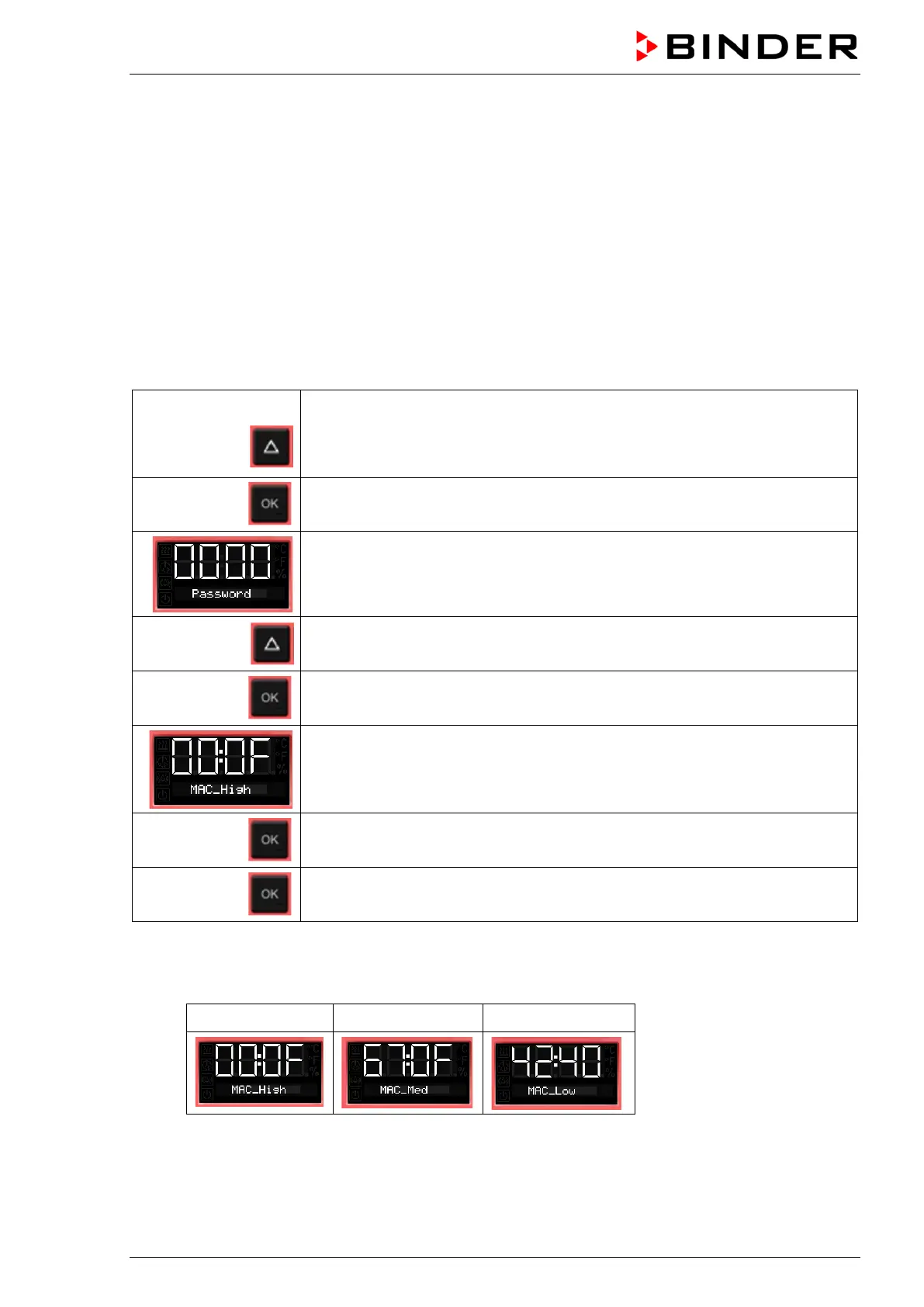
From Normal display
without fan 5x
with fan 6x
with the arrow-up button to the user menu
Confirm with OK.
Enter the password (factory setting: 00 00)
and confirm each entry with OK.
5 x
with the arrow-up button to the Ethernet menu.
Confirm with OK.
The first digits of the MAC address are shown.
Continue with OK. The middle digits of the MAC address are shown.
Continue with OK. The last digits of the MAC address are shown.
Displaying the chamber’s MAC address serves to identify the chamber in the Ethernet network.
Example: 00-0F-67-0F-42-40
00-0F 67-0F 42-40



 To Next Page