Getting to know the Bindomatic 301 DFS 17
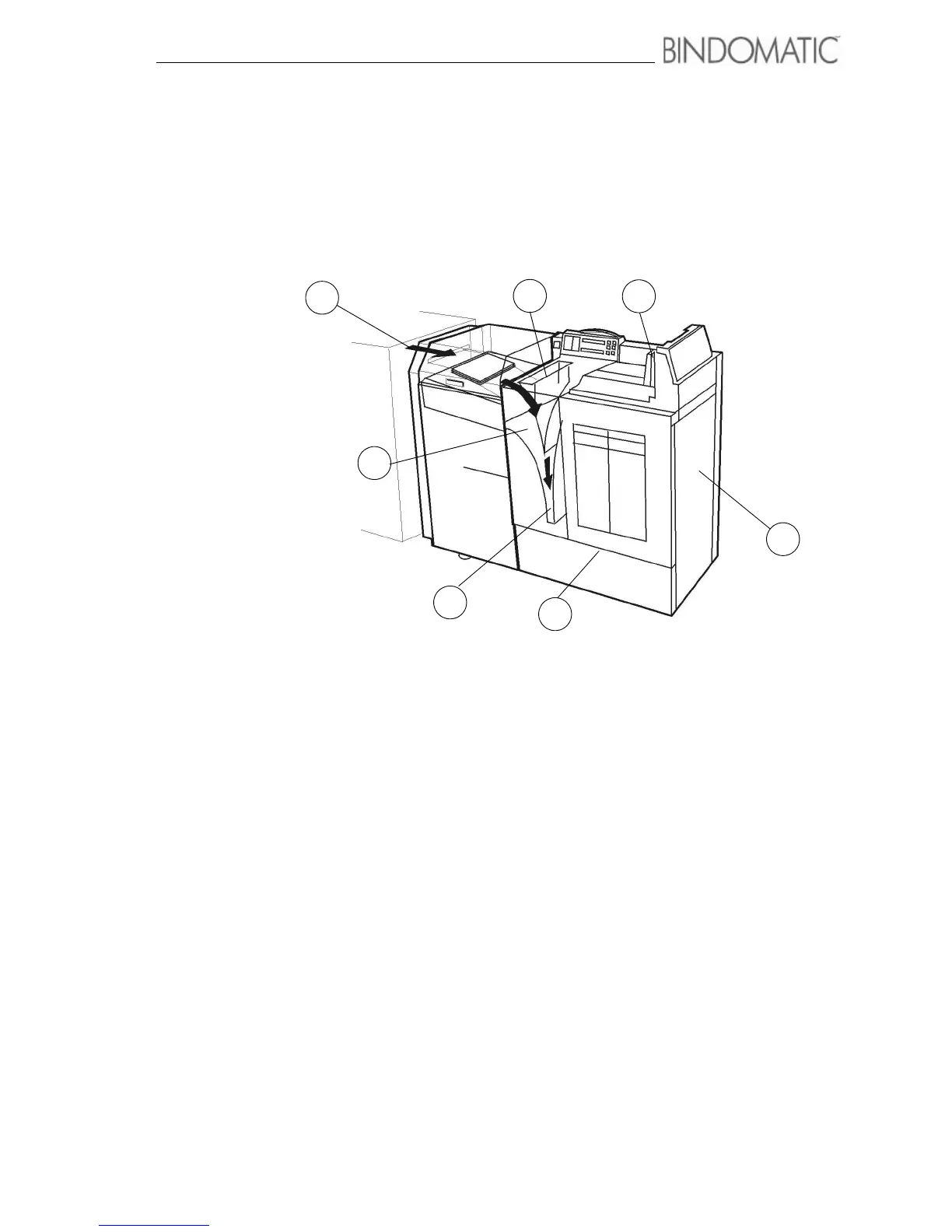
Document path through the Bindomatic
301 DFS
The arrows in the illustration below show the movement of the copy sets along the 301 DFS
document path.
1
2
3
4
5
6
7
1. Manual Input Station In manual mode, the operator inserts the copy sheets into the
Manual Feeder. The Manual Feeder delivers each copy set to the
Manual Input Station.
2. Auto Input Station In automatic mode, the host machine feeds the copy sheets into
the Interface Module of the 301 DFS. The Interface Module
delivers each copy set to the Auto Input Station.
3. Set Drive Station The Manual Input Station or Auto Input Station delivers the copy
set to the Set Drive Station where the copy set sheets are aligned.
4. Document Drive Station If a Cover Tray has been selected, the cover is delivered to the
Document Drive Station where the cover is held open. The Set
Drive Station feeds the copy set into the open cover in the
Document Drive Station.
5. Binder Module The Document Drive Station delivers the document to the Binder
Module.Heat melts the glue in the cover spine to bind the copy set
sheets into the cover. Cooling fans then cool the document. After
this process, the document is delivered to the Vertical Transport.
6. Vertical Transport The Vertical Transport elevates the document to the Output Tray
of the 301 DFS.
7. Output Tray The Output Tray receives the bound documents and stacks them
until the operator unloads them.



 To Next Page