28 Making the documents
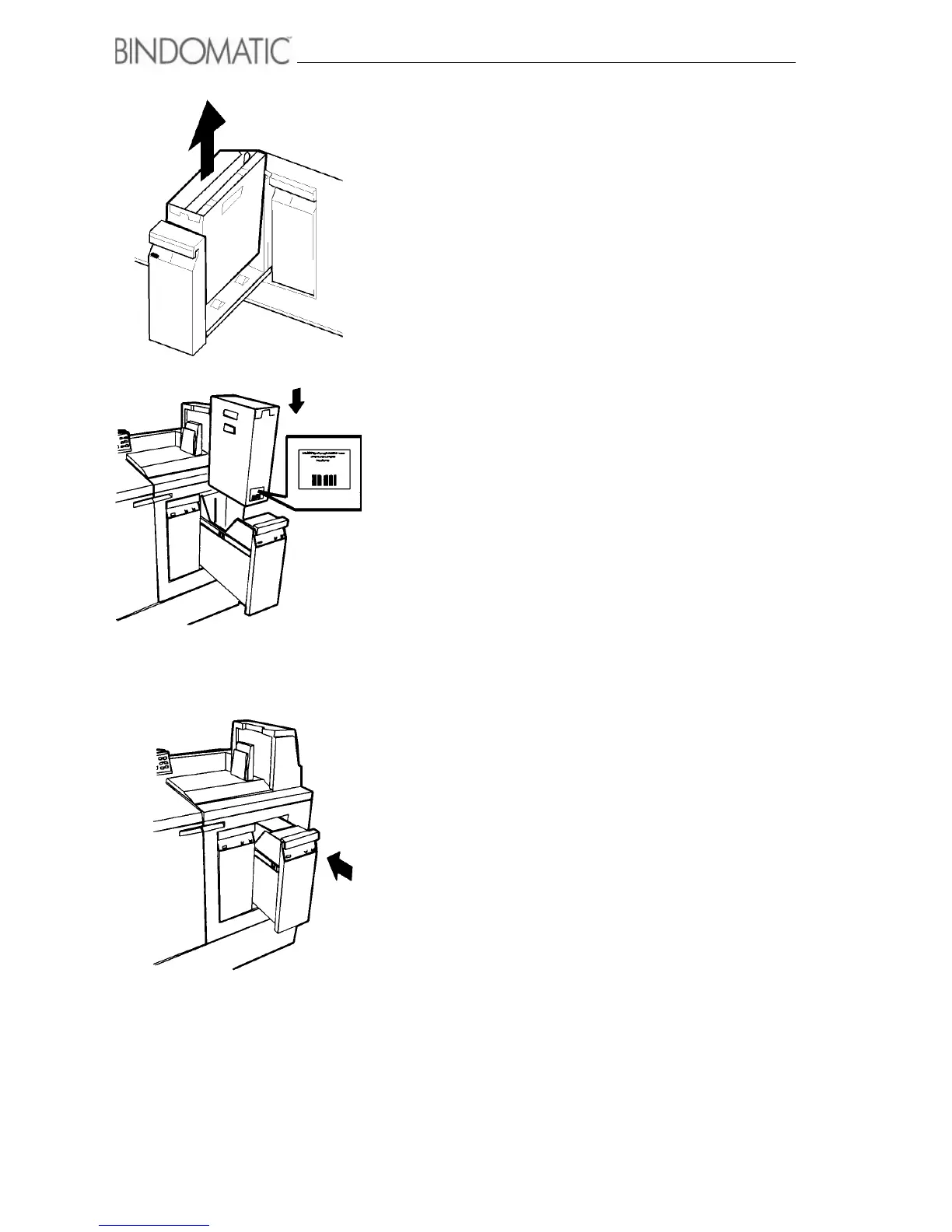
3. Remove the cassette from the Cover Tray.
WARNING: When you insert a cassette into a Cover Tray, the
bar code on the front of the cassette must face the front of the
Cover Tray. If you attempt to force the cassette into the Cover
Tray backwards, you may damage the cassette.
4. Place the new cassette into the Cover Tray.
• Ensure that the bar code is facing the front of the Cover
Tray.
5. Close the Cover Tray.
• The amber Please Wait indicator light will go on to
advise you that the Cover Tray is locking.
•
When the Cover Tray is locked, the red In Use
indicator light will go on
NOTE: The Cover Tray will not close unless it contains a
cassette.
NOTE: If the barcode on the cassette cannot be read, you are
asked to confirm the use of the cassette despite of this. If you
chose to do so, the machine will not check the thickness of the
document relative to the selected cover as long as this cassette
is selected. If you chose to not use the cassette, press the un-
lock button on the tray to replace the cassette or just allow the
option to time out. The display will in this case say that the
cassette in the tray is not available.



 To Next Page