72 Biodex Medical Systems, Inc. © 2017
Database Cleanup
Database Cleanup is an administrative maintenance function that reduces the system’s overall
file size.
Selecting the <Database Cleanup> button displays a confirmation screen prompting the user
whether or not to proceed with the clean up or cancel the action.
Advanced System Maintenance
The Advanced System Maintenance screen is hidden from normal view. This screen, when
active, allows the user to make adjustments such as selecting a language preference,
performing speed and elevation calibration, and performing strain gauge calibration.
To access the System Maintenance screen:
1. Touch <Utilities>.
NOTE: The next step requires pressing the hidden keypads in the right and left corners of
the displays touch screen.
2. To access the <System Maintenance> prompt on the display:
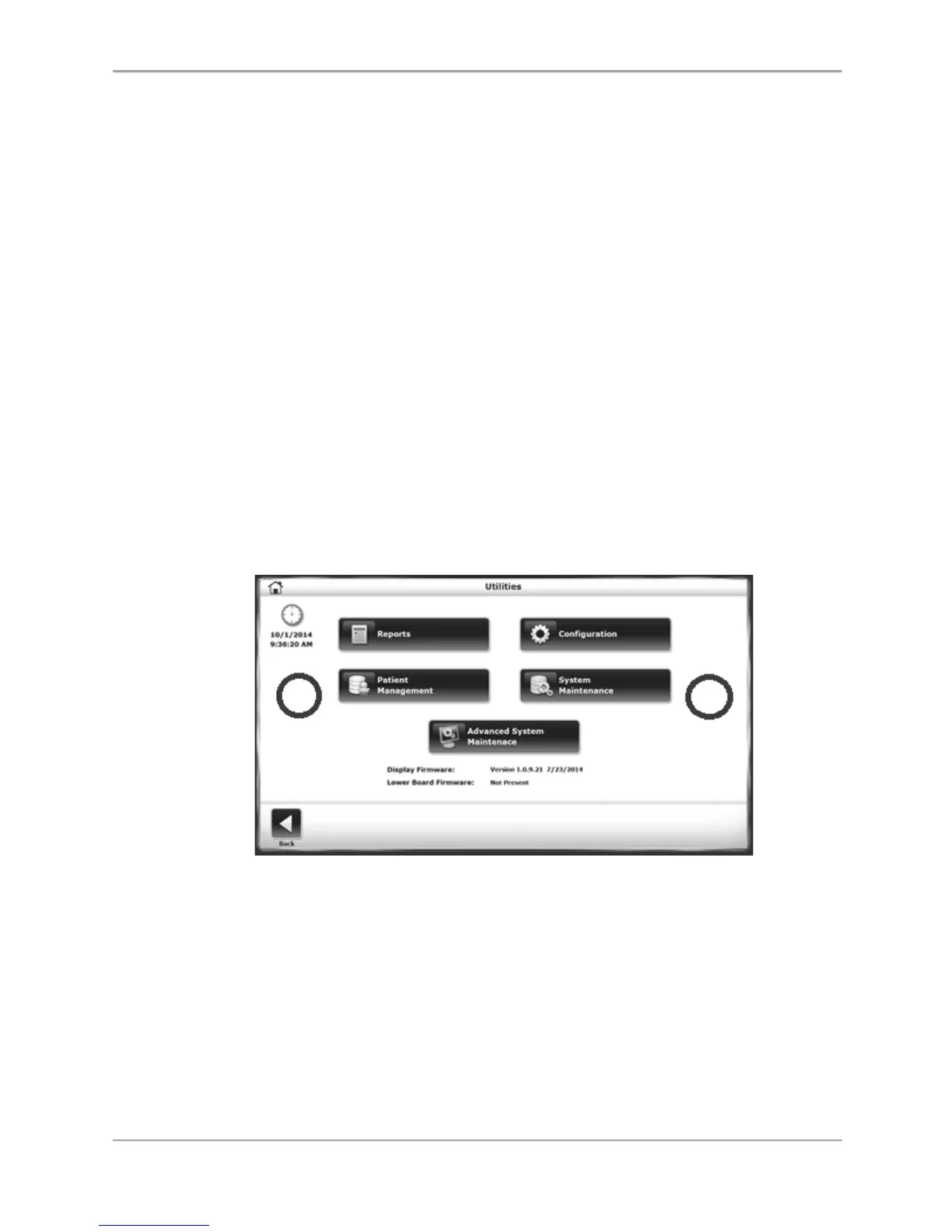
a. Touch the right side of the Utilities screen (refer to the red circle in Figure 8.27).
b. Touch the left side (as indicated by the red circle in Figure 8.27).
c. Touch the right side a second time.
Figure 8.27. Unmarked touch areas for Access to the Advanced System Maintenance
Screen.
3. Touch <Advanced System Maintenance>. The Advanced System Maintenance screen is
displayed.



 To Next Page