User’s Guide
Zigbee ID ZIG-100 modules each have their own unique IDs. Following that, in order to
communicate between each others, they need to know the IDs of respective
devices. In general, with known IDs, devices can communicate one to one and
additionally, you can send broadcasting messages to all ZIG-100s. For further
details, you can check out the ZIG-100 manual.
You can change the communication mode setup through the behavior control
program.
CM-5 Setup To setup the IDs of other ZIG-100 from ZIG-100, you have to use behavior control
program. Both CM-5s must have ZIG-100 built-in and must know the unique IDs of
each others.
Additionally, both must set and save the IDs of each others through behavior
control program before communicating.
For example, let’ suppose that robot A has ID of 120 and robot B has ID of 121. For
robot A to send data to robot B, the robot A has to set and save robot B’s ID of
121. Likewise, the robot B has to set and save the ID of robot A, which is 120.
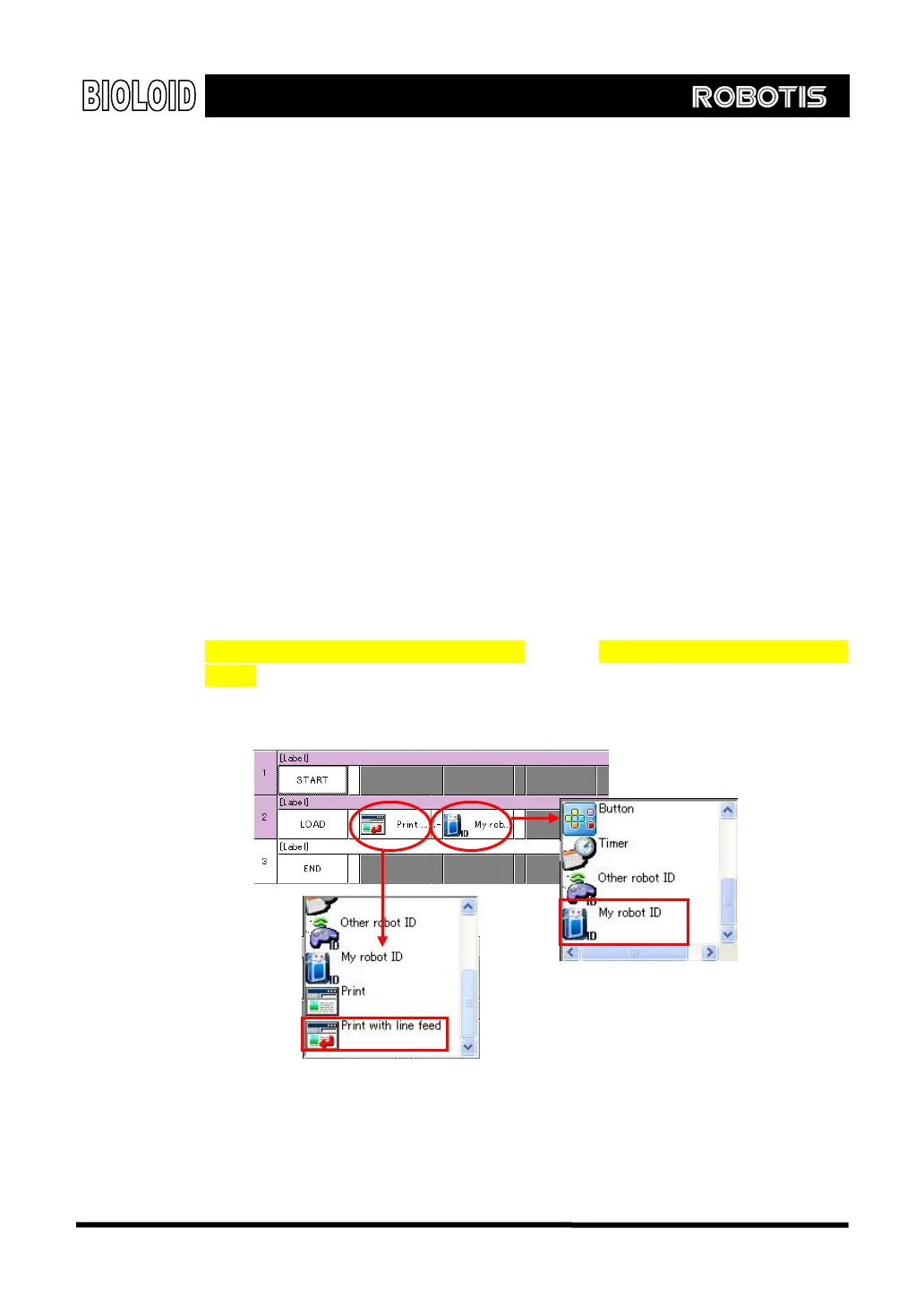
To find own ID and set the ID of others, follow the instruction below. Also refer to
“Examples\Example(Read my RF ID).bpg”and “Examples\Example[Set other RF
ID].bpg” inside the CD.
[Finding own Zigbee’s ID through the behavior control program]
Own ID cannot be changed as it is read from the ROM of ZIG-100.
102



 To Next Page