User’s Guide
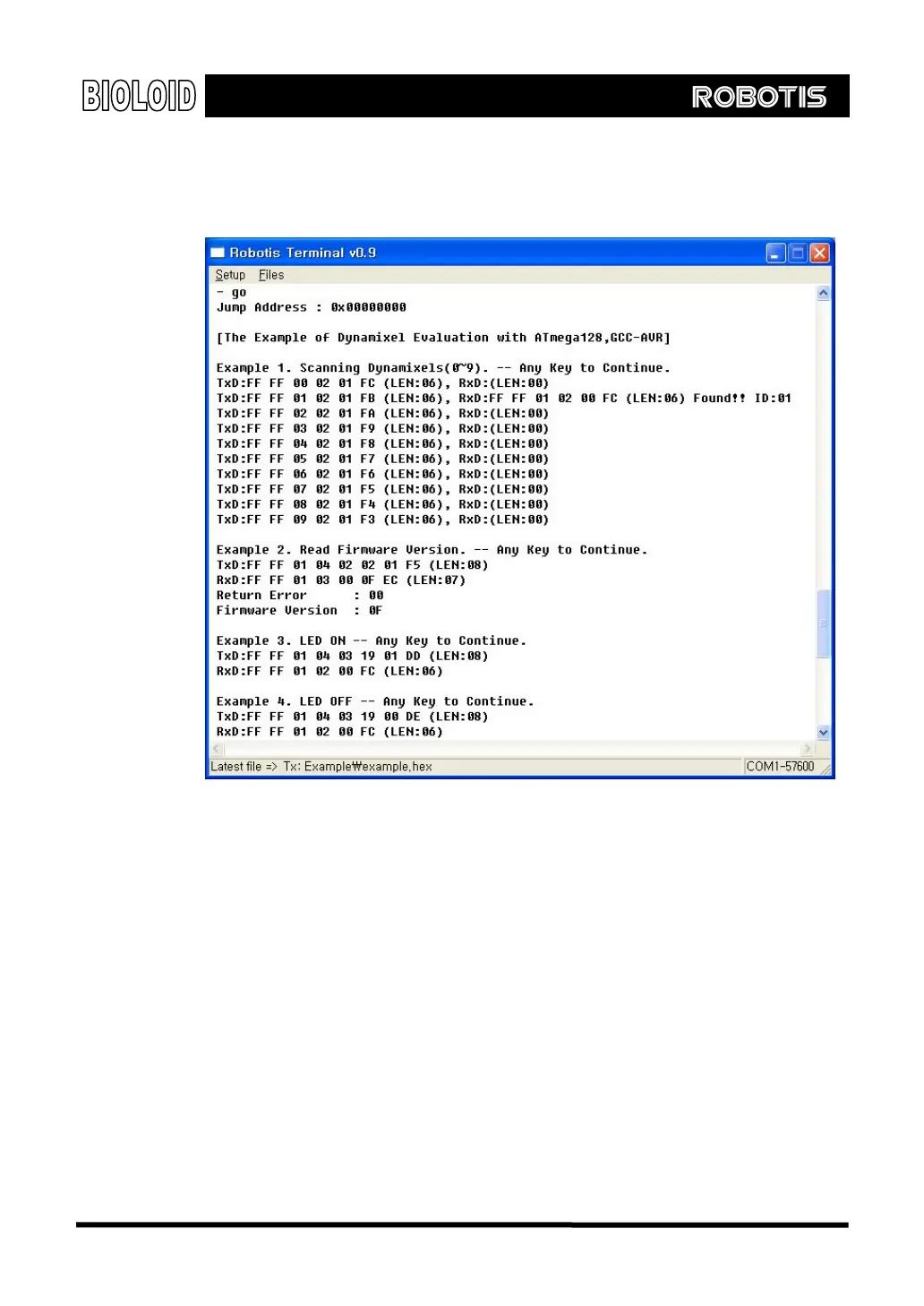
Download Now, let’s use the Robot Terminal to download “example.hex” to the CM-5 unit.
Please refer to Chapter 2 for downloading instructions. Use the “Go” command
to execute “example.hex.” The screen shot of this is shown below. Pressing a
key will make it proceed to the next example.
Example 1 sends the “Ping” command to the Dynamixel actuators (ID from 0 to
9) and checks if there are any replies. The Baud rate for the CM-5 is set to
57,600 bps. From the results shown here, you can see that one Dynamixel
actuator with the ID of 1 is connected to the CM-5 unit.
Example 2 demonstrates the use of the “Read” command. It reads the data
from Address 2 of the Control Table of the Dynamixel actuator with the ID of 1.
The data from Address 2 is the Firmware version and the results show that it
currently has a firmware version of 0x0F. Please refer to the Dynamixel manual
for information about the Control Table and for the structure of the packets
Example 3 turns on the LED of a Dynamixel actuator by writing 1 to address 0x19
of the Control Table. All actions for the Dynamixel actuators can be activated in
this way by writing data to the corresponding address in the Control Table.
Example 4 turns off the LED of a Dynamixel actuator by writing 0 to address 0x19
of the Control Table.
128



 To Next Page