Digital Power Meter Model 5000-XT
8
Connecting the Directional Power Sensor (DPS)
1. Do one of the following:
For Models 5010, 5010B, 5011, 5012, 5012A, 5012B, 5016, 5016B,
5017, 5017B, 5018, 5018B, 5019, and 5019B:
Connect the Bird DPS to the “Sensor” serial port on the DPM using the
sensor cable provided.
For Models 5014:
Connect the Bird DPS to the “Sensor” USB port on the DPM using the
sensor cable provided.
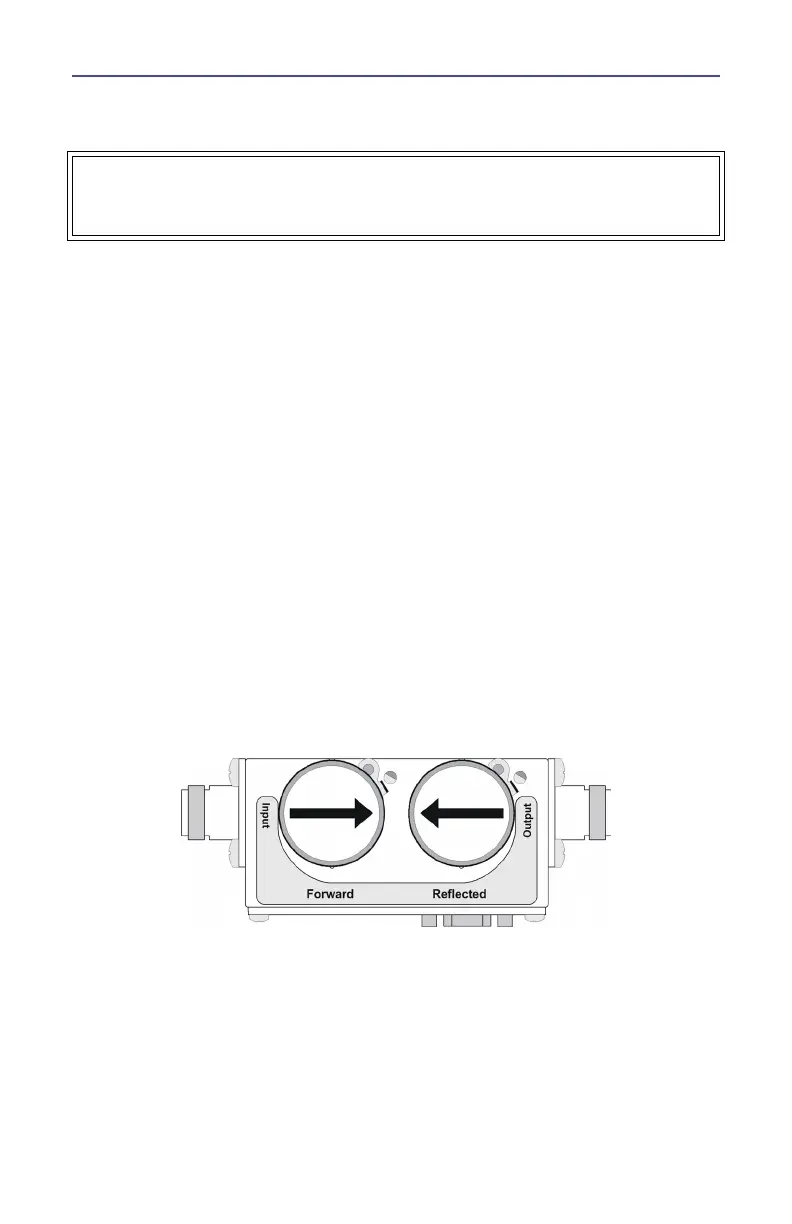
2. Connect the DPS to the RF line so that the arrow on the sensor points
towards the load.
Note: The arrow on the forward element should point towards
the load.
Note: The arrow on the reflected element should point towards
the source.
Note: Both elements must be either APM/DPM or 43 types, do
not mix elements.
3. Set the power on the DPM to the forward element’s power rating.
Figure 4 DPS Element Orientation
WARNING
RF voltage may be present in RF element socket. Keep element in socket
during operation.



 To Next Page