4.3 Patient information
To edit patient information, operate as follows:
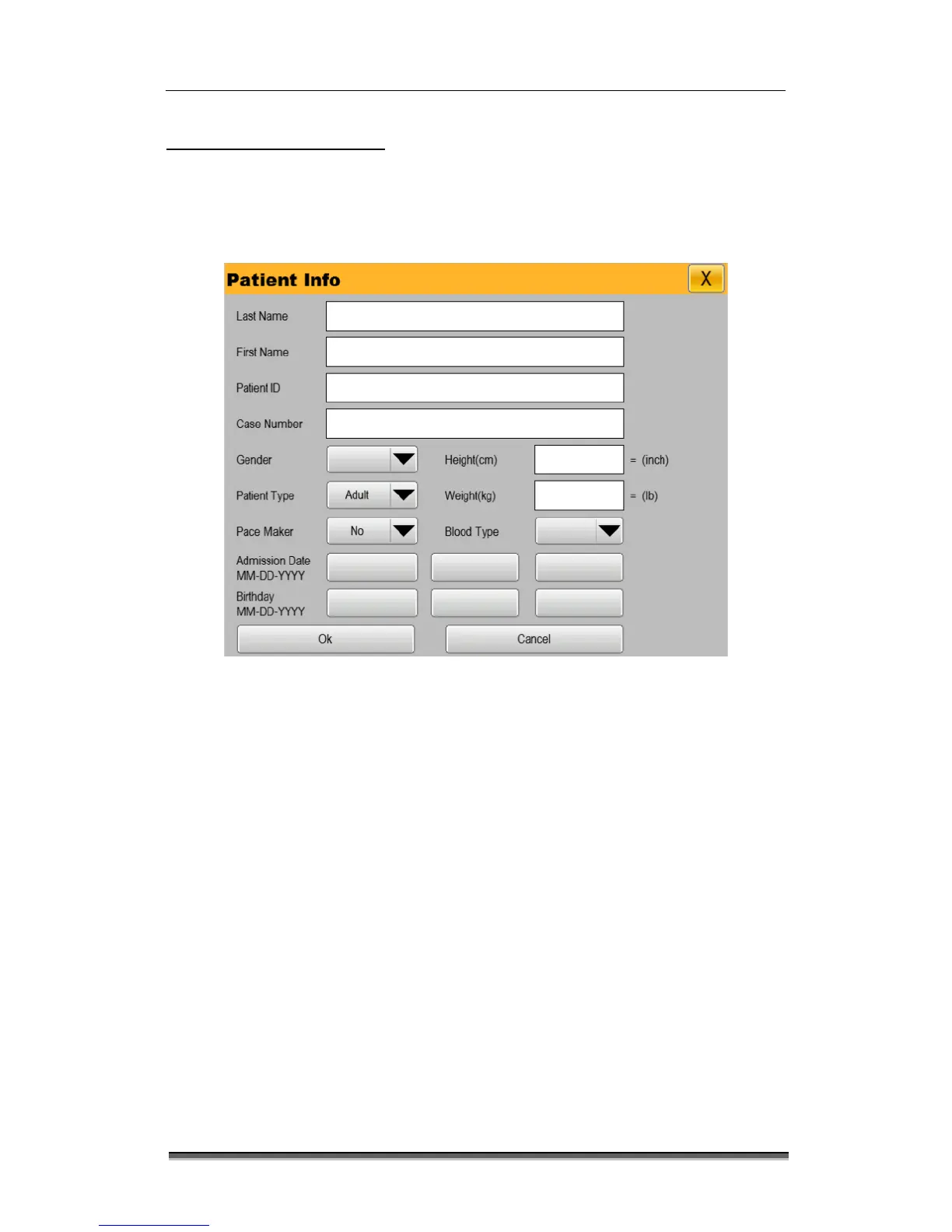
In the “Patient” menu, select “Patient Info”. The “Patient Info” menu as shown in Figure 4-3 will
be displayed.
Figure 4-3. “Patient Info” menu
1. Select “Last Name”, and enter patient’s surname through the soft keyboard(Letters: not
more than 20 characters).
2. Select “First Name”, and enter patient name through the soft keyboard(Letters: not
more than 20 characters).
3. Select “Patient ID”, and enter the patient ID through the soft keyboard (Letters: not more
than 20 characters).
4. Select “Case Number”, and enter the case number through the soft keyboard(Letters:
not more than 20 characters).
5. Select “Gender”, and set the patient’s gender.
6. Select “Patient Type”, and set the patient category as needed: Adult and Pediatric.
7. Select “Pace Maker”, and set whether the patient wears a pacemaker.


 To Next Page