10.5 Setting SpO
2
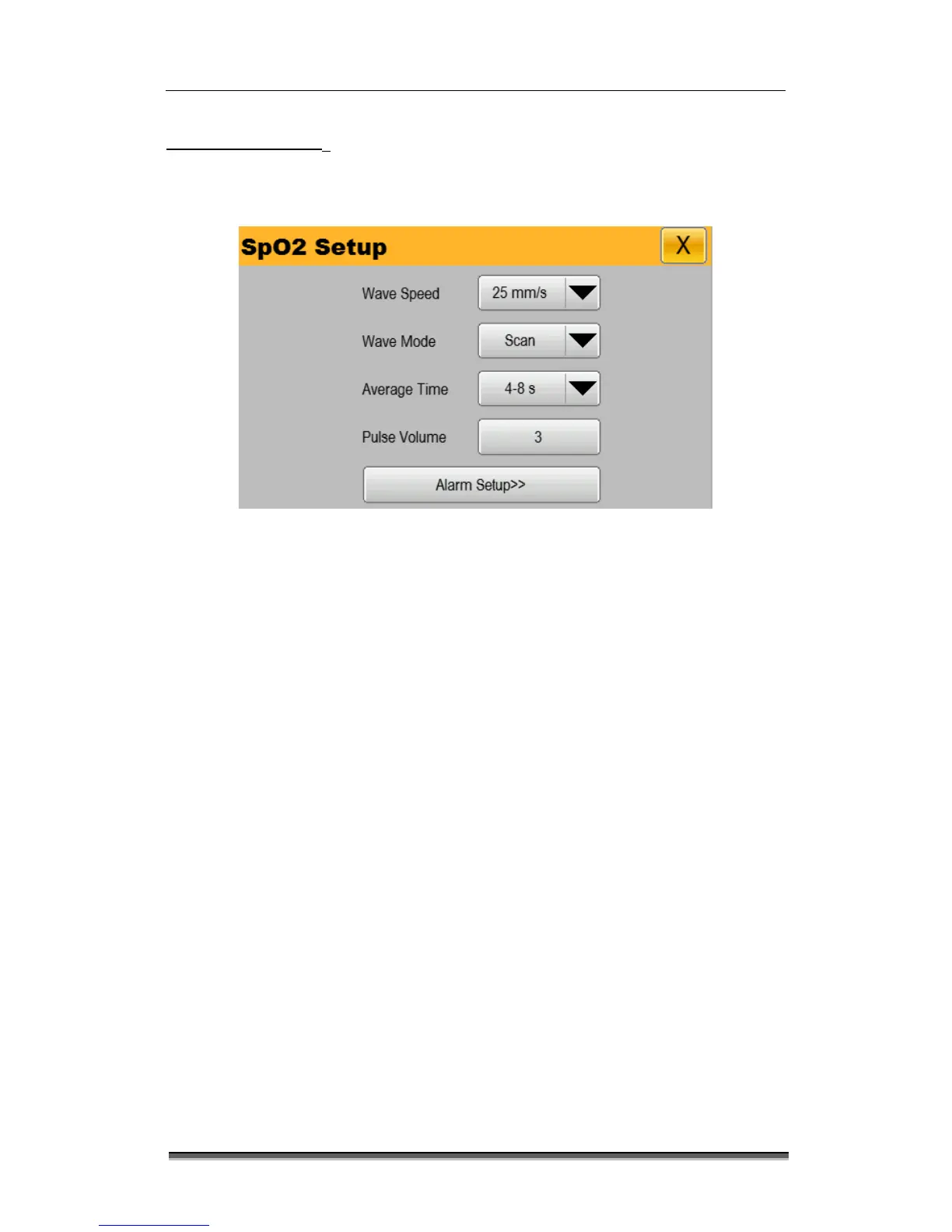
Select SpO
2
parameter area or SpO
2
wave area → “SpO
2
Setup” menu, which is shown below.
You can set SpO
2
through “SpO
2
Setup” menu.
Figure 10-3: “SpO2 Setup” menu
10.5.1 Setting wave speed
Select “Wave Speed” and set wave speed to “12.5mm/s” or “25mm/s”; the faster speed,
the smoother wave.
10.5.2 Setting wave mode
Select “Wave Mode”, and set the wave drawing mode
“Scan”: Scan mode.
“Fill”: Fill mode.
10.5.3 Setting average time
Select “Average Time”, and set the average time to “2-4s”, ”4-8s” , ”8-16s”.
10.5.4 Pulse volume
The user can set the pulse volume. The pulse volume can be set to 0, 1, 2, 3, 4, 5, 6, 7, 8,
or 9. By default, the pulse volume is set to 3.


 To Next Page