7.5 ECG setup
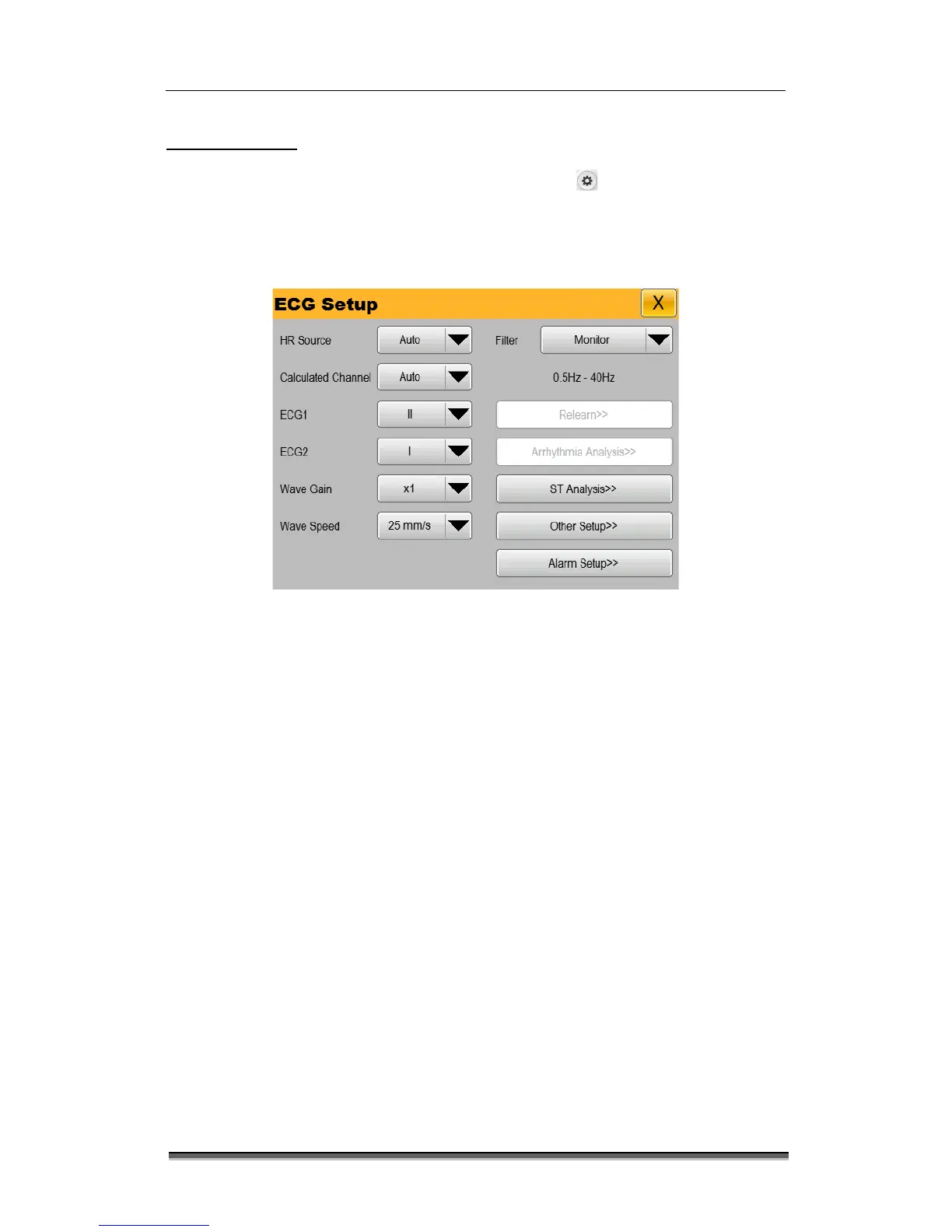
Select the ECG parameter area or wave ECG area or select the [Settings] smart hotkey and
“Parameter Setup >>” and “ECG Setup >>” to pop up the “ECG Setup” menu, which is as shown
below. You can set the ECG through the “ECG Setup” menu.
Figure 7-5: “ECG Setup” menu
Select “HR Source”, and set the heart rate source.
“Auto”: Automatically select HR source.
“ECG”: Select ECG monitoring as the HR source.
“SpO2”: Select SpO2 monitoring as the HR source.
Select “Calculated Channel” and select heart rate calculated channel.
“Auto”: Automatically select Heart Rate calculated Channel.
“I”: Select the first ECG waveform as the Heart Rate calculated Channel.
“II”: Select the second ECG waveform as the Heart Rate calculated Channel.
“V”: Select the third ECG waveform as the Heart Rate calculated Channel.
Select “ECG1” / “ECG2” to set the display wave channel. Select “ECG1”/ “ECG2”, and set
the names of upper ECG wave and lower ECG wave on the screen.
ECG1/ECG2 should not be the source of the same wave, source waveform can be set
I/II/III/AVR/AVL/AVF/V.
Select “Wave Gain”, and set the ECG wave gain. When the wave is shorter, increase the


 To Next Page