EN
11
Appliance description
www.bora.com
4 Appliance description
8
8
8
8
8
2
46 3
9 8
5
7
1
10
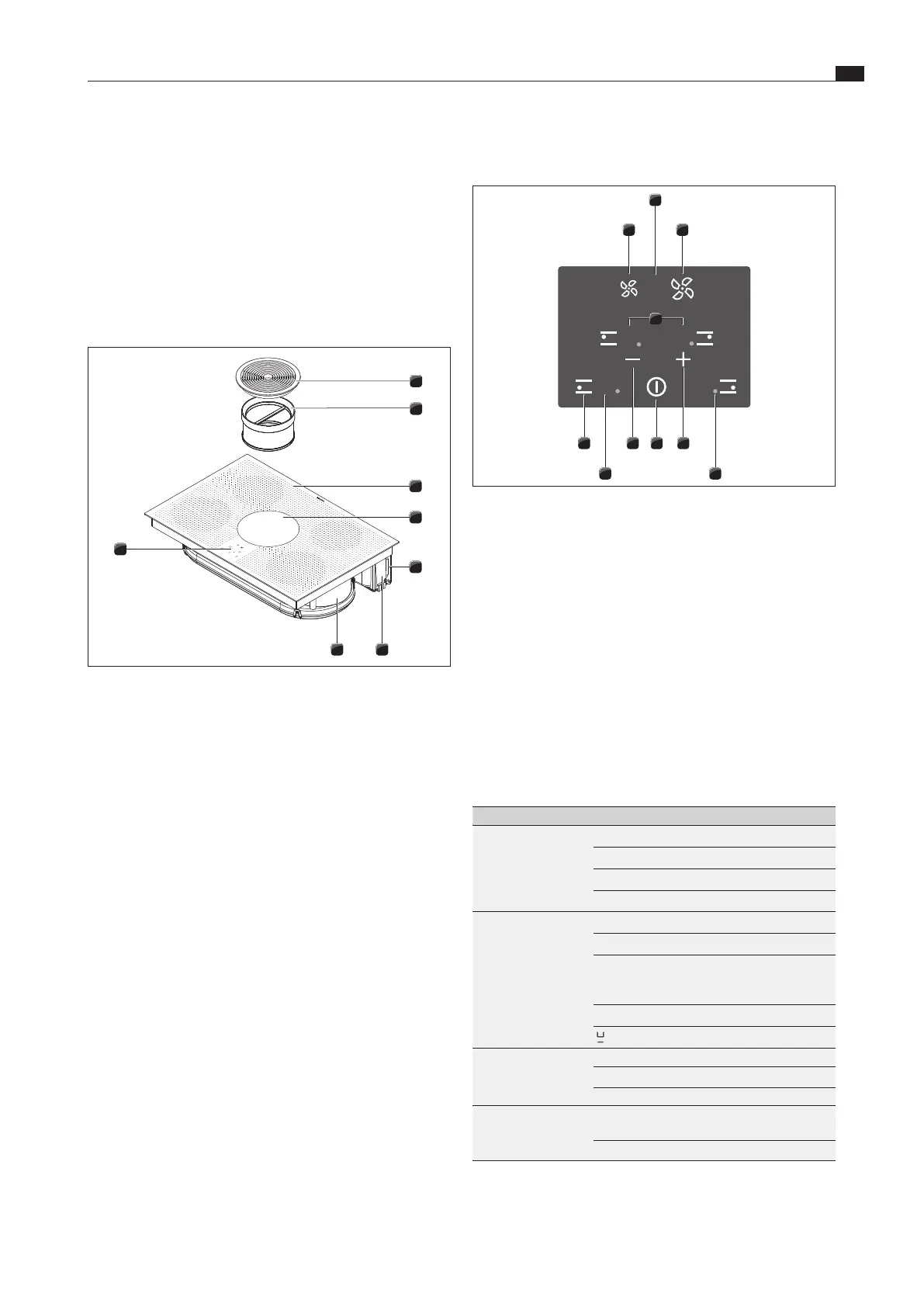
Fig. 4.2 Operating panel
Sensor buttons:
[1] Reduce fan power level
[2] Increase fan power level
[3] Increase power level
[3] Increase timer value
[4] Switch cooktop on/off
[5] Reduce power level
[5] Decrease timer value
[6] Select cooking zone
Display fields:
[7] Fan level indicator/filter service display
[8] Cooking zone indicator lamp
[9] Cooking zone indicator
[10] Timer
Display field Display Meaning
Fan level indicator
0
Fan off
1
or
2
Setting
P
Power setting
n
Automatic after-run
Cooking zone
indicator
1
...
9
Power level
P
Power setting
H
Residual heat indicator: Cooking
zone is switched off but still hot
(temperature >60°C)
L
Childproofing feature active
Pan size recognition
Cooking zone
indicator light
on
Automatic cut-off (timer) activated
flashing
Timer on (
00
); no time set
off Timer off
Timer display (1*)
01
...
99
Set minutes for short time
(egg timer) or automatic cut-off
00
Timer on; no time set
Tab. 4.1 Meaning of the displays
Observe all safety and warning information during operation
(see the “Safety” chapter).
4.1 System description
4.1.1 Structure
2
1
4
5
3
8
67
Fig. 4.1 Cooktop
[1] Air inlet nozzle
[2] Stainless steel grease filter
[3] Cooktop
[4] Inlet opening
[5] Telescopic pull-out
[6] Activated charcoal filter housing
[7] Air guiding housing
[8] Operating panel
4.1.2 Operating panel and operating principle
The cooktop extractor and cooktops are operated via a central
operating panel. The operating panel is fitted with electronic
sensor buttons and display panels. The sensor buttons respond
to finger contact (touch zones). Keep your finger pressed on
the sensor button until you either hear an acoustic signal or the
display changes accordingly.



 To Next Page