INGENIO COMPACT ИБП руководство пользователя
INGENIO COMPACT UPS user manual
36 OMS90051 РЕД. / REV. A
4 FRONT PANEL
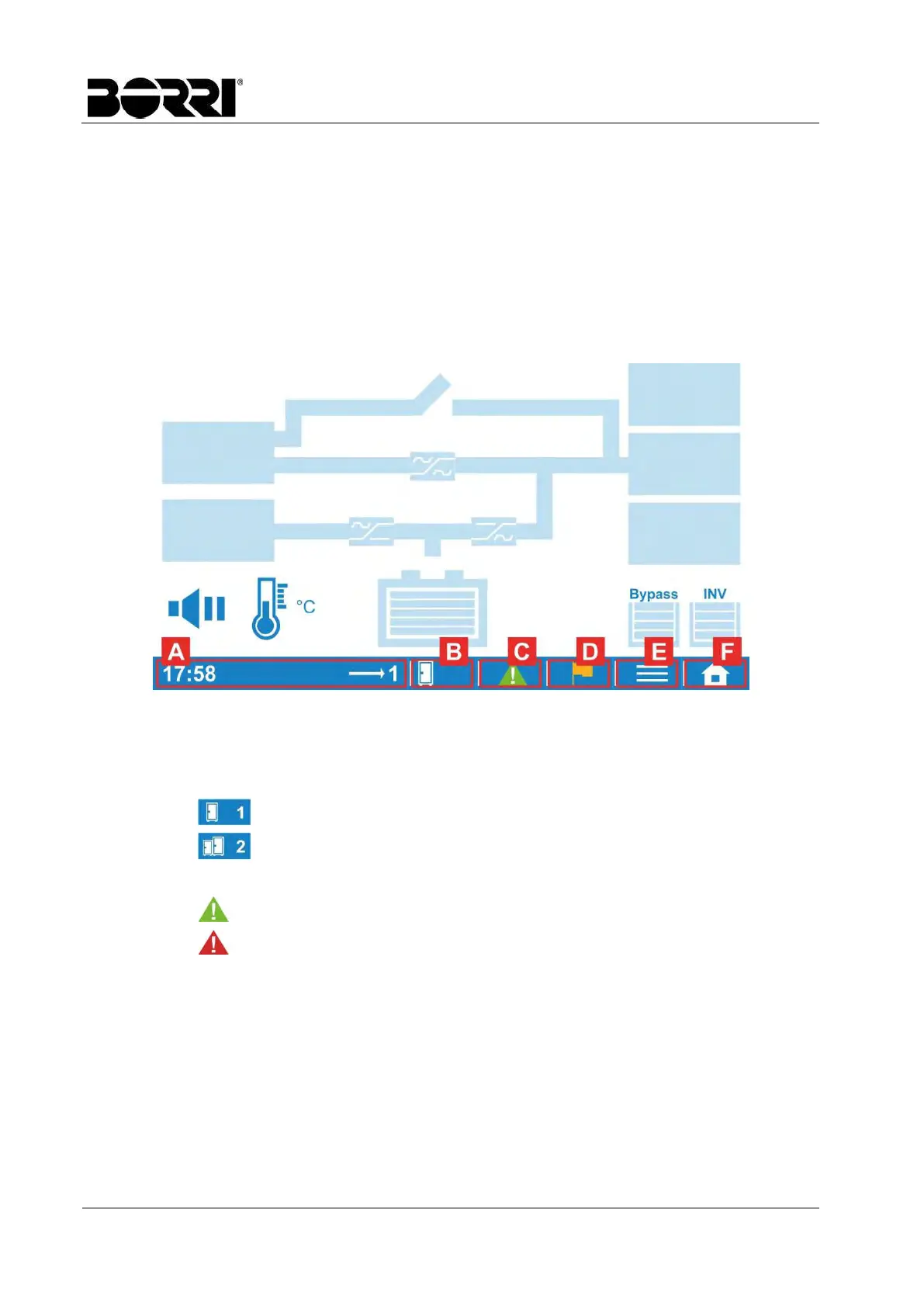
The UPS is equipped with a LCD touch screen which provides a simple and intuitive user
interface. The touch screen is organized with a home page, through which it is possible to
access all the main sections, and with a mimic diagram which shows the energy flow and the
main input/output operating parameters.
4.1 TOUCH SCREEN SECTIONS
The bottom part of the touch screen contains tap-sensible areas which lead to different sections
of the UPS monitoring interface.
Picture 6 – Touch screen sections
[G] Display the current time and the status of the UPS
[H] Indicate Single or Parallel system, and select the desired UPS unit to check the
information
Single unit
Parallel system
[I] Shows the alarm messages
The green icon indicates that no alarm is present
The red icon indicates the presence of alarms
[J] Shows the UPS status
[K] Enters the Sub-Menu, if available in that specific page
[L] Opens the Menu page (Home)








 To Next Page