84 en | Installing the Aspirating Smoke Detector Aspirating Smoke Detector
2018.04 | 2.0 | F.01U.130.926 Operation Guide Bosch Sicherheitssysteme GmbH
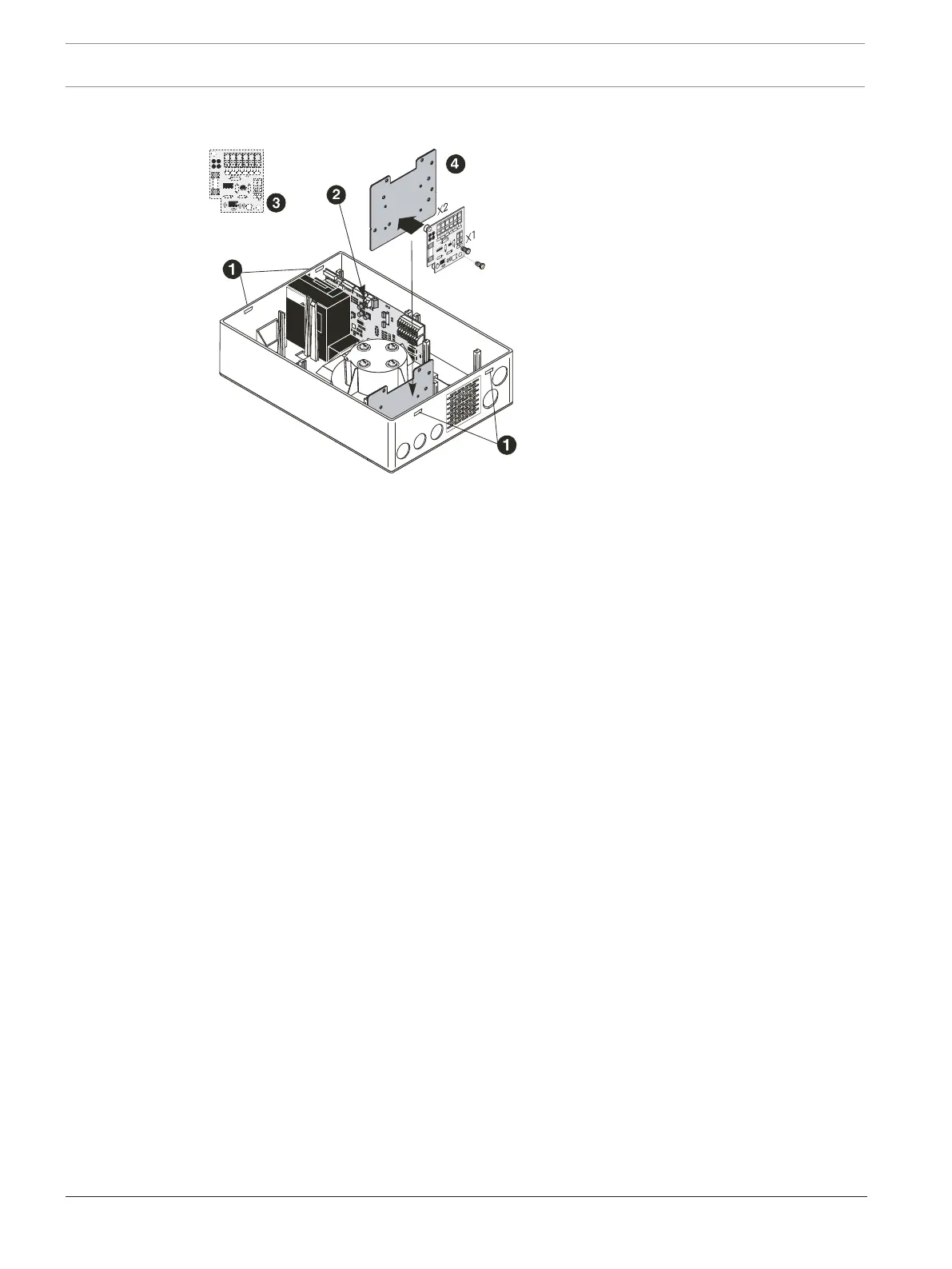
5.5.2 Installing the reset board
– Carefully unlock the quick-release fasteners on the housing using a slotted-head
screwdriver, by simultaneously pressing on the closure latches on one side. Then lift the
housing cover off carefully.
– Unplug the display board cable from the motherboard and remove the housing
cover.Place the calculated terminal resistor 1 R
ER
into connection terminal X1.Fasten the
reset board with the plastic spacers to the FCS-320-IK installation kit. Mount the
installation kit with the attached reset board at the position marked in the FCS-320
housing. Electrical connection (X2) is described in Electrical connection of the reset board,
page 85. Reattach the display board cable to the motherboard and refit the housing
cover. Resecure the cover by engaging the quick-release latches.
See also
– Electrical connection of the reset board, page 85




 To Next Page