MIC IP ultra 7100i │ MIC IP starlight 7100i Installing a MIC Camera on a Hinged DCA | en 27
Bosch Security Systems Installation Manual 2019-12 | 1.2 |
M25
3/4” NPT
4X
9.0
24 VAC
/ RS-485
RJ45
Cat
5e/Cat6
Shie
lded
T
w
isted Pair
(STP)
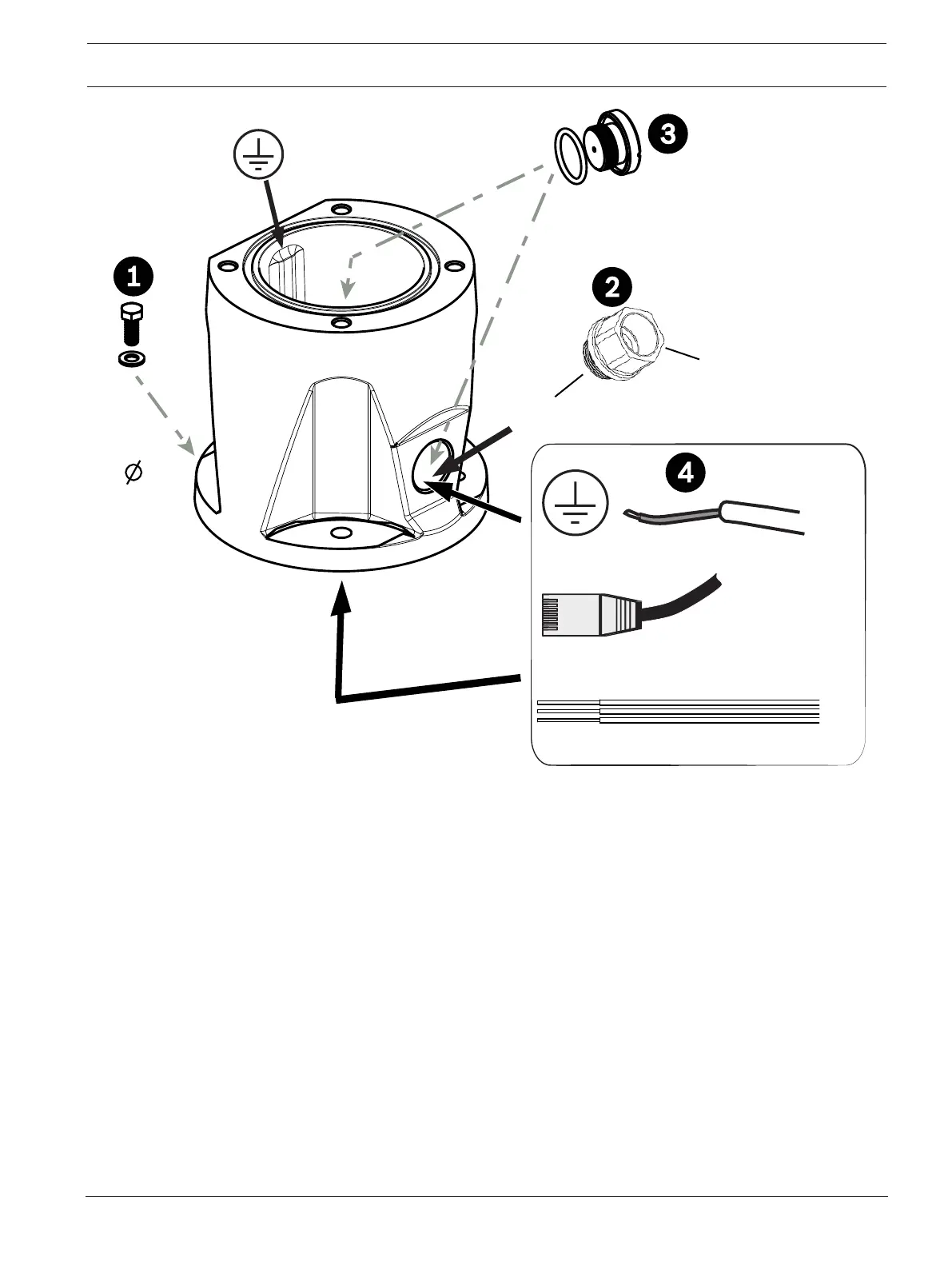
1. Attach the DCA to the mounting location using user-supplied hardware (item 1). (Bosch
recommends stainless steel bolts and washers.)
2. Attach user-supplied conduit or glands to the side hole or to the bottom hole. If applicable,
use the conduit adapter (male M25 to female ¾ in. NPT) (item 2, included with the DCA).
3. Route cables into the DCA (item 4), either through the bottom or from the side.
4. Use the blanking plug and O-ring (item 3, included with the DCA) to close the unused hole
(bottom or side) in the DCA.









 To Next Page