98 | en
If, however, you want to continue
using an existing Bluetooth® con-
nection, you should cancel the
smartphone integration setup pro-
cess.
f If a smartphone is connected via
MirrorLink™ or Android Auto and a
Bluetooth® connection from the
same smartphone already exists,
the Bluetooth® connection will be
maintained.
f Smartphones that are integrated via
MirrorLink™ or Android Auto require
a Bluetooth® connection in addition
to smartphone integration via USB
in order to provide full support for
the telephone functions.
Users can use the non-phone fea-
tures of MirrorLink™ or Android
Auto without a Bluetooth® connec-
tion.
If there is no Bluetooth® connection
established before you integrate a
MirrorLink™ or Android Auto smart-
phone, you will have to establish the
Bluetooth® connection manually
(see the section entitled “Connect-
ing a device via Bluetooth®” (page
95)).
f Smartphone integration via Apple
CarPlay does not allow any parallel
Bluetooth® connection. If an Apple
CarPlay smartphone is already
connected via Bluetooth®, this
Bluetooth® connection will be
canceled.
To connect a smartphone,
f connect it to the USB port.
The smartphone is detected automatically and
connected via smartphone integration.
To disconnect the smartphone from the device,
f unplug the smartphone from the USB port.
An appropriate notification appears briefly in
the display.
5 FM/AM radio mode
Notes:
f AM reception: Generally, strong AM
signals provide stable sound quality
with low signal noise. At night,
however, atmospheric conditions
may sometimes lead to interference
from other stations.
f FM reception: The FM waveband
offers the highest sound quality;
however, the signal may be suscep-
tible to noise due to:
– The limited reach of some trans-
mitters.
– Distortion caused by signals
reflected off local buildings and
other obstructions.
– “Shadow zones” wherein the
signal reception is obstructed or
restricted.
5.1
Listening to the radio
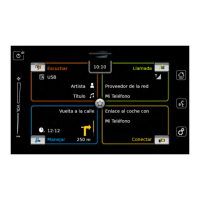
f Tap the direct-select button in the Home
menu.
Note:
You will also find the button in the
display of the currently playing media.
f Tap the Radio tab, if necessary.
Operation | FM/AM radio mode


 To Next Page