120 | en
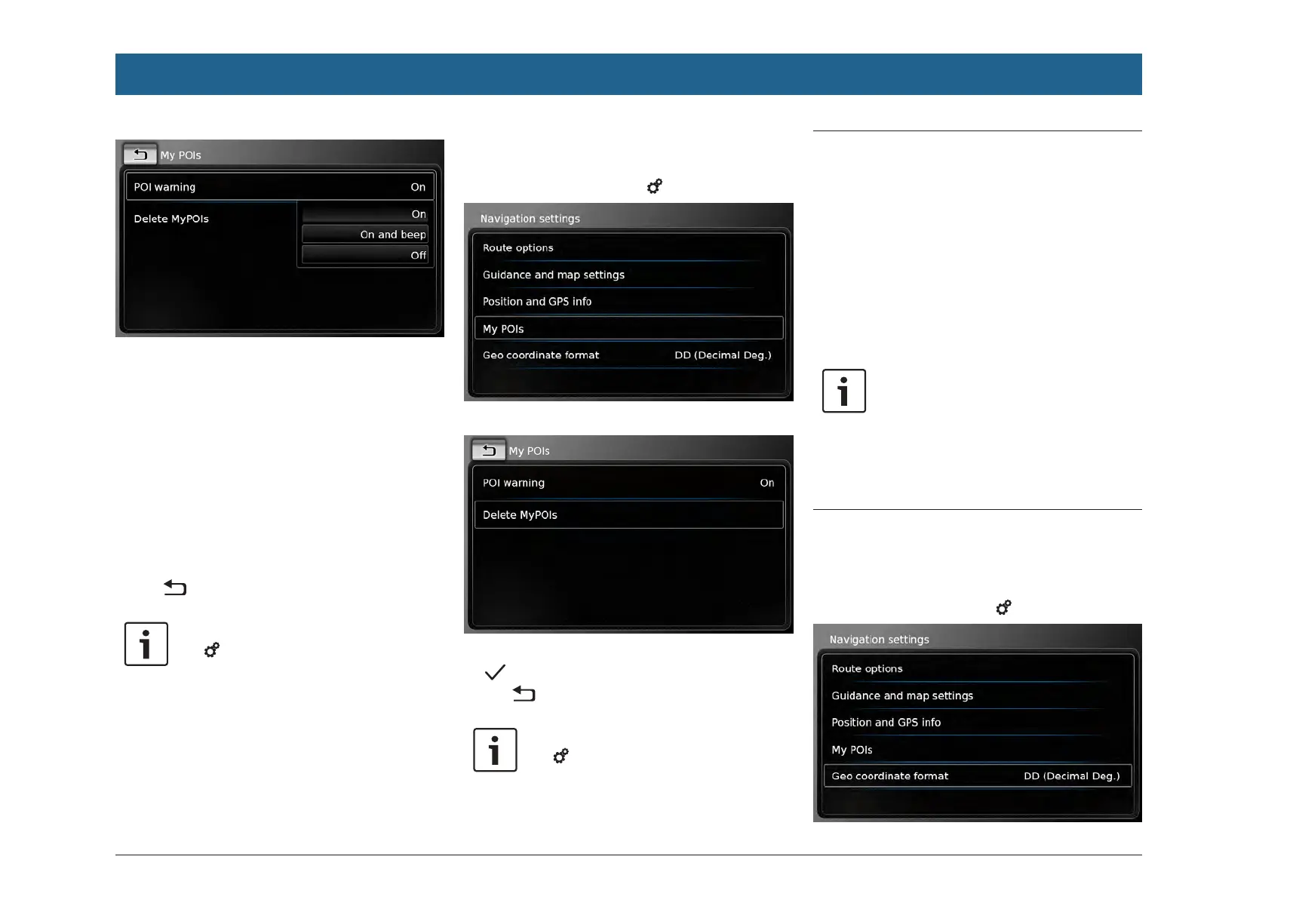
f Tap the relevant option:
f On:
The system issues the point of interest
warning by displaying a symbol.
f On and beep:
The system issues the point of interest
warning by displaying a symbol and mak-
ing a beep sound.
f Off:
No point of interest warning is issued.
f Tap .
Note:
Tap 6 to close the options display.
7.12.4
Deleting your own points of
interest from the device
f In navigation mode, tap 6.
f Tap My POIs.
f Tap Delete MyPOIs and confirm by tapping
.
f Tap .
Note:
Tap 6 to close the options display.
7.13 Enabling the keypad lock while
driving
You can set the keypad lock in the system set-
tings.
If the Lock keypad while driving setting is ena-
bled, you will only be able to access the keypad
while the vehicle is stationary.
For further details on this, please read the sec-
tion entitled “Enabling the keypad lock while
driving” (page 85).
Note:
When the Lock keypad while driving
setting is enabled, certain features of
the device’s navigation and smart-
phone integration functions are disa-
bled to avoid driver distraction.
7.14
Selecting the geo coordinate
format
You can set the format in which geo coordinates
are specified.
f In navigation mode, tap 6.
Navigation


 To Next Page