102 | en
You will find the following information and con-
trols in the audio display:
Note:
The information that is available
depends on the current audio source:
f Information on MP3 tracks must be
stored as ID3 tags on the audio
source.
f Bluetooth® devices may employ
communication protocols that do
not provide all the track informa-
tion.
f No track or playback information is
available with AUX playback.
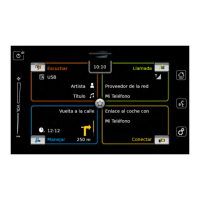
H
Current playback source
I Title information area
J button: Skip to next title/fast forward
K
button: Pause playback
When playback is paused:
button:
Resume playback
L
Playback progress bar
M button: Skip to previous title/rewind
N
button: Shuffle function
O
button: Repeat function
The title information area I provides informa-
tion on the current track, audiobook or podcast,
for instance:
f Artist
f Title
f Album
The playback progress bar L displays the
playback position in the current title and the
elapsed and total playing time of the title.
6.3.2
Pausing playback
f Tap K.
Playback is paused.
f Tap K.
Playback resumes.
6.3.3
Skipping to the next/previous
title
f Tap J or M.
The next or previous title is played.
6.3.4
Selecting titles in the media
browser
f Tap the title information area I.
The media browser opens. For further details on
this, please read the section entitled “Media
browser” (page 104).
6.3.5
Fast forward/rewind
f Touch and hold J or M until you
reach the desired position.
Or:
f Touch the playback progress bar L and
swipe left or right along the bar to alter the
position in the title continuously.
6.3.6
Skipping forwards/back-
wards in the current title
f Tap the desired position in the playback
progress bar L.
6.3.7
Repeat function
f Tap the toggle button O to switch between
Repeat off, Repeat track and Repeat selec-
tion.
– Repeat track
: Repeat the current title
– Repeat selection : Repeat the current
playback category (e.g. album, artist,
folder)
– Repeat off
: Deactivate the repeat
function
6.3.8
Shuffle function
f Tap the toggle button N to switch between
Shuffle off and Shuffle selection.
– Shuffle selection
: Shuffle the tracks in
the current playback category (e.g. album,
artist, folder)
– Shuffle off : Deactivate the shuffle
function
Playing media


 To Next Page