128 | en
be heard at a lower volume. When
connected via Android Auto, the
Bluetooth® audio player feature will
not be available; in this case, please
use the Android Auto audio player
instead.
9.1
Calling up the smartphone dis-
play
f Tap the Connect area in the Home menu.
Your smartphone’s user interface is displayed.
Note:
Certain types of smartphones may
provide various compatible applica-
tions. For further details on this, please
read the next section.
9.2
Selecting a particular applica-
tion on a smartphone
Certain types of smartphones may provide
various compatible applications.
To select an application,
f tap in the Home menu.
The list of compatible applications is displayed.
f Tap the desired application.
The selected application’s user interface is
displayed.
9.3
Smartphone integration set-
tings
Selecting an item in the smartphone integration
settings list will activate the respective feature.
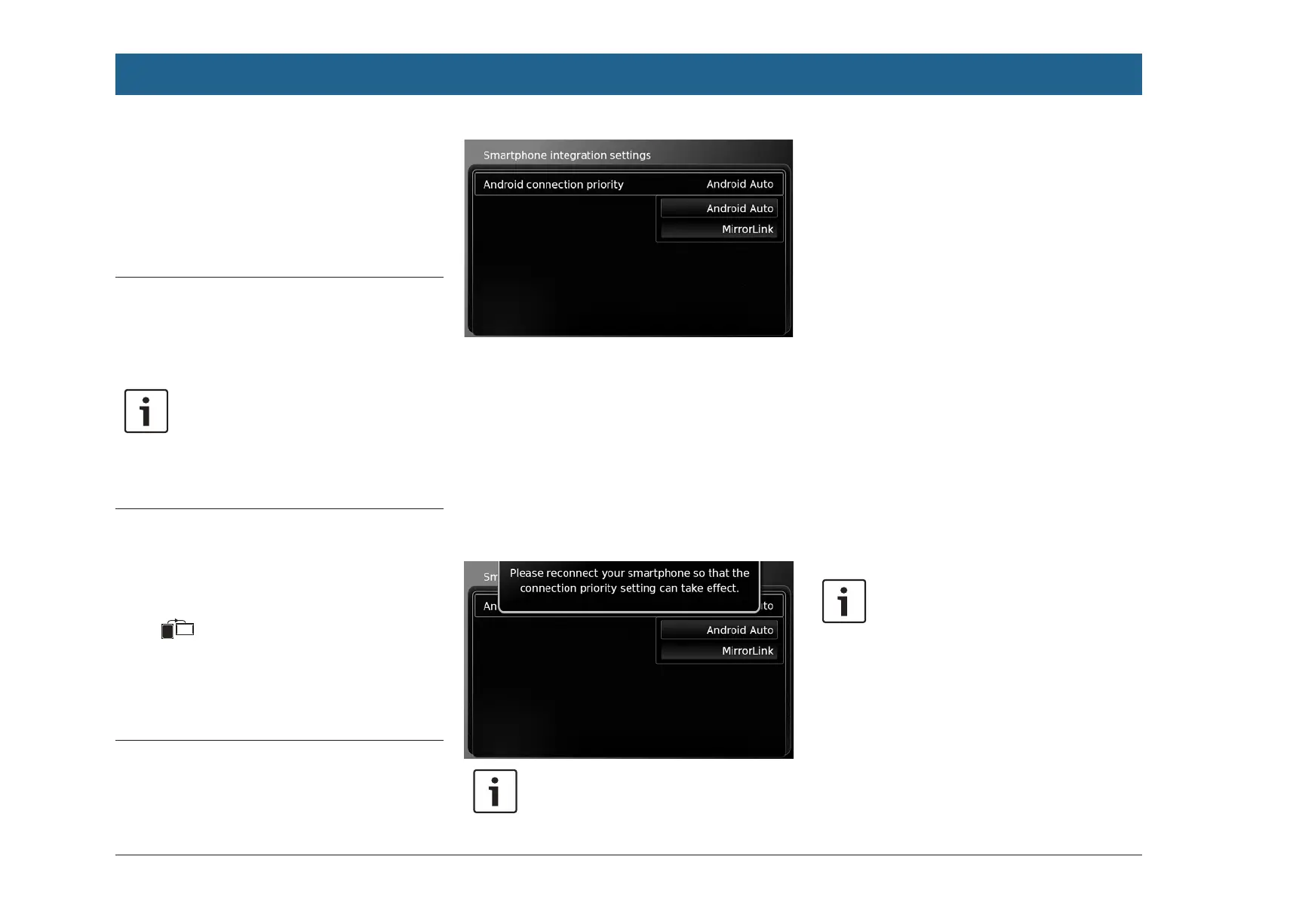
9.3.1 Android™ connection priority
Android connection priority is used if a smart-
phone supports both Android Auto and Mirror-
Link™. If this is the case, the user has complete
freedom to choose which feature they would like
to use. The user can select the respective fea-
ture and will then be shown a pop-up notifica-
tion that asks them to reconnect the smart-
phone via USB in order to use the selected
feature.
Notes:
f Android connection priority only
applies if the MirrorLink™ and
Android Auto features are available
on the same smartphone. One
feature, i.e. either MirrorLink™ or
Android Auto, can be chosen at a
time.
f A change to the Android connection
priority setting only takes effect
after the smartphone is discon-
nected.
9.3.2
Enabling the keypad lock
while driving
You can set the keypad lock in the system set-
tings.
If the Lock keypad while driving setting is ena-
bled, you will only be able to access the keypad
while the vehicle is stationary.
For further details on this, please read the sec-
tion entitled “Enabling the keypad lock while
driving” (page 85).
Note:
This function applies to the Apple
CarPlay and Android Auto features but
does not apply to the MirrorLink™
feature.
Smartphone integration


 To Next Page