96 | en
f It is possible that a paired Blue-
tooth® device will not reconnect
automatically in some situations. In
such cases, please follow the proce-
dure described under “Connecting
an already paired mobile phone”.
f If a smartphone is already con-
nected to the device via smartphone
integration, it is not possible to
establish a Bluetooth® connection
to another mobile phone.
f An existing Bluetooth® connection
will be disconnected automatically
as soon as another smartphone is
connected via smartphone integra-
tion.
General information
The device supports Bluetooth® 3.0 + HS and
the following Bluetooth® profiles and standards:
f A2DP 1.2
f AVRCP 1.3
f HFP 1.6
f MAP 1.0
f PBAP 1.1
f SPP 1.1
f Vcards 2.1, 3.0
Opening the Select Bluetooth device menu
f Tap the direct-select button in the Home
menu.
or:
f Tap the Call area in the Home menu.
f Tap .
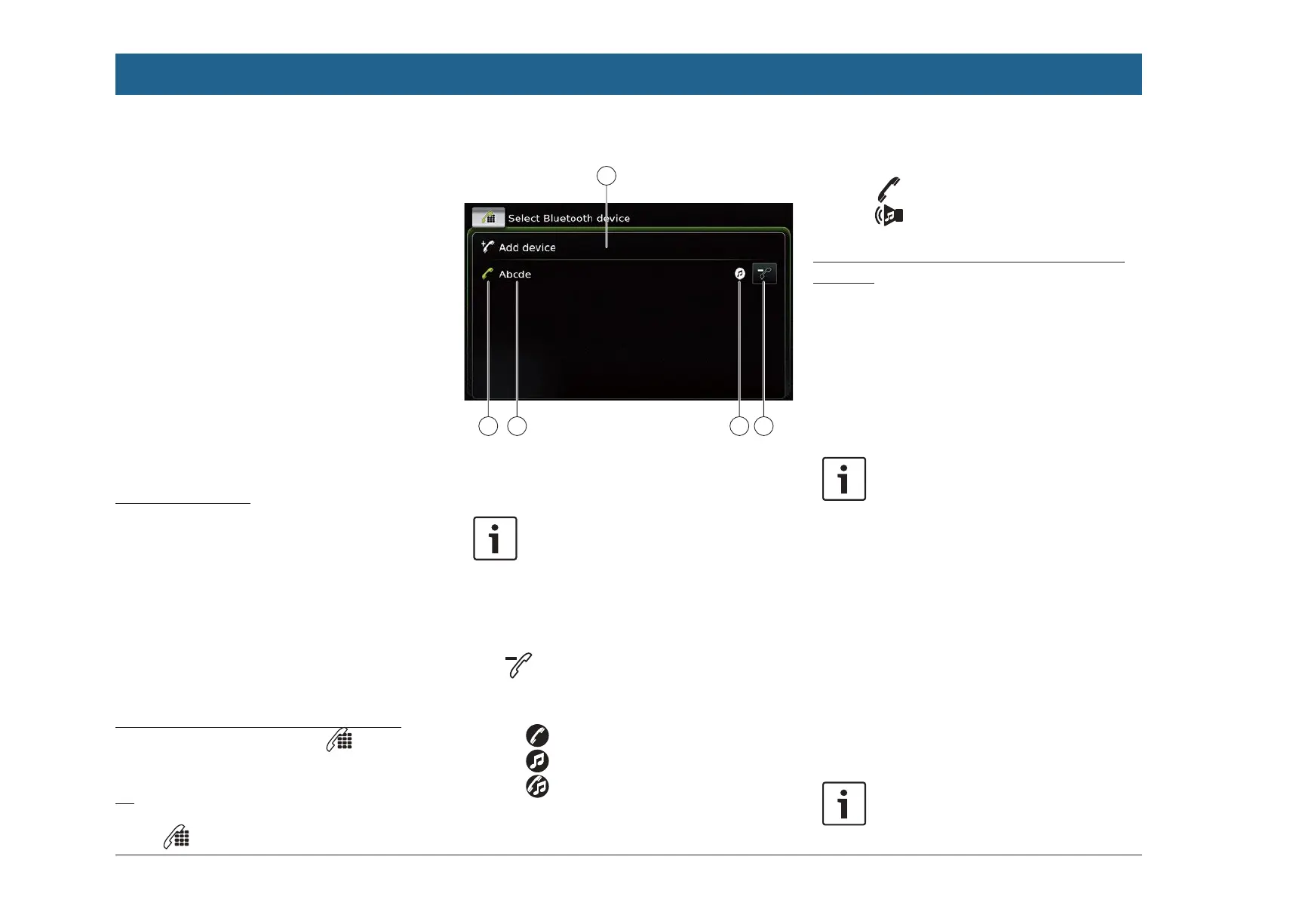
The Select Bluetooth device menu is displayed:
9101112
You will find the following information and con-
trols in the Select Bluetooth device menu:
Note:
The currently connected device is
always the first item in the device list.
8
Add device button: Start pairing a new
mobile phone
9 button: Delete a paired mobile phone
:
Supported Bluetooth® functions of the
connection:
f : Telephone
f : Audio streaming
f : Telephone and audio streaming
; Bluetooth® name of the device
< Indication of Bluetooth® device type and
currently connected device:
f : Telephone
f : Audio streaming device
Pairing and connecting a mobile phone for the
first time
f In the Select Bluetooth device menu, tap Add
device 8.
The device is now available for setting up a
connection (pairing). The Bluetooth® PIN of the
device is displayed. Next, please follow the
instructions provided by the device and your
mobile phone.
Notes:
f The Bluetooth® name of the device
is “Suzuki”.
f If 10 mobile phones are already
paired with the device, it will not be
possible to pair and connect a fur-
ther mobile phone. In this case, first
delete one of the paired mobile
phones (see the section entitled
“Deleting a paired mobile phone”
(page 97)).
There are 3 methods of establishing a Blue-
tooth® connection. Please proceed according to
the method employed:
Note:
Please refer to your mobile phone’s
instruction manual for information on
Operation


 To Next Page