User manual WTS Ver.1.16
Seite 12 von 52
6 LED AND KEY FUNCTIONS
NET
net weight LED: net weight display (semi-
automatic tare or preset tare)
LED lit: input 1 closed
zero LED (deviation from zero not more
than +/- 0.25 divisions)
LED lit: input 2 closed
stability LED LED lit: output 1 closed
L other unit of measure no meaning
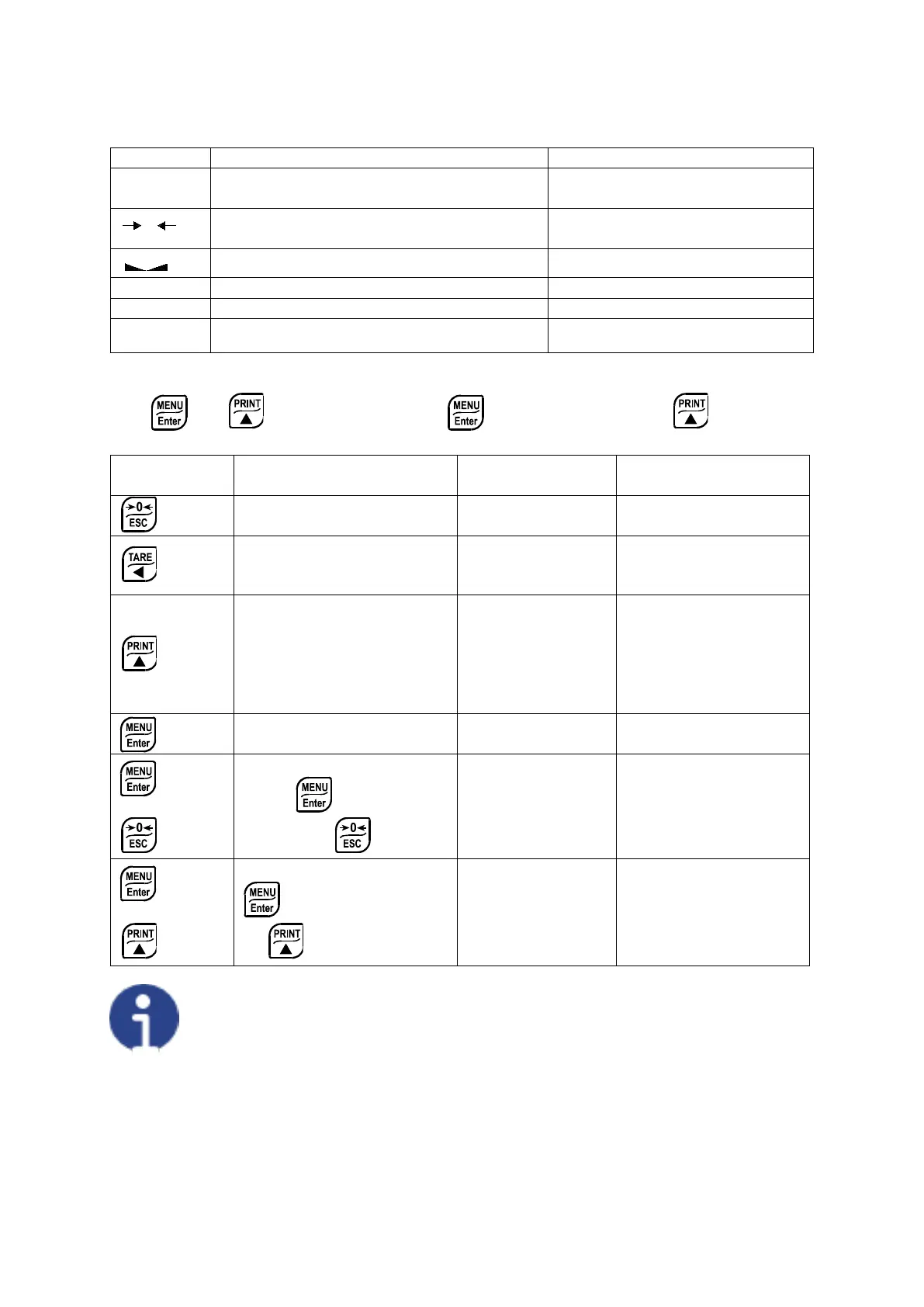
*) To activate the secondary LED function, during weight display press and hold down the
keys and at the same time (press immediately followed by ).
KEY Short press
Into menus
Tare resetting
Cancel or return to
previous menu
Gross Net Net Gross
modified or return to
mV load cell test
Net weight:
temporarily display
Modify selected figure
or go to next menu
item
Setting setpoints and
hysteresis
Confirm or enter in
submenu
+
Setting general parameters
(press immediately
+
Setting preset tare (press
immediately followed
The LEDs light up in sequence to indicate that a setting and not a weight is being
viewed.


 To Next Page