User manual WTS Ver.1.16
Seite 32 von 52
10 SETPOINTS PROGRAMMING
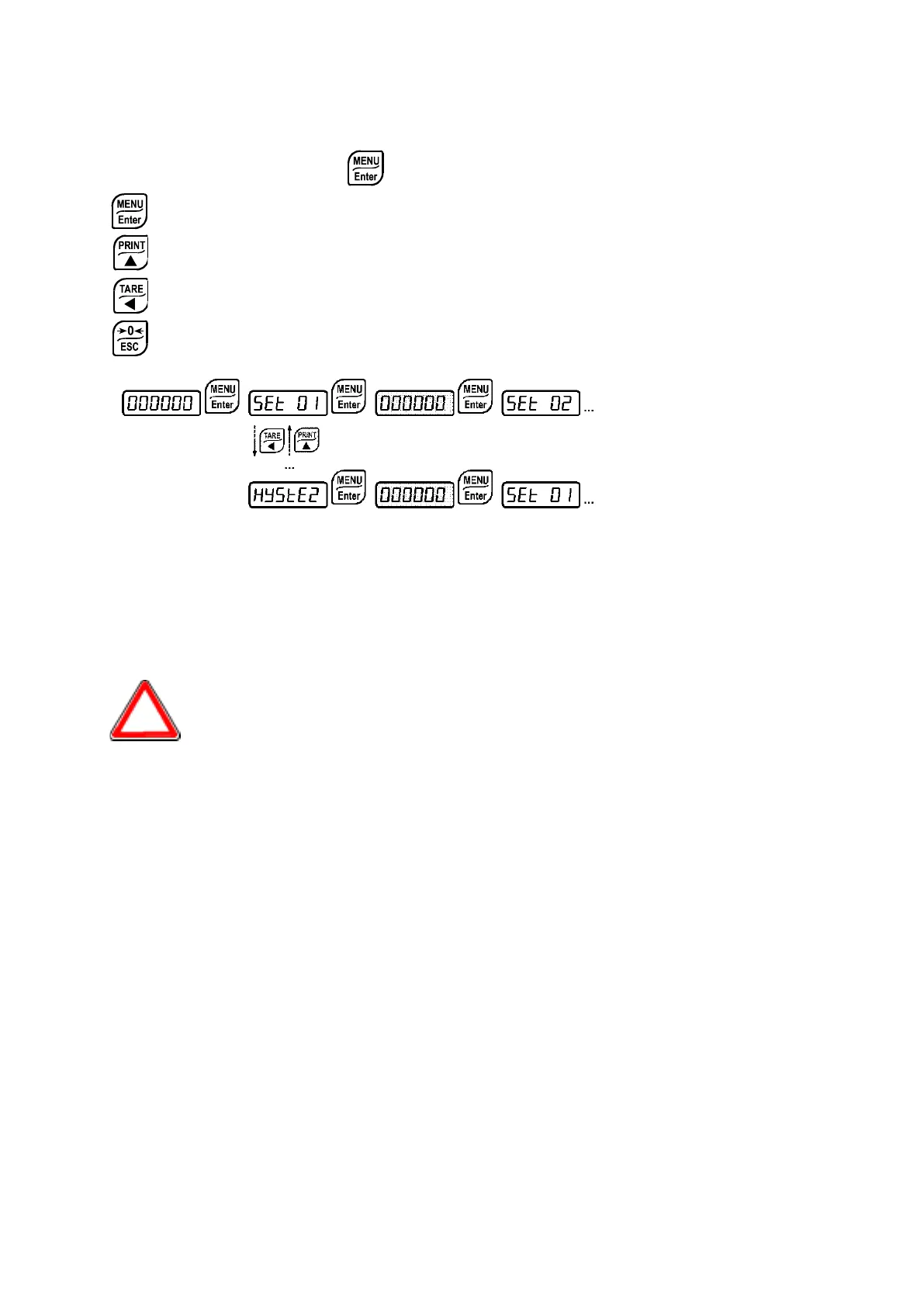
From the weight display, press
to access the setpoints setting.
: to enter a menu/confirm the data entry.
: to modify the displayed value or menu item.
: to select a new value or modify the displayed menu item.
: to cancel and return to the previous menu.
-
(from 0 to full scale; default: 0): Setpoint; relay switching occurs when the weight
exceed the value set in this parameter. The type of switching is settable (see paragraph
OUTPUTS AND INPUTS CONFIGURATION).
-
(from 0 to full scale; default: 0): Hysteresis, value to be subtracted from the setpoint
to obtain contact switching for decreasing weight. For example with a setpoint at 100 and
hysteresis at 10, the switching occurs at 90 for decreasing weight.
These values are set to zero if the calibration is changed significantly (see
paragraphs THEORETICAL CALIBRATION and REAL CALIBRATION (WITH
SAMPLE WEIGHTS).


 To Next Page