User manual WTS Ver.1.16
Seite 18 von 52
9.3 FILTER ON THE WEIGHT
Setting this parameter allows a stable weight display to be obtained.
To increase the effect (weight more stable) increase the value (from 0 to 9, default
4).
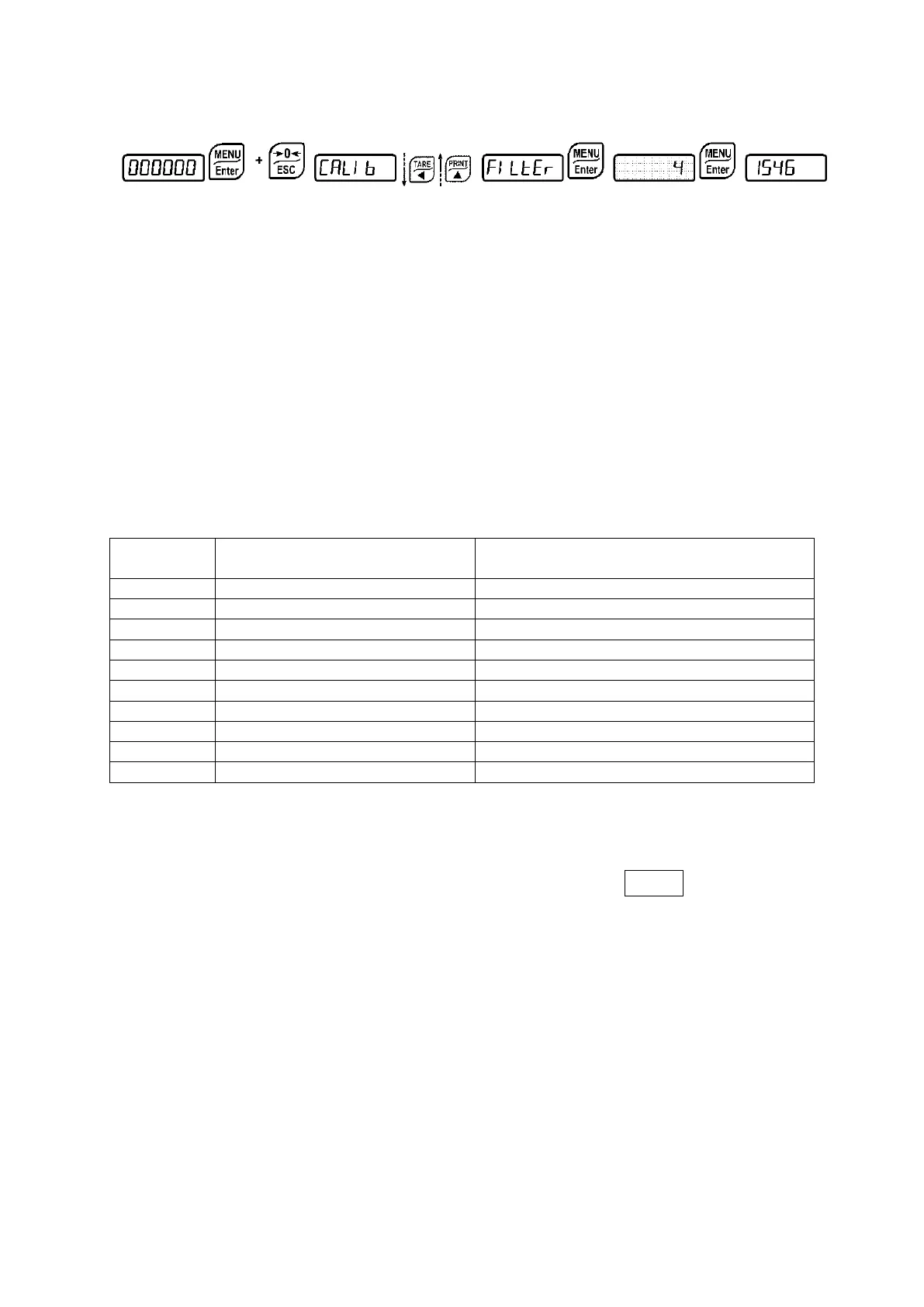
As seen in the diagram:
- By confirming the
message, the currently programmed filter value is displayed.
- By changing and confirming the value, the weight is displayed and it will be possible to
experimentally verify its stability.
- If stability is not satisfactory, confirming brings back the message
and the filter may
be modified again until an optimum result is achieved.
The filter enables to stabilise a weight as long as its variations are smaller than the
corresponding “Response Time”. It is necessary to set this filter according to the type of
application and to the full scale value set.
Response times [ms]
Display and serial port refresh
frequency [Hz]
9.3.1 ANTI PEAK
When the weight is stable, the anti peak filter removes any sudden disturbances with a
maximum duration of 1 second. Confirm the filter on the weight with
ENTER and select one
of the following options:
: anti peak filter enabled (default);
: anti peak filter disabled.


 To Next Page